Product video Wind Noise Reduction Video
Newsletter. Do you want to...
  • Receive hot deals and product news before anyone else?

  • Participate in competitions and win great prizes?
     
First Name *
Last Name
Email *
Send
 
 
Product features
  • 3 layer Wind Noise Reduction
  • HD Voice for better sound experience
  • Stream multimedia – GPS, music and podcasts with A2DP
  • Behind-the-ear style for all day comfort
  • Voice Guidance gives spoken battery level and connection status
  • Multiuse™ - connects to 2 Bluetooth® devices simultaneously
  • Up to 6 hrs talk time & 8 days standby time
Product details

ALL-DAY COMFORT AND WIND-NOISE REDUCTION

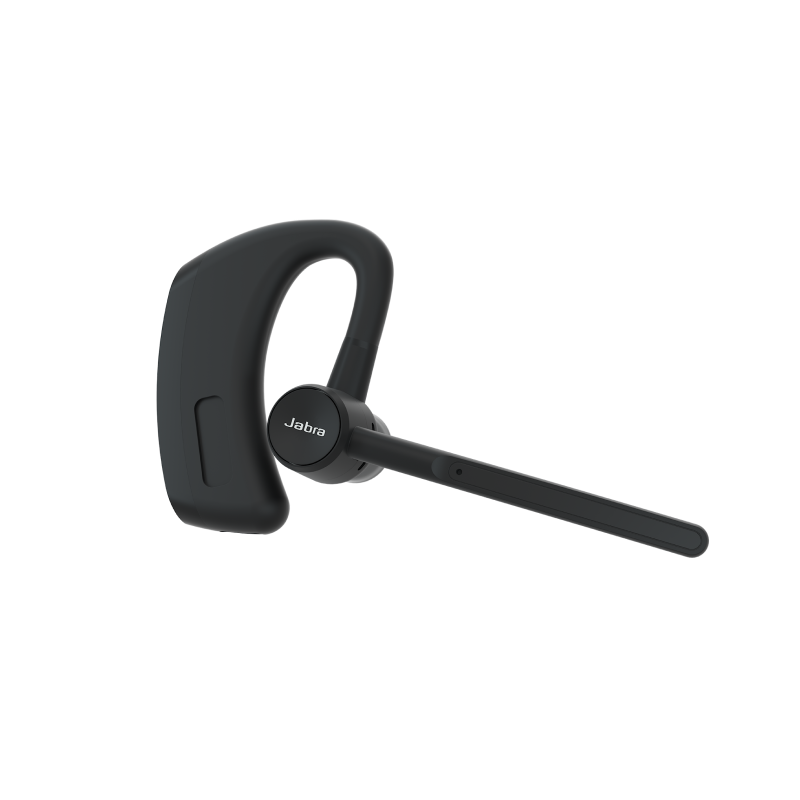
Sitting closely and lightly behind your ear, the Jabra WAVE Bluetooth® headset prevents wind and background noise from interfering with your conversations. With its carefully placed microphone and HD Voice technology, the sound quality is always crystal clear. When you wear Jabra WAVE, you hear every word.

Jabra WAVE is slim and exceptionally comfortable. Its classic behind-the-ear style makes it perfect for wearing all-day long. You will enjoy a truly hands-free experience on every phone call or while streaming all your favorite multimedia – GPS, music and podcasts – directly from your Bluetooth® device to your headset. Jabra WAVE makes sure you never miss an opportunity. Wear it to work, on the move or in the car, and wave goodbye to noise on all your calls.

Jabra WAVE was launched with HD Voice and A2DP in October 2011

Support
Support options
Please select from the below available downloads for this product. If you have further questions, please do not hesitate to visit the support section or use the form above if you would like to be contacted
FAQ's

I cannot hear anything in my headset

- Increase the volume in the headset.
- Ensure that the headset is paired to a device that is playing.
- Make sure your phone is connected to the headset by tapping the Answer/End button.

I want to reset the headset

It is possible to reset the headset. Turn the headset ON. Then ’Press and hold’ the volume down and answer/end buttons at the same time for approx. 5 seconds until the battery icon and Bluetooth® icon flash 5 times simultaneously - then the pairing list is reset.

Turn the headset OFF. The next time you power on, the headset will go into pairing mode as the first time you powered your new Jabra WAVE on.

Will the Jabra WAVE work with other Bluetooth® equipment?

The Jabra WAVE is designed to work with Bluetooth® mobile phones. It can also work with other Bluetooth® devices that are compliant with Bluetooth® version 1.1 or higher and support a headset and/or hands-free profile.

I cannot use Reject call, call on hold, Redial or voice dialling

These features are dependent on the ability of your phone to support a hands-free profile. Even if the hands-free profile is implemented reject call, call hold and voice dialling are optional features which are not supported by all devices. Please consult your device manual for details.

Please note that some features can only be operated from the primary device e.g. voice dial using Jabra WAVE with 2 mobile phones.

I am having pairing problems

You may have deleted your headset pairing connection in your mobile phone. Follow the pairing instructions.

I hear crackling noises

Bluetooth® is a radio technology, which means it is sensitive to objects between the headset and the connected device. It is designed for the headset and the connected device to be used within 10 meters (33 feet) of each other, with no major objects in the way (walls, etc.).
Where to buy
Buying Options

Jabra products are available nationwide through a variety of channels including online retailers, nationwide retailers, wireless operators, consumer electronic chains and communications specialists. We also have a network of product resellers composed of independent companies providing Jabra hands-free solutions for their customers’ telephony needs.


Official Jabra Webshop  
Official Jabra Webshop
  www.jabra.com/buy
 
Retailers and Wireless Carriers   Contact Information
 
Amazon  
AMAZON
  www.amazon.com
 
AT&T Wireless  
AT&T
  www.att.com
 
Best Buy  
Best Buy
  www.bestbuy.com
 
Dell  
 
  Jabra Store @ Dell
 
Endomondo       store.endomondo.com/us/
 
Headsets.com  
Headsets.com
  www.headsets.com
 
Sprint  
Sprint
  www.sprint.com
 
 Staples  
Staples
  www.staples.com
 
T-Mobile  
T-Mobile
  www.t-mobile.com
 
 
Canada Retail   Contact Information
 
Bell Canada  
Bell Canada
  www.bell.ca
 
Grand And Toy  
Grand And Toy
  www.grandandtoy.com
 
Canada Distributors   Contact Information
 
Affinity Electronics of Canada Inc.  
210 Saunders Road
Barrie, Ontario
Canada L4K 2M9
Phone: 888-669-8158
  sales@affinitycanada.com


Variants
Available Variants
  • Jabra WAVE (100-93040000-60)
  • 3 layer Wind Noise Reduction
  • HD Voice for better sound experience
  • Stream multimedia – GPS, music and podcasts with A2DP
  • Behind-the-ear style for all day comfort
  • Jabra WAVE - Red Edition(100-93040000-30)
  • 3 layer Wind Noise Reduction
  • HD Voice for better sound experience
  • Stream multimedia – GPS, music and podcasts with A2DP
  • Behind-the-ear style for all day comfort
  • Jabra WAVE Bluetooth Headset(100-93040000-02)
  • 3 layer Wind Noise Reduction
  • HD Voice for better sound experience
  • Stream multimedia – GPS, music and podcasts with A2DP
  • Behind-the-ear style for all day comfort
Virtual Tour

Click to experience the product benefits and features.

Product Zoomer
Click on the image above to browse the product gallery
Compatibility?
 
.
Related Products
Previous
Dummy alt
Next