
HÄUFIG GESTELLTE FRAGEN (FAQ)
How do I set the presence status in Jabra Suite for Mac?
How do I set the presence status in Jabra Suite for Mac?
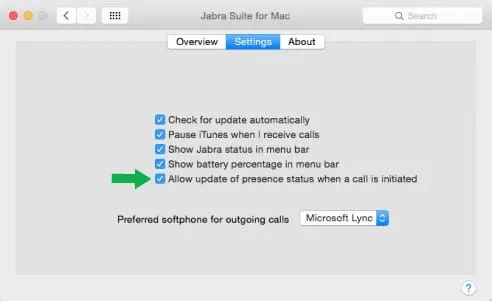
To enable or disable this feature, follow these steps:
1. Open Jabra Suite for Mac.
2. Click Settings.
3. Select Allow update of presence status when a call is initiated.
Note: All Jabra devices that are supported for Mac support this feature, and they should have the latest firmware installed.
Only the following softphones support this feature:
• Skype version 6.15 or later
• IBM Sametime version 8.5.2 IFR1 or later, and Embedded IBM Sametime installed in Lotus Notes 9.0
1. Open Jabra Suite for Mac.
2. Click Settings.
3. Select Allow update of presence status when a call is initiated.
Note: All Jabra devices that are supported for Mac support this feature, and they should have the latest firmware installed.
Only the following softphones support this feature:
• Skype version 6.15 or later
• IBM Sametime version 8.5.2 IFR1 or later, and Embedded IBM Sametime installed in Lotus Notes 9.0

Wussten Sie schon?
0