
How do I manually adjust the advanced settings on my Jabra Pro 900?
To adjust the advanced settings, follow these steps:
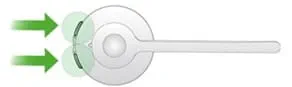
- When not on a call, simultaneously press and hold both of the Volume buttons on the headset until you hear a beep.
- Use the Volume up and Volume down buttons to toggle the setting. The current setting is announced in the headset. Use the Answer/end call button to accept your preferred setting.
- Repeat step 2 to continue to adjust settings.
- To exit the setup menu, simultaneously press and hold both of the Volume buttons on the headset until you hear a beep.
The advanced settings include:
- Mute reminder tone
- Base ringtone
- Base ringtone volume
- Intellitone
- Wireless range
- Remote call control
