
How do I remove the Jabra Direct feedback option for end users?
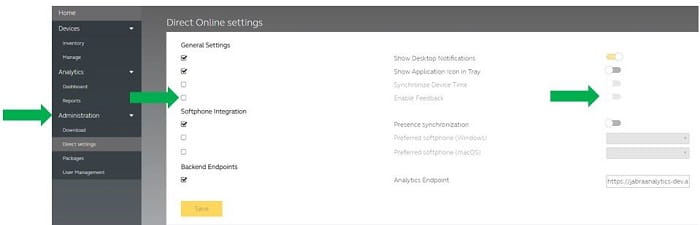
To remove the Feedback tab that is displayed in the Jabra Direct menu, change the following setting in Jabra Xpress.
- Go to Jabra Xpress > Administration > Direct Settings > General Settings.
- Select the Enable feedback setting by placing a check mark in the box to the left.
- Click the slider to turn the setting off and click Save.
Note
End user feedback on Jabra devices and Jabra Direct is monitored by our quality team.
Images and text are for guidance purposes only. Actual images and text may vary depending on the connected device and updates to the software.

Did you know?
0