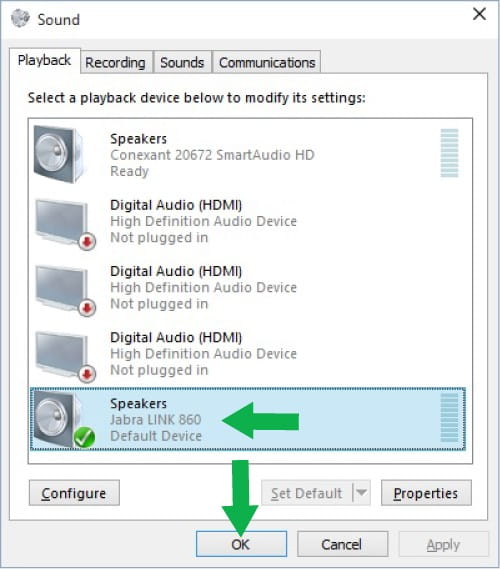
How do I synchronise the speaker volume with the Windows volume?
To ensure full audio control, the Jabra Link 860 must be selected as the default audio device in Windows. Follow these steps:
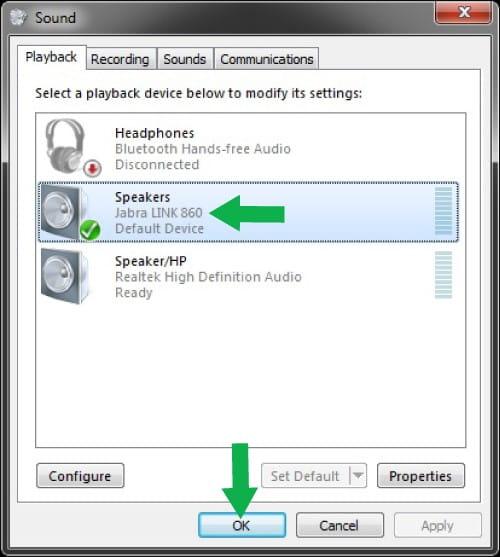
Windows 7:- Click Start.
- Click Control Panel, and then click Sound.
- Click Hardware and Sound. (This applies if sorted by category. If sorted by icons, click Sound and go to step 5.)
- Click Sound.
- On the Playback tab, if the Jabra device is not selected as the default device, select it and then click Set Default.
- Do the same on the Recording tab.
- Click OK.
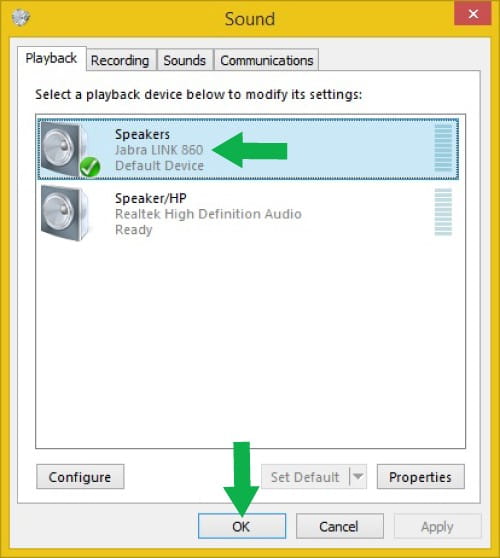
Windows 8:
- Tap or click the Windows icon, enter “sound”, and then click or tap Sound.
- On the Playback tab, if the Jabra device is not selected as the default device, select it and then tap or click Set Default.
- Do the same on the Recording tab.
- Click OK.
Windows 10:
- Tap or click the Windows icon, enter “sound”, and then click or tap Sound.
- On the Playback tab, if the Jabra device is not selected as the default device, select it and then click or tap Set Default.
- Do the same on the Recording tab.
- Click OK.