
QUESTIONS FRÉQUEMMENT POSÉES
How do I set up Push-to-Talk on my Jabra Biz 2300/2400II CC?
How do I set up Push-to-Talk on my Jabra Biz 2300/2400II CC?
Prerequisites
- Jabra Direct - latest version
- Jabra Biz 2300 - firmware version 2.60 or later
- Jabra Biz 2400II CC - firmware version 1.7.0 or later
You can apply the Push-to-Talk functionality to any of the three buttons on the USB controller.
To configure a button for Push-to-Talk, follow these steps.
- Plug your Jabra device into your computer.
- In Jabra Direct, select your device.
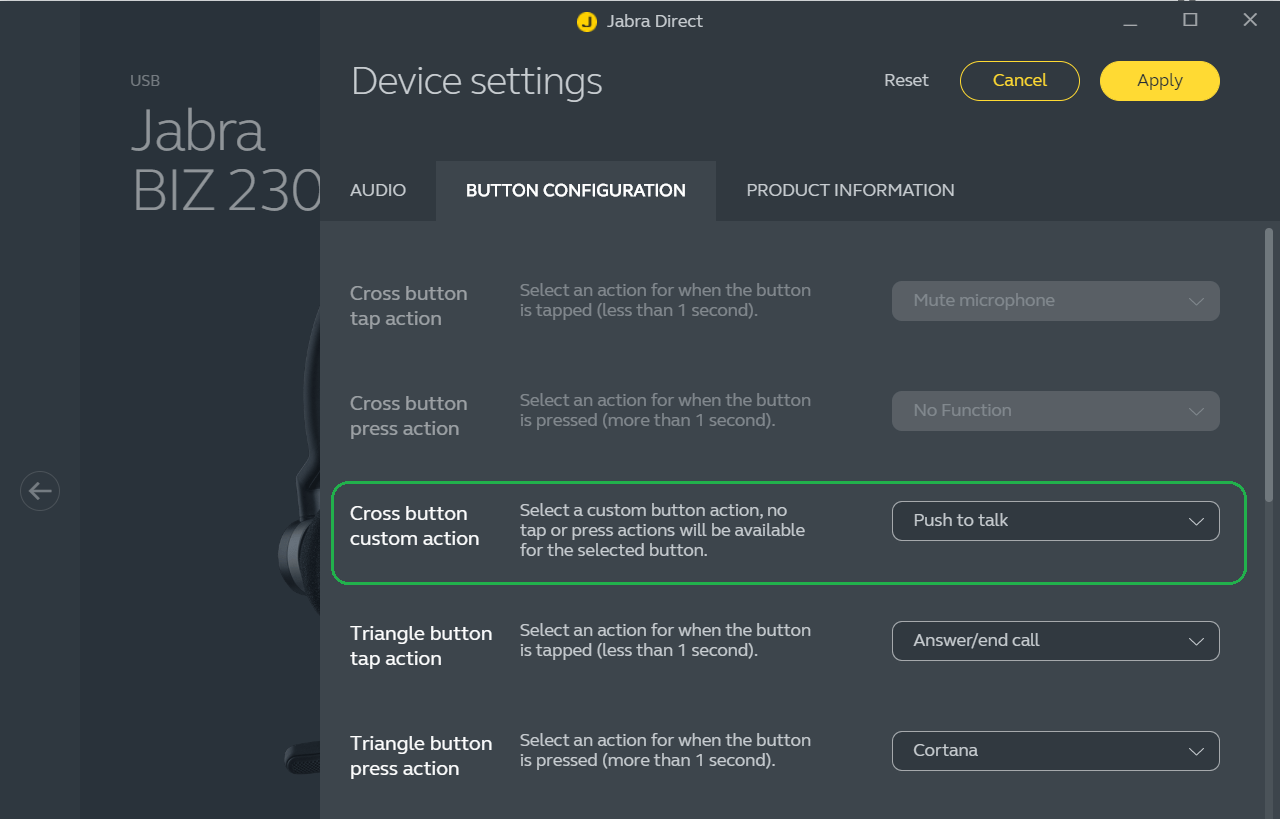
- Click Device > Button configuration.
- Go to the custom action for the button you want to apply the Push-to-Talk functionality to, for example the Cross button custom action, and select Push to talk.
- Click Apply to save your changes.
Note
When you apply a custom action to a button on the controller, the 'tap' and 'press' actions for the button are no longer available.
