
How do I pair my Jabra Elite 4 with my mobile device?
How do I pair my Jabra Elite 4 with my mobile device?
To pair your headset with your smartphone, tablet, or other handheld mobile device, follow these steps.
- Turn on the Bluetooth setting on your mobile device.
- Turn on your earbuds by removing them from the charging case. Alternatively, press the Left and Right buttons.
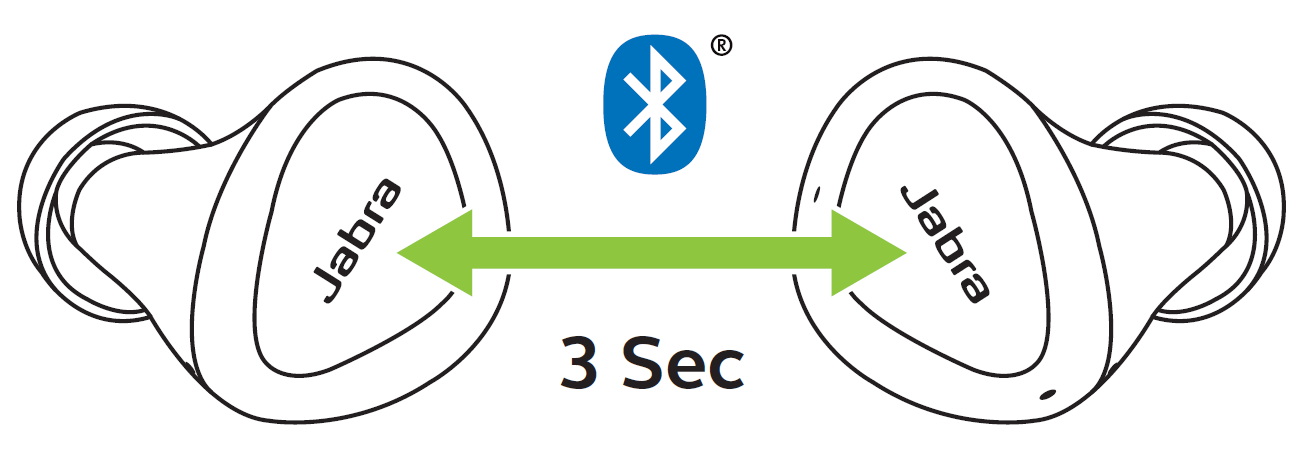
The LEDs on both earbuds will turn green. - To enter pairing mode, simultaneously press and hold (3 seconds) the Left and Right buttons on the earbuds, until the LEDs on the earbuds flash blue.
The earbuds are now ready to pair with your mobile device.
Note
If you want to use just one earbud, you must still pair both earbuds with your mobile device. After the pairing, you can place one of the earbuds in the charging case.
- To pair, go to the Bluetooth menu on your mobile device and select the Jabra Elite earbuds from the list. If the Jabra device is listed more than once, select the entry showing the headphone icon. Enter “0000” (four zeros) if you are asked for a pin code.
In daily use, when you turn on the earbuds, they will automatically reconnect with the last previously paired device, if it is turned on and within range.
Note
Android users can also use Google Fast Pair to pair their headset with their Android mobile device.
If pairing is not successful, try the pairing steps again, or try pairing with a different Bluetooth device. For troubleshooting tips, see here. Optionally, try using the Bluetooth Pairing Guide which provides detailed steps for pairing with a mobile device.
