
QUESTIONS FRÉQUEMMENT POSÉES
How do I set my softphone as the preferred softphone in Jabra Direct?
How do I set my softphone as the preferred softphone in Jabra Direct?
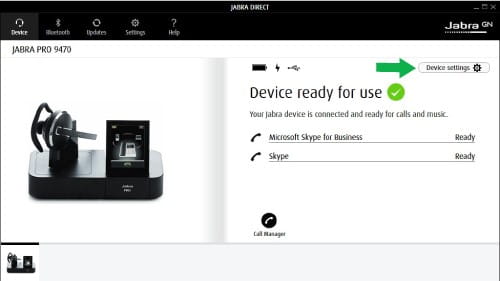
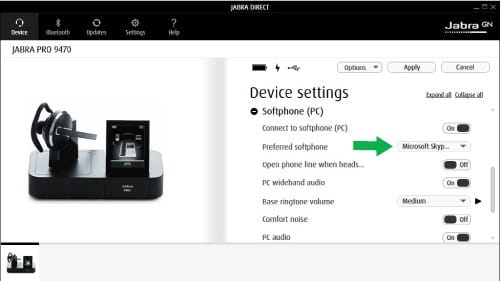
To set your softphone as the preferred softphone in Jabra Direct, follow these steps.
- In Jabra Direct, click Device settings.
- Scroll down and expand Softphone (PC).
- In Preferred softphone, select your preferred softphone.
- Click Apply.
Note
If you are using the Jabra Go 6470, the preferred softphone selected in Jabra Direct will override the softphone selected on the device itself.
Images and text are for guidance purposes only. Actual images and text may vary depending on the connected device and updates to the software.

Le saviez-vous ?
0