
QUESTIONS FRÉQUEMMENT POSÉES
How do I connect the Jabra speakerphone with my computer using the Bluetooth adapter?
How do I connect the Jabra speakerphone with my computer using the Bluetooth adapter?
If you are using a Jabra Speak 510+, the speakerphone and the Jabra Link Bluetooth adapter are pre-paired and ready to use out of the box.
To connect a Speak 510 with a Link, follow these steps.
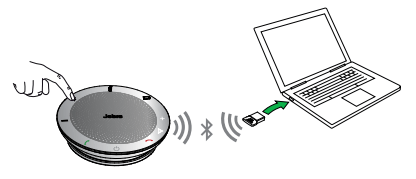
- Press and hold (2 seconds) the Bluetooth button on the speakerphone until the Bluetooth LED flashes blue.
- Release the button when you hear the connection instructions.
- Plug the Link into any available USB port on your computer. The connection is established when the LED turns solid blue.
Note
Ensure that any Bluetooth devices that were previously connected with the Link are turned off.
