QUESTIONS FRÉQUEMMENT POSÉES
How do I synchronize the speaker volume with the Windows volume?
How do I synchronize the speaker volume with the Windows volume?
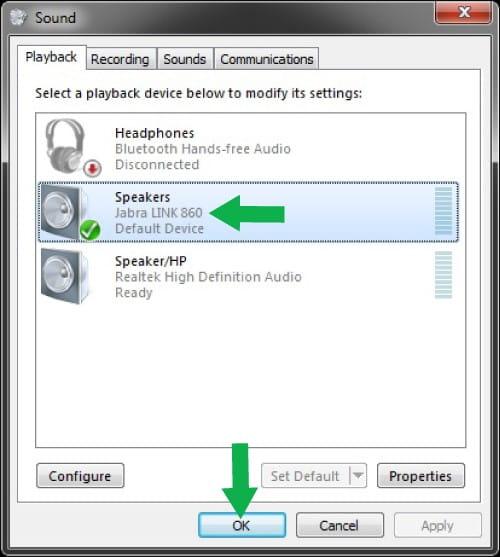
To ensure full audio control, the Jabra Link 860 must be selected as the default audio device in Windows. Follow these steps.
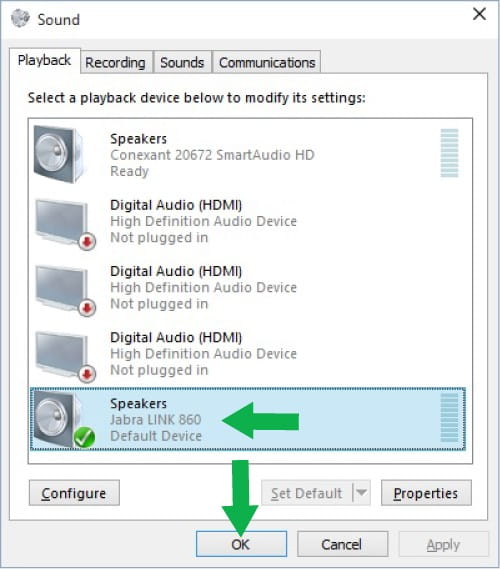
Windows 10
- Tap or click the Windows icon, enter “sound”, and then click or tap Sound.
- On the Playback tab, if the Jabra device is not selected as the default device, select it and then click or tap Set Default.
- Do the same on the Recording tab.
- Click OK.
Windows 8
- Tap or click the Windows icon, enter “sound”, and then click or tap Sound.
- On the Playback tab, if the Jabra device is not selected as the default device, select it and then tap or click Set Default.
- Do the same on the Recording tab.
- Click OK.
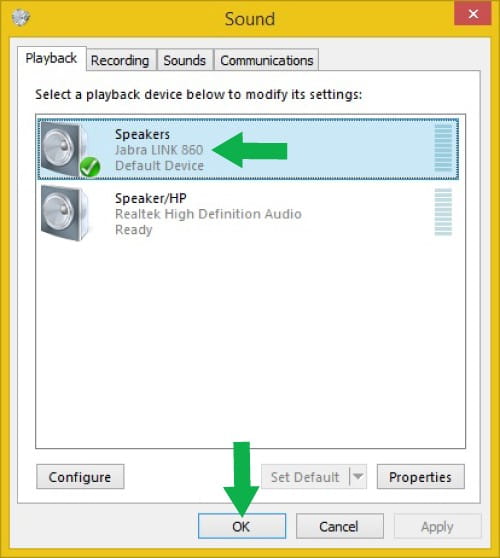
Windows 7
- Click Start.
- Click Control Panel, and then click Sound.
- Click Hardware and Sound. (This applies if sorted by category. If sorted by icons, click Sound and go to step 5.)
- Click Sound.
- On the Playback tab, if the Jabra device is not selected as the default device, select it and then click Set Default.
- Do the same on the Recording tab.
- Click OK.