
How do I link two Jabra Speak 750 speakerphones?
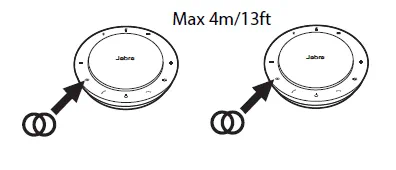
If two Jabra Speak 750 speakerphones are within a 4m/13ft range of each other, the Link button will be visible. To temporarily link the audio between them, tap the Link button on both speakerphones. To unlink the speakerphones, tap the Link button on one of the speakerphones.
The link will be disconnected if you turn off or enter pairing mode on one of the speakerphones. Afterward, the link does not automatically reconnect. You will need to manually reconnect using the same procedure as above.
Note
Linking two Jabra 750 speakerphones uses a Bluetooth connection. Each Speak 750 can only have two active Bluetooth connections. If two Bluetooth devices are connected to the Jabra Speak 750, the last connected Bluetooth device will be replaced by the temporary link. When the Jabra 750 devices are unlinked, the Bluetooth device connection that was temporarily replaced, will be restored.
