
QUESTIONS FRÉQUEMMENT POSÉES
How do I connect my Jabra wireless headset with the Jabra Link 14201-10 to my Aastra desk phone so I have remote call control using my headset?
How do I connect my Jabra wireless headset with the Jabra Link 14201-10 to my Aastra desk phone so I have remote call control using my headset?
Prerequisites
- Jabra Link 14201-10
- DHSG connection cable from Aastra
Connection
- Connect the AC adapter that is supplied with the headset to the headset base, and connect the other end to an electrical outlet.
- Connect the Jabra Link 14201-10 EHS cable with the red band to the AUX interface on the headset base, and connect the end with the blue band to the headset base socket that is marked with a phone icon.
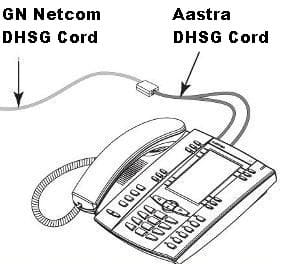
- Connect the Jabra Link 14201-10 EHS cable single end to the RJ45 adapter that is supplied with your Aastra DHSG Cable Kit.
- Connect the Aastra DHSG Cable Kit cord with the blue band to the RJ45 adapter.
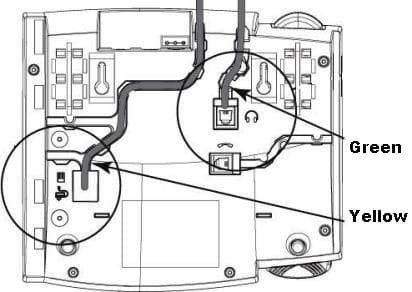
- Connect the Aastra DHSG Cable Kit cord with the green band to the headset interface on the Aastra desk phone, and connect the end with the yellow band to the socket for the Aastra phone expansion module.
Configuration
- Ensure the Audio Mode is set to “Headset/Speaker”, and the DHSG mode is enabled on your desk phone.
- Follow the setup instructions for your Jabra wireless headset. If the headset base requires manual configuration, set the Electronic Hook Switch setting to “DHSG” and set the dial tone switch to position “A”.
- Make a call to the headset. If the volume of your voice is too loud or quiet to the person you are calling, adjust the headset microphone volume until you achieve the optimum level.
