

What Is a Hybrid Work Schedule? Models & Tips That Work
Your hybrid policy says “two days in the office.” But what happens when one person comes in on Monday, a few on Thursday, and nobody gets the face time they came for?
It’s flexible, sure, but it can also create friction amongst the team and resentment towards the policy. Lack of coordination is one of the reasons hybrid models fail, because up to 29% of employees are more likely to come to the office when their colleagues are present. *
Which means a hybrid work schedule could help you increase in-person collaboration and make office time actually worth the commute.
We’ll show you how to do it, with real examples and practical tips that help hybrid work actually work.
*Source: PNAS
What is a hybrid work schedule?
Hybrid work is a model where employees split their time between working remotely and working on-site. A hybrid work schedule brings structure to that model, defining which days people come into the office, who they come in with, and how that time is used.
Because without structure, hybrid work starts to mirror the isolation of fully remote setups. Employees miss each other in person (which reduces opportunities to build relationships and collaborate), and collaboration across teams remains limited to virtual meetings. It also could add frustration and create resentment toward the hybrid policy – why make the commute if no one else is?
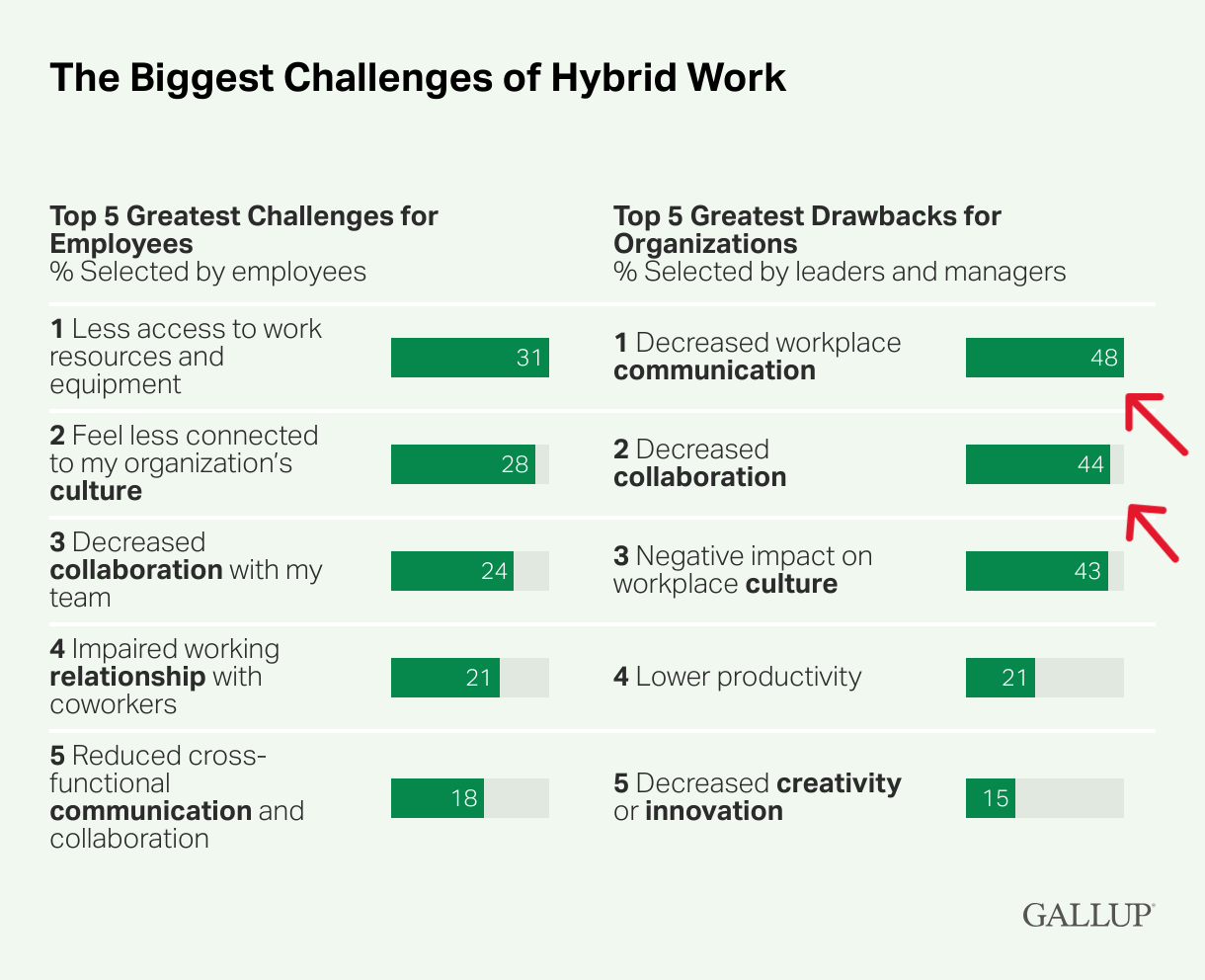
Already, decreased communication and collaboration are two of the biggest drawbacks of hybrid work:
Is there a ‘best’ hybrid work schedule?
No. There is no best hybrid work schedule.
What works for one company or one team might fail in another. The right hybrid work schedule depends on:
- The nature of your business (whether you need more people on-site or not).
- How your teams operate (better remotely or on-site), and
- What your employees need to succeed (fewer distractions, strong WiFi and tech setup, regular in-person syncs).
For example, Asana’s ‘Anatomy of Work’ study from 2023 shows that employees want hybrid work because it “helps them fit work around their personal lives” and “still reap the benefits of in-person collaboration when they’re in the office.”
That’s why the question isn't “Which schedule is best?” but “Which schedule best works for your team?”.
To make that decision, consider:
- Collaboration needs: Do team members rely on each other to move work forward?
- Focus time: Do tasks require individuals to work independently, preferably in silence (which remote work allows)?
- Customer-facing roles: Is there a need for consistent availability throughout the week?
- Team rhythms: Are there recurring meetings, deadlines, or shared workflows to align around?
Whatever you choose, consistency matters. So, choose a predictable rhythm. Employees should know when they’ll be together and why.
How many days a week should hybrid employees be in the office?
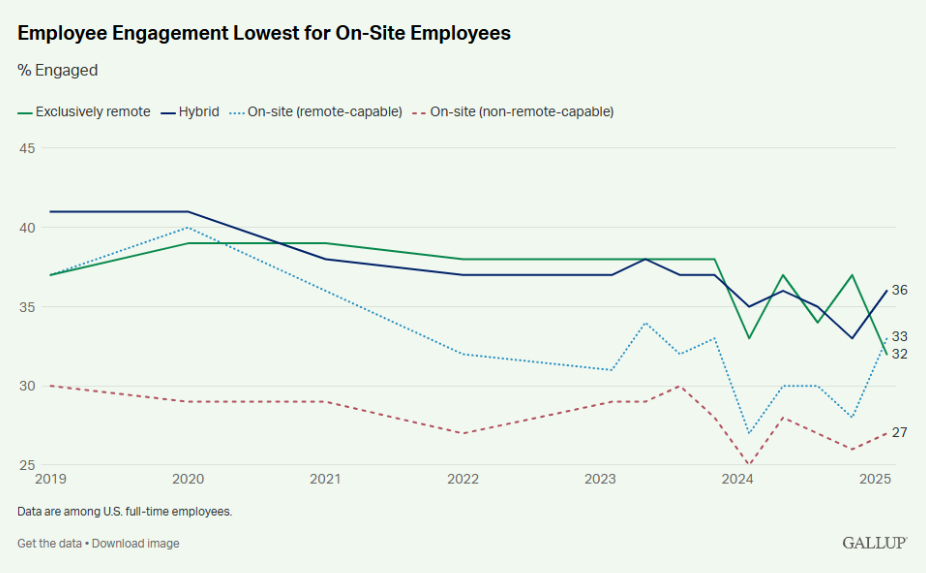
Data from 2019 to 2025 suggests engagement is highest (36%) when hybrid employees have around two or three in-office days, compared to fully remote (33%) and fully on-site (27%) arrangements.
But even if you’ve landed on the right number of in-office days, it only works if those days are used intentionally. Some tasks benefit from physical collaboration, others don't. So, how do you decide which work belongs where?
Consider this framework:
- Start with business needs & current goals: Which tasks truly benefit from being in-person? Can the teams effectively collaborate on this new target while working remotely?
- Layer in employee input: What working patterns help them do their best work? Two or three days on-site?
- Align with the team: Pick common in-office days to reduce friction and encourage interaction.
Some organizations have fixed days (e.g., in-office Tuesday through Thursday), while others let the teams choose. Below, we break down hybrid work schedule models, including fixed, rotational, employee-choice, manager-assigned, and a blended approach.
Hybrid work schedule examples: How companies structure the week
Here are five common approaches to hybrid work:
1. Fixed schedule
In a fixed hybrid model, everyone comes into the office on the same designated days, say, Tuesday to Thursday, with remote work on the others. This approach is straightforward and easy to coordinate because employees know when to report to the office and when to work from home.
It also means no one shows up to an empty office wondering where everyone else is, and teams can actually collaborate in person.
For example, aside from allowing fully on-site and remote teams, salesforce allows workers to work three days per week in person (10 days per quarter for the engineering team). the ceo talks about that here:

Another example is the Ford Foundation. Out of the three days for on-site work, two days are mandated, and each individual can choose their third on-site day.
This schedule brings people and teams together and creates a predictable cadence for collaboration.
However, fixed schedules aren’t always flexible enough for employees who juggle school runs or face hour-long commutes every morning. It affects their routine, especially if they've structured it differently because of remote work.
Another downside is that you can’t reduce office space, which makes it harder to lower your real estate costs even after adopting a hybrid work model.
2. Rotational schedule
A rotational schedule staggers in-office time across teams or departments (giving rise to the nickname, staggered schedules). Here, a team might come on Monday and Wednesday, while another team is scheduled for Tuesday and Thursday.
This schedule reduces crowding, which can help your company reduce its office space (and by extension, real estate cost). But when teams don’t overlap because they come in on a team-by-team basis, spontaneous interactions (which is why 73% of hybrid employees come to the office) and cross-functional collaboration (which 71% value) suffer.
People miss each other in the office, and that can erode cohesion over time. Teams also miss the chance to tap into other departments' expertise when they hit roadblocks—the kind of problem-solving that happens naturally when different teams overlap.
3. Employee-choice model
Also called the bottom-up model, it gives employees autonomy over when they come in. There are no mandated days, just the expectation that they’ll meet their goals and stay in sync with their team.
For example, Eventbrite.
David Hanrahan, former Chief Human Resources Officer at Eventbrite, said they asked employees about their preferred in-office frequency to guide how they'll manage their office space.
Based on the data, only a small portion of employees choose to come in four to five days a week, around 20–30% choose remote work, while over 50% choose to come in “a couple of days here and there” when they like.
The upside: people can plan their weeks and come in when they prefer. For some workers, this can lead to better productivity and satisfaction.
The downside: this variability makes it hard to plan who will be in on specific days, which makes it harder to cut down on office spaces (and real estate costs).
4. Manager-assigned or team-defined model
Rather than mandating days from the top, this model lets managers (& their teams) decide when they’ll be in the office. The company sets a guideline (e.g., two in-office days per week), but execution is local.
This reflects a strategy Salesforce considered in 2023. Under their Return & Remote approach, managers made decisions for their teams about how and where to work:
- Hybrid teams are assigned to a location to work in person for three days per week. This workday includes when they meet with customers, partners or attend events.
- Customer-facing teams work in person four days per week.
- Product and engineering teams work in person 10 days per quarter.
- Fully remote teams don’t have an office, but remote status is based on agreement with the manager.
This balance of structure and flexibility allows teams to work the way they work best. It also encourages buy-in: when people help shape the policy and influence what managers pick, they’re more likely to follow it.
But the downside is fragmentation. If every team picks a different pattern, inter-departmental meetings become harder to schedule. And in-person meetings (across departments) are reduced to virtual chats and annual retreats.
On the flip side, virtual chats can also be as engaging as in-person conversations with professional headsets like Jabra Evolve2 65 Flex. It’s designed for work/calls (and entertainment), so even when the kids are home, the train’s crowded, or the office is a little busy, callers will hear you, not your surroundings.

5. Blended approach
A blended hybrid schedule combines elements from multiple models. One common structure: everyone comes in on a fixed anchor day (say, Wednesday), teams decide one additional in-office day, and employees choose the rest.
The Lloyds Banking Group is an example of this. According to Tom Kegode, their ex-people and place officer, anchor days allow people to work together, so they're “super intentional and super coordinated” about it.
They have three layers of this:
- Full division/team, where everyone in the team comes on specific days.
- Community/regional basis, where different teams meet once a month “to create that kind of cross-team cohesion.” Here, there’s socialization and collaboration across teams.
- Then, a close team – say a group of work-buddies who workshop problems together – use an anchor day for problem-solving activities. Tom calls it “heads up” rather than “heads down” work.
The strength of the blended approach is balance. It gives employees freedom without compromising on physical collaboration. However, it requires clearer communication and scheduling discipline. Without it, people might start to skip in-office days, which may lead to resentment from coworkers who show up.
How do you manage a hybrid work schedule? 5 tips and best practices from the real world
1. Set clear expectations for hybrid attendance
Employees need to know when they’re expected in the office and why. Vague or optional policies lead to mismatched schedules, which don’t help the team maximize the potential of hybrid work.
To avoid this, put the rules in writing. Clarify:
- Which roles need to be on-site (and when)?
- Which days or meetings require in-person attendance? Why?
- Who decides the schedule (central policy vs. team)?
Shopify, for example, is a remote-first company, but it’s explicit about expectations.
It’s the same for Eventbrite. Although it follows an employee-choice model, it still sets expectations at the macro level. Leaders ask employees to indicate how often they’ll come in, then use that data to provide resources for when they're on-site.
The key insight? Even when presence is flexible, expectations about patterns and visibility still exist, and they're communicated intentionally.
So, regardless of your hybrid work model, establish minimum guidelines and ensure managers adhere to them.
2. Communicate hybrid policies with consistency
Hybrid schedules only work when everyone knows the rules and hears them often.
Employees may forget the rhythm if your policy lives in a buried PDF or a one-time email. So, avoid that.
At Rue Gilt Groupe, for example, Gabriella Micciche, a buyer on the merchandising team, schedules her team’s meetings on their dedicated in-office days. That way, employees come in, and the time spent together is used for hands-on collaboration, training, and relationship building.
It also frees up her remote days so she can focus on “executing (actual) tasks and projects.” She’s consistent about this structure, which makes the policy predictable and worth following.
More importantly, Rue Gilt Groupe reinforces its hybrid norms company-wide. They have Slack channels like “Rue-volution” for social connection and a Spirit Committee to support a hybrid culture across office and remote workers.
Regardless of your hybrid work model:
- Keep the rules visible.
- Use channels that coworkers already trust, like your internal wiki or Slack announcements.
- Reinforce them in meetings and reference them in 1:1s, so people remember and adhere to them.
3. Use anchor days to boost collaboration
Anchor days are specific days when everyone (or most people) comes into the office. But if you’re bringing people in just to work silently side by side, you’re missing the point.
Use anchor days for things that actually benefit from being together, like:
- Anything that brings people together. This can be workshops, customer meetings, or brainstorming sessions that need whiteboards and real-time input.
- Set a few minutes for informal and spontaneous interactions before or after these sessions, just to help coworkers socialize with each other.
- Use anchor days for inter-departmental meetings or conversations that don’t happen organically on Slack.
- In-person feedback and mentorship sessions.
This structure gives the day purpose and makes inter-departmental collaboration worthwhile in hybrid settings. These moments also increase engagement (according to 64% of employers), motivation, and retention.
4. Ensure inclusive meetings for those who aren't on site
For the times you need to collaborate with remote participants, don’t make them feel like silent observers. Hybrid meetings must ensure that every participant is seen, heard and included, so coworkers on-site don’t do all the talking.
To create inclusive meetings:
- Use a dedicated display (not a laptop) to connect with remote attendees so they’re not sidelined.
- Avoid whiteboards that only people in the room can see. Or, position the whiteboard in a way that's visible to remote attendees.
- Assign a facilitator to intentionally ask for their contributions.
And most importantly, use a technology that makes this easy. For example, Jabra PanaCast 50 is a video bar that has:
- Three 13 megapixel cameras (39MP in total).
- A panoramic 4K video technology to stream high-quality video.
- 180° camera view (captures the whole room).
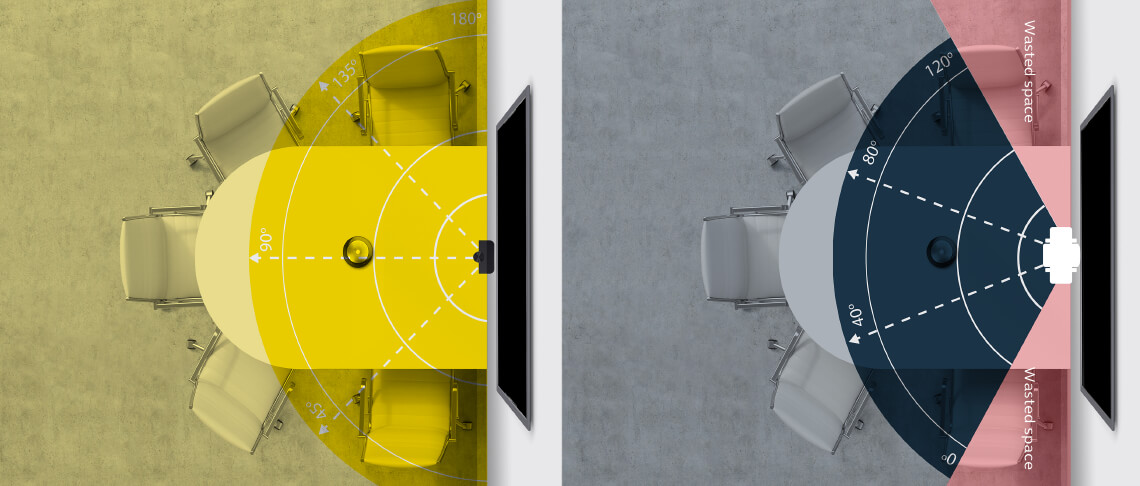
- Uses intelligent speaker tracking to follow the flow of conversation. This means you can configure the video bar to bounce from speaker to speaker so remote teams can see who is speaking (and zoom out to accommodate all attendees) without manually adjusting the camera angle.
- Has eight beamforming mics, which ensure people are heard even if they’re sitting 12+ feet from the camera.

- It has a whiteboard-sharing feature that streams your physical whiteboard so remote participants don’t miss any sketches or scribbles during the brainstorming session. And with eight beamforming microphones, everyone in the room is heard, no matter where they sit.
Here’s what the whiteboard feature looks like:

Finally, the tools that make hybrid work actually work
Policies and schedules set the foundation for collaborative hybrid work. But the right tools make it functional, inclusive, and productive. Here are some essential tools:
1. Cameras: Make every seat at the table visible
One of the biggest gaps in hybrid work is presence. When some people are in the room and others are on video, it’s easy for remote participants to fade into the background.
The solution? Equip your meeting rooms with cameras that see the whole room with Jabra PanaCast 50.
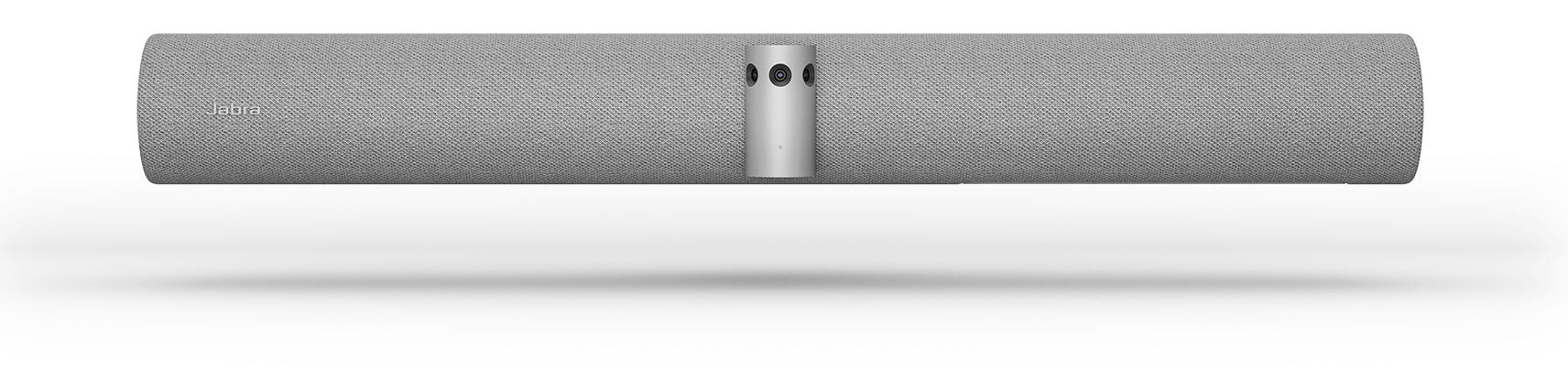
Aside from the capabilities mentioned earlier, there are built-in speakers in the video bar, so you won’t need to invest in a separate speaker to complement the high-quality 180° view camera system. It automatically identifies and removes residual echo and static noise, so the audio is clear for the recipients.
It works seamlessly with Zoom, Microsoft Teams, RingCentral, and other video calling apps, which makes it suitable for hybrid work.
2. Headsets: so remote attendees can hear clearly
Clear audio is non-negotiable because it's hard to follow the conversations or feel included if you can't hear someone clearly.
For this, we recommend Jabra Evolve2 65 Flex.

It’s designed for people who work remotely, or shift between home and office and need a work headset for calls and music. It’s designed with six microphones in its ear cups that cancel out background noise (thanks to the hybrid ANC technology), and gives 21 hours of talktime on a single charge. This means you (and teammates) can take calls in noisy offices (or kitchens) and still sound like you’re in a private office.
Listen to this demo for the difference between your laptop’s microphone and the Jabra Evolve2 65 Flex.
If your team works in sales, support or other roles that involve a lot of customer calls and meetings, we recommend Jabra Engage Series headsets.

Engage 75 SE, for example, has:
- 150 meters (490 feet) call range, which means you can pick up calls even when you’re away from your desk.
- 13 hours of talktime.
- Ability to cancel noise up to 80 dB. Yes. In fact, for Jabra Engage headsets, we developed an AI-enhanced voice clarity feature that erases all background noise from your caller’s end so it doesn’t affect your conversation. Check it out:

You should also listen to the difference in the audio quality of Jabra Engage 75 SE and a regular headset.
3. Coordination and collaboration tools
When companies offer flexible or employee-choice schedules, there is a chance that nobody knows who’s coming in and when. So people commute in… to sit alone.
To avoid this, encourage teammates to indicate when they’ll be in the office on weekdays. Depending on your preferred schedules, a simple “Hi all, I’ll be in the office on X day(s) next week” in a dedicated Slack channel can encourage others to come on such specific days too.
You can use a scheduling tool like Robin if you want something more structured. Robin allows employees to log their in-office days on a shared calendar, view who else is planning to come, and plan their week accordingly. It’s like a bird’s-eye view of office presence, so no one shows up to an empty room.