
How do I use the conference call mode with my Jabra Engage 65?
How do I use the conference call mode with my Jabra Engage 65?
You can set up a conference call with the Jabra Engage 65 by pairing up to three additional headsets with the same base. You can pair a headset “over the air” or dock it in the base. If you dock a headset in the base, the headset must have the same docking interface as the base. For example, a Jabra Engage mono headset and a Jabra Engage mono or stereo base.
1. Add headset(s) using base docking
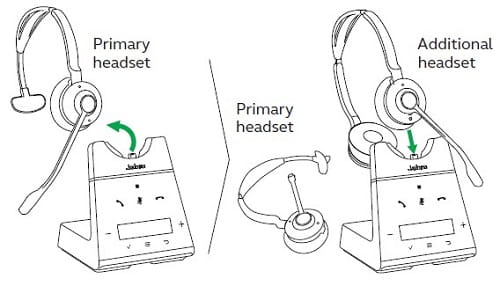
- Undock the primary headset.
- Dock an additional headset in the base.
- When the headset has been successfully paired with the base, a voice prompt is announced in the primary headset. Press the Call button on the primary headset to accept the additional headset. The audio is then shared with additional headsets, which are muted by default.
2. Add headset(s) without base docking (pair over the air)
- Undock the primary headset.
- Turn off the additional headset by holding the Call button for 4 seconds.
- Hold the
(3 seconds) on the base. The Conference LED
will flash.
- Put the additional headset into pairing mode by holding the Call button for 5 seconds until the LED on the headset flashes blue. The base and the headset will attempt to pair.
- Press the Call button on the primary headset to accept the additional headset, and complete the pairing. The audio is then shared between headsets, which are muted by default.
End or leave a conference call
To end the call for all headsets, press the Call button on the primary headset, or dock the primary headset in the base. Additional headsets can leave the conference by pressing the Call button on the headset, or by docking the additional headset in the primary headset base (not the additional headset base). The conference call will continue for all other headsets.
Permanent conference mode
By default, the conference will end automatically for all additional headsets when the call ends. To continue the conference with the additional headsets until the primary headset is docked, change this specific setting in Jabra Direct.
