
.jpg?h=2160&iar=0&w=3840&hash=C3C7894F7F4E80E69FFE331A1E0F1721)
Hybrid vs. Remote Work: Head-to-Head Comparison
Research tells us employees want remote flexibility:
- 93% of remote-capable employees prefer either a remote or a hybrid work model.
- Six out of 10 fully remote employees say they’ll start looking for new jobs if they aren’t allowed to work remotely anymore.*
But how much flexibility should you offer, and in what form? Should you go fully remote? Build a hybrid model? Which one will make your team more collaborative, productive, and excited to call your organization home?
To decide, you need a clear, practical comparison of hybrid and remote work models—what each offers, where they fall short, and how they impact culture, productivity, and retention.
In this guide, you’ll get exactly that.
Hybrid vs remote work: What you need to know before choosing a policy
Before diving in, let’s define the three main work models:
- On-site work means employees work from a physical office every workday.
- Remote work means employees can work full-time from anywhere — typically their homes—with no required trips to the office.
- Hybrid work combines both: employees split their time between remote and on-site work, following a set schedule or team-based structure.
However, three big misconceptions trip people up:
- Hybrid means “come in whenever.” It doesn’t. The “come in anytime” approach often leads to empty offices and frustrated employees. True hybrid work is intentional and balances flexibility with structure.
- “Remote” means “disconnected”. When remote work isn’t implemented well, isolation can happen. But with the right tools and structure, remote teams can communicate just as clearly, and sometimes more effectively, than their in-office counterparts .
- Remote work means “work from home.” Remote employees can work from anywhere—their home, a coworking space, or even while traveling. If you want your team to work only from home, that’s more of a work-from-home setup than a remote one, and you should specify that.
Some companies include location-flexible options in their hybrid policy, like allowing employees to work from anywhere for a few weeks each year.
Read: What Is a Hybrid Work Schedule? Models & Tips That Work
What is the difference between onsite, remote, and hybrid?
| On-site work | Hybrid work | Remote work | |
|---|---|---|---|
Primary location | Central office, every workday | A mix of office and remote locations | Fully remote (home, coworking space, etc.) |
Flexibility | Low – fixed schedule and location | Medium – depends on company policies | High – employees control where they work |
Collaboration style | In-person meetings and spontaneous interactions | Blend of in-person and virtual collaboration | Fully virtual, requires digital-first communication and collaboration |
Work-life boundaries | Clear (commute separates work and home) | Some boundaries via office days | Blurred, unless boundaries are self-imposed |
Talent reach | Limited to office location and commuting distance | Semi-flexible – talent must be close enough to come in as needed | Global – no hiring constraints based on geography |
Technology needs | Minimal – mostly in-person communication | High – Video conferencing cameras and digital collaboration tools (Zoom, Microsoft Teams, etc.) for both office and remote teams |
Very high – Full reliance on tech like headsets, webcams, and project management tools (Asana, Basecamp, etc.) |
Which is better: hybrid or remote work?
The short answer? It depends.
Let’s look at the data:
According to Gallup, remote-capable employees are already in either hybrid or fully remote setups, and of them, six in ten actually prefer hybrid .
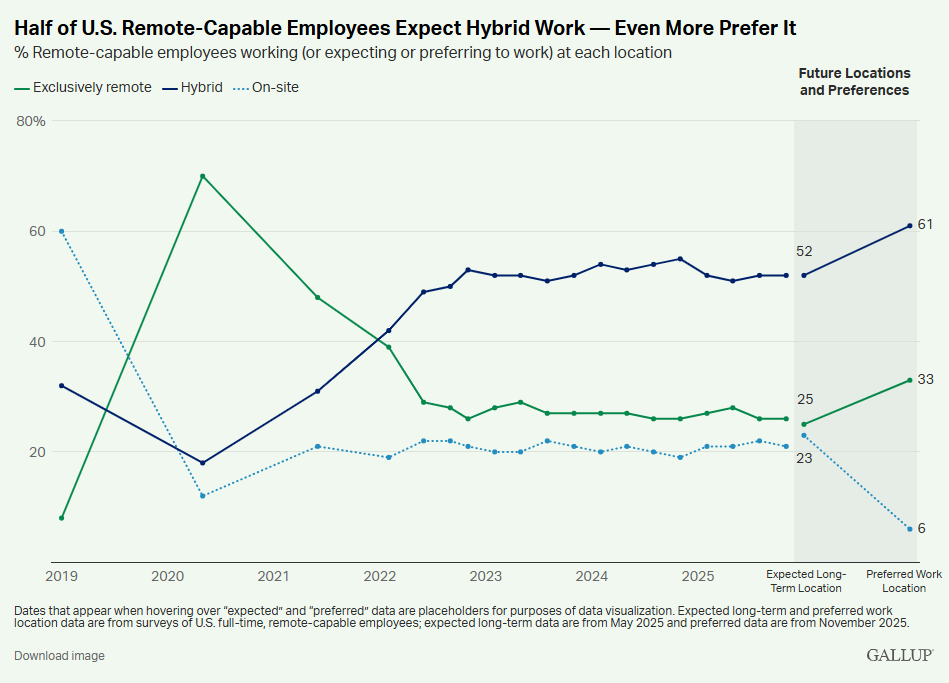
Source: Gallup
Why? The top reasons are:
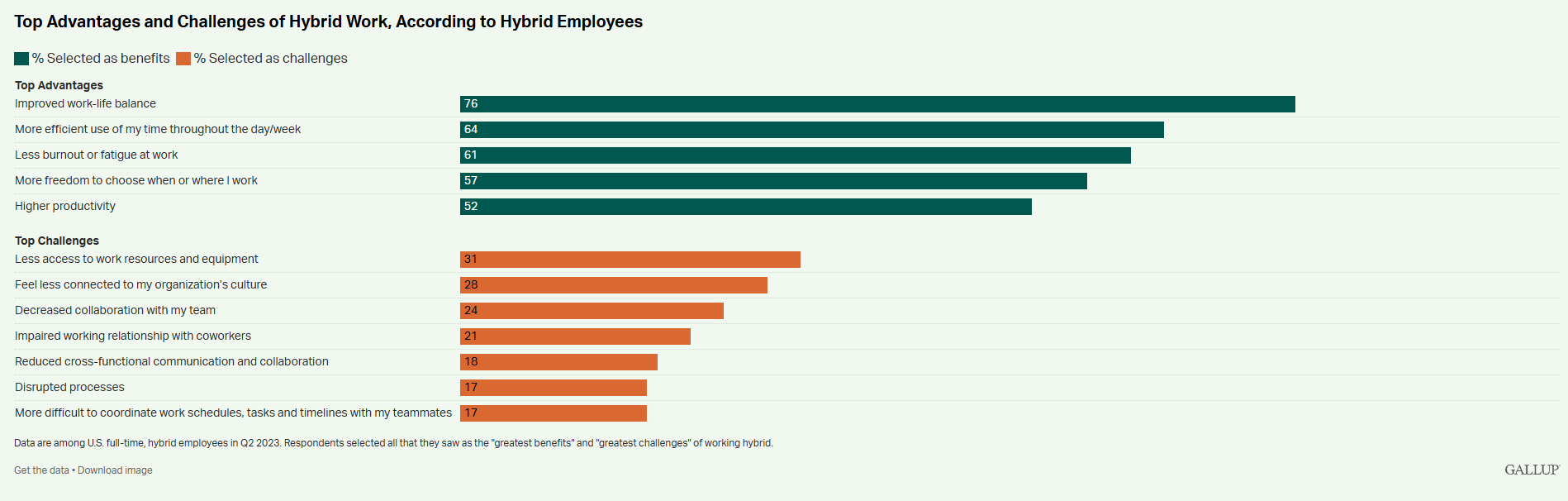
- Better work-life balance (76%)
- More efficient use of time (64%), and
- Less burnout (61%).
An exclusively remote model could offer these benefits, but hybrid workers like that in-office days allow them to:
- Build relationships and trust with coworkers through in-person time
- Build relationships and trust with coworkers through in-person time
- Have casual conversations with managers and leadership
- Stay connected to company culture
- Draw clearer lines between work and personal life
That said, just because most employees prefer hybrid doesn’t mean it’s always the better model.
There are several scenarios where a fully remote setup is the smarter, more sustainable choice:
- You’re a small company with a global team. Opening offices across time zones is unrealistic.
- Your company is fully digital. If all your tools and systems are built for asynchronous work, bringing people into an office adds complexity, not value.
- Your talent is distributed. If your best hires aren’t near your office, going hybrid could limit your hiring pool.
- Your team works independently. Roles that require deep focus (like engineering, writing, or design) may benefit more from the flexibility and quiet of remote work.
- You want to save on overhead. No offices means no real estate costs, utilities, or commute expenses.
Ultimately, choosing the right model comes down to your team structure, business goals, and operational capacity.
A hybrid model might be ideal for roles that require collaboration, mentorship, or a lot of cross-team collaboration. While, remote might be better if you prioritize flexibility, access to top talent, and lower costs.
The key is to be intentional. Pick the model that fits how your people actually work and support it with the tools and policies that make it thrive.
Pros and cons of hybrid work policies
The case for hybrid work: Key advantages and opportunities
1. Flexibility and autonomy
Hybrid work gives employees more control over how and where they work. Whether it’s choosing to focus at home or collaborate in person, hybrid allows teams to match their environment to their tasks.
2. Work-life balance
76% of employees who prefer a hybrid model do so because it improves work-life balance. Regular in-office time helps employees set firmer work-home boundaries, while remote days cut out commute stress and free up more personal time.
3. Increased productivity and efficiency
Many hybrid employees report improved productivity when they can tailor their work environment to the task at hand. Remote days allow for deep focus without office distractions, while in-office time supports efficient collaboration and quick decision-making.
4. Talent attraction and retention
Hybrid flexibility is now a key factor in attracting and retaining talent . It signals trust and modern thinking, two qualities today’s job seekers actively look for. It also broadens your hiring pool beyond office commuting zones, giving you access to skilled candidates across a wider range of locations.
5. Cost savings
Hybrid work can reduce office space needs, lowering costs tied to real estate, utilities, and equipment. While some remote-first companies offer employees a home office budget, it rarely adds up to what businesses spend on renting and maintaining a physical office, especially in major cities.
The case against hybrid work: Key disadvantages and common missteps
1. Coordination complexity
In a hybrid work model, team members often aren’t working in the same place or at the same time. Without clear scheduling practices and well-coordinated workflows, it becomes harder to align on meetings, manage deadlines, and keep projects moving forward. The result? Slower decisions and potential delays.
2. Proximity bias
Without intentional management practices, employees who are in the office on a given day often become more visible to leadership, while those working remotely risk being overlooked. Over time, this can influence performance evaluations, promotion opportunities, and involvement in key projects, quietly creating inequities within the team.
3. Poor policy clarity
Without clearly defined expectations around in-office days, meeting schedules, and team workflows, employees feel frustrated and uncertain about how to navigate hybrid work effectively. This leads to unpredictable office attendance, uneven collaboration, and wasted commutes.
4. Impact on company culture and engagement
- Weakening of relationships: Reduced in-person interaction can gradually erode team bonds, making it harder to maintain trust and cohesion across the organization.
- Reduced employee engagement: Without thoughtful efforts to build connection, some employees may feel disconnected from the company and its goals.
5. Technology gaps
When video and audio quality vary across conference rooms and remote setups, remote participants often struggle to fully follow discussions or contribute effectively. This creates a poor meeting experience, discourages equal participation, and undermines team cohesion.
Communication is critical in hybrid work, particularly during virtual meetings between in-office and remote teammates.
This is where video conferencing solutions like Jabra PanaCast 50 shine. With its 180° field of view and intelligent zoom, PanaCast 50 ensures that remote participants can clearly see and hear what’s happening in the room, creating a more inclusive, equitable experience for all attendees.
Pros and cons of remote work policies
Remote work offers valuable advantages, but it also brings trade-offs that companies need to manage carefully.
The case for remote work: Key advantages and opportunities
1. Flexibility and control
Remote work allows employees to work from anywhere, choose their work hours, and tailor their environment to their needs. This flexibility helps employees better manage their time, balance personal responsibilities, and design a workday that fits their lives.
2. Improved work-life balance
Without a daily commute, employees regain valuable time, making it easier to integrate work with family and personal life. But maintaining that balance depends on clear company expectations and individual discipline to set healthy boundaries.
3. Customizable workspace
Remote employees can design a personalized workspace that supports both well-being and performance. From laptop stands and ergonomic chairs to adjustable lighting and Bluetooth headsets , they can tailor their setup to match their work style and needs.
4. Deeper focus
Remote environments often make deep focus easier, with fewer interruptions than a busy office. For roles that involve frequent calls (like sales or customer support), working remotely also provides a quieter setting that supports clear, professional conversations.
5. A broader talent pool
Remote work expands an organization’s ability to recruit top talent. Companies can access a wider, more diverse candidate pool at a national or even global scale, without requiring relocation.
6. Reduced costs
Remote work can help both employees and companies save money. Employees save on commuting, meals, and work attire, while companies reduce office space, utilities, and other overhead expenses.
The case against remote work: Key disadvantages and common missteps
1. Isolation and reduced social interaction
Working remotely can sometimes lead to feelings of loneliness and isolation. Without regular in-person interaction, employees may miss the casual conversations and camaraderie that naturally develop in an office, which can gradually weaken team cohesion.
2. Work-life balance challenges
Remote work can improve work-life balance, but it doesn’t happen automatically. Without a clear separation between work and personal space, and without the natural transition of a commute , it can be harder for remote employees to fully "switch off." Over time, this may lead to longer work hours and a greater risk of burnout.
3. Communication and collaboration difficulties
Miscommunication is more common in remote settings, especially when teams rely on asynchronous tools like email or Slack. Without face-to-face cues, it’s easier for employees to misinterpret tone or intent, which leads to misunderstandings or conflict.
4. Harder culture-building
Building and sustaining company culture is more challenging in remote environments, where employees can miss out on informal moments, social activities, and organic relationship-building. Without intentional efforts to build connections, remote workers may gradually feel disconnected from the organization’s culture, identity, and values.
For remote workers in call-heavy roles, like sales or customer support, or for those working in environments with background noise, professional-grade headsets can make all the difference.
Headsets like Jabra Evolve2 65 Flex and Jabra Engage Series deliver premium sound quality, active noise cancellation (ANC), and all-day comfort, helping employees stay focused, clearly connected, and fully present in every conversation.
How to choose between hybrid and remote work
Choosing between hybrid and remote work starts with understanding how your team operates and what kind of environment helps them do their best work.
Here are some key factors to help guide your decision:
| Factor | Hybrid work may be better if… | Remote work may be better if… |
|---|---|---|
Team structure | Teams rely on cross-functional collaboration or frequent in-person interaction | Teams are spread across different locations and/or don’t rely much on in-person interactions to get work done. |
Collaboration needs | Work benefits from live, synchronous collaboration (brainstorming, coaching, creative work) | Work can be done effectively with asynchronous collaboration and a few meetings |
Customer-facing roles | Some client interactions or key moments are best handled face-to-face | Most customer interactions happen through calls or video conferences |
Leadership approach | Leadership values in-person connection for culture-building and team cohesion | Leadership is comfortable driving employee engagement, alignment, and accountability through digital channels |
Technology readiness | Your teams use video conferencing tools (Zoom, Teams), room cameras, and collaboration apps (Slack, Miro) to support both in-room and remote teamwork | Your teams use remote-first tools like video conferencing tools (Zoom, Teams), cloud docs, and project management platforms (Asana, Trello). |
Regardless of which model you choose, two types of communication technology are essential for helping your teams collaborate effectively:
- Videoconferencing cameras are crucial for hybrid meetings as they give remote participants a clear, eye-level view of everyone in the meeting room.
- For example, Jabra PanaCast 50 , with its 180° field of view and intelligent zoom, ensures that remote workers can see and hear all in-room participants clearly. This creates an inclusive meeting experience and makes conversations feel more like face-to-face discussions.

-
Noise-cancelling headsets help both hybrid and remote workers stay focused and connected, whether they’re working from home, a shared office, or on the move. We offer two headset series:
- Jabra Evolve3 Series: Premium sound quality with AI-powered voice clarity, all day comfort, and highest level of noise cancellation — perfect for knowledge workers who need to move between locations or block out distractions during deep focus work.
- Jabra Engage Series: These headsets are designed for call-heavy roles like sales and customer support, and they deliver crystal-clear voice quality, superior noise isolation, and all-day wearing comfort.

Tips to make your policy transition smooth
If you’re switching work models, get these key areas right first:
- Change management: Bring employees into the conversation early. Explain why the company is making this shift, what the new model will look like, and how it supports business goals and employee wellbeing. Also, address concerns head-on to build trust.
-
Communication plans: Define how your teams will communicate day-to-day.
- What’s the role of virtual meetings?
- What’s expected in async channels?
- What tools will be used for different types of communication?
- Expectation setting: Outline when employees are expected to be in the office (if applicable), how performance will be measured, and how collaboration and responsiveness will work in the new model.
How to transition from onsite full-time to hybrid
Shifting from full-time in-office to hybrid changes how employees interact and plan their day. To make it stick, be deliberate about how you roll out, communicate, and support employees through the transition. Here's how to do it right:
-
Communicate the shift clearly.
As Frida Ahrenby, Chief Marketing Officer at Rillion , puts it: “Clarity is everything. People can adapt to almost any change as long as they understand the why and the how behind it.” She recommends that you start with a clear rollout message. Explain why the company is making this change, what’s expected from employees, and how hybrid work supports both business goals and employee wellbeing. If possible, provide a simple one-pager or internal FAQ so there’s no confusion about what’s changing and when. -
Set anchor days to create structure.
As Chan Yerneni, CEO at EssayGrader , notes: “Hybrid only works when there’s predictable face-to-face time. Anchor days give teams the rhythm they need to stay aligned and actually feel like a team.” He suggests companies choose 1–2 days per week where teams are required to be in the office. This encourages collaboration, makes meetings more efficient, and helps teammates build relationships. -
Upgrade meeting rooms for true hybrid collaboration.
If your meeting rooms aren’t tailored for remote participation, equip them with video conferencing cameras that capture the full room and headsets /speakerphones that deliver clear, reliable audio. These tools help remote employees see who’s speaking, hear what’s being said, and actively contribute to the conversation. As Lise Pleyber, Director of Marketing at Coast explains: “The goal isn’t just to broadcast a meeting, it’s to bring remote teammates into the room. Good audio and video turn passive listeners into real participants.”
How to transition from remote to hybrid
Going from fully remote to hybrid can feel like a step back, unless you actively help employees rebuild in-office routines while preserving the flexibility they value. Here’s how to do that:
-
Help employees ease back into office life.
Ease people back into office life gradually. Start with optional or low-stakes days in the office to help them rebuild routines. Communicate the “why” behind in-person days (e.g., team workshops, mentorship, brainstorming), and offer support with things like commuting, workspace setup, or wellness. -
Make in-person time meaningful.
Use in-office days for things that actually benefit from face-to-face time: team-building, creative sprints, or coaching, and not solo tasks that could be done from home. This way, employees see the value in coming to the office. -
Tackle proximity bias head-on.
Managers should be trained to avoid favoring those physically present. Use video conferencing setups that put remote employees on equal footing—think front-of-room displays where remote faces are clearly visible, and mics that pick up all voices. Encourage turn-taking and check-ins so no one is sidelined in hybrid settings.
How to transition from hybrid to remote
Shifting from hybrid to fully remote work requires rethinking how your teams communicate, collaborate, and stay aligned without shared space. Here’s how to make it work:
-
Set clear ways to work asynchronously.
Define your core tools and how to use them. Spell out when to Slack vs. email, what counts as a “must-attend” meeting, and how updates should be shared across time zones. Also, set response-time expectations so nobody feels pressure to always be “on.” -
Give teams the tools they need to thrive.
Remote workers need more than a laptop. Make sure they have noise-cancelling headsets, webcams, and access to collaboration tools like Miro, Notion, or Asana. These tools help teammates feel connected, stay productive, and contribute effectively, no matter where they’re working from. -
Focus on outcomes, not online time.
In a remote setup, showing up should be about delivering results, not clocking hours. So, set clear expectations around how work will be measured, recognized, and celebrated. Then train your managers to lead with trust, set realistic goals, and keep team members accountable without micromanaging them.
Read: How to optimize your return to the office for hybrid work
Transitioning to hybrid or remote work? Avoid these common pitfalls.
Even with a strong plan, certain missteps can quickly derail a smooth hybrid or remote transition. Here are some to avoid:
- Rushing the transition: Rolling out a new model without enough lead time or employee input can lead to confusion and resistance. Instead, take a phased approach and listen to your employees’ feedback.
- Vague policies: If policies around attendance, communication, or work hours are unclear, you’ll end up with uneven experiences across teams. To prevent this, spell out what’s changing and why. Overlooking tech needs: Hybrid and remote models depend on reliable video conferencing, messaging, and project management tools. Inadequate technology frustrates employees and disrupts effective teamwork.
- Ignoring culture: Changing where work happens also changes how people connect. If leadership isn’t intentional about maintaining culture, it can fade quickly. So, establish routines that keep people feeling seen and connected, like weekly team check-ins, rotating virtual coffee-chats, monthly recognition shoutouts, or hybrid-friendly retreats.
- Leaving managers unsupported: A strong hybrid or remote policy only works if managers know how to lead in it. Without training, they may struggle to set clear expectations, run inclusive meetings, and track performance without relying on physical presence.
How Jabra supports your shift to hybrid or remote work
Your teams need tools that consistently support productive, connected work, no matter where that work happens.
Jabra’s professional audio and video solutions support both hybrid and remote work, helping teams stay connected and productive through any transition.
From our PanaCast video cameras that bring hybrid meetings to life, to Evolve3 and Engage Series headsets that deliver exceptional clarity across remote and in-office calls, Jabra helps your teams stay connected and productive through every stage of change.