

8 Best Video Conferencing Platforms Ranked by Use Case
We’ve analyzed the top-performing apps on the market to bring you our selection of the best video conferencing software for your needs.
Choosing our winners out of the smorgasbord of video conferencing apps was difficult. However, Jabra has over 150 years of experience in engineering communication solutions, so we know a thing or two about effective video conferences.
Alongside our own industry insights, we put in the research — scouring the internet, checking user forums, and talking with experts to really understand which platforms are being used for specific use cases.
Every business has a different budget, so beyond the big three (Google Meet, Zoom, or Microsoft Teams), we wanted to share options from basic to premium. We then refined the market down to the best eight options according to:
- Features
- User-friendliness
- Performance
- Pricing
- Specific use cases
As a result, we now have a strong list of the best video conferencing platforms for your business.
Whether you’re searching for the simplest tool to use, the one that’s best suited to grow with your brand, or the one that offers the best value for money, there’s a tailor-made solution below.
Note: Each platform we’ve covered has a pretty robust free version, so you can test and see if it’s right for you before you commit.
The Best Video Conferencing Platforms Compared
No time to get into the complete breakdown? Here’s our list of the top platforms for specific use cases.
- Zoom - best for growing businesses
- ClickMeeting - best for hosting webinars
- Google Meet - best for Google integrations
- Zoho Meeting - most cost-effective
- Webex - best for cross-platform functionality
- Microsoft Teams - best for accessibility
- BigBlueButton - best for e-learning or virtual training
- Livestorm - best for security
Read on for more details about why we chose each one. But here’s the TL;DR (Too Long; Didn’t Read) version:
| App | Best for | Features | Cons | Price |
|---|---|---|---|---|
Zoom | Growing businesses |
|
| Free - $24.99/month |
ClickMeeting | Hosting webinars |
|
| Free - $310/month |
Google Meet | Google suite integrations |
|
| Free - $22.70 |
Zoho Meeting | Most cost-effective |
|
| Free - $540 |
Webex | Cross-platform functionality |
|
| Free - $25 |
Microsoft Teams | Accessibility & 365 integrations |
|
| Free - £22 |
BigBlueButton | E-learning sessions |
|
| Fee - £3,800 |
Livestorm | Security |
|
| Free - $79 |
1. Zoom
Best for scalability
Zoom is one of the most popular options for free video conferencing for most businesses. Its simple interface, mail, and calendar integrations, as well as collaborative functions like team chat and whiteboard sharing aid meeting equity.
Even the free version of Zoom comes with features like:
- Automated captions in multiple languages
- Breakout rooms
- Waiting room
- Spotlight

If you’re wondering, “Which platform can grow with my business?” Then Zoom’s affordable and extensive plans allow you to improve inclusion as your headcount increases.
Discounts on webinars and rooms, unlimited cloud storage, unlimited meetings, and advanced support allow you to meet with up to 1,000 people as many times as you like.
This solution is perfect for businesses in the health and safety, construction, and event management industries, where multiple meetings a week with varied audiences are necessary.
Additionally, new advancements like smart name tags can automatically identify people in your meeting.
Experienced keynote speaker and author Shira Miller highlights that calling people by their name can have several galvanizing effects on audiences, including helping to build deeper connections, increasing motivation, and promoting employee engagement.
Smart name tags display attendees' names on screen, even in Zoom Rooms, ensuring no one is forgotten. This helps build trust and prevents any awkward moments for the host.

However, while it is super popular, it is not without its challenges. For example, more security-sensitive businesses like law firms, banks, and medical facilities may want to look into Zoom’s chequered security past.
Noteworthy features
- Gallery view for up to 49 participants
- Simple to use
- Robust free plan
- AI-generated real-time transcription and meeting summaries
Pricing
| Plan | Participants | Who for | Inclusions | Price |
|---|---|---|---|---|
Free Basic Plan | Smaller Teams |
| Free | |
Pro Plan | 100-300 | Small businesses | Basic Plan features plus:
| $15.99/month |
Business Plan | Up to 300 | Medium businesses |
| $21.99/month |
Enterprise Plan | Up to 1,000 | Large businesses |
| $24.99/month or a custom quote |
Possible cons
- Free version only allows 40-minute sessions
- Potentially weaker security for sensitive discussions
2. ClickMeeting
Best for hosting webinars
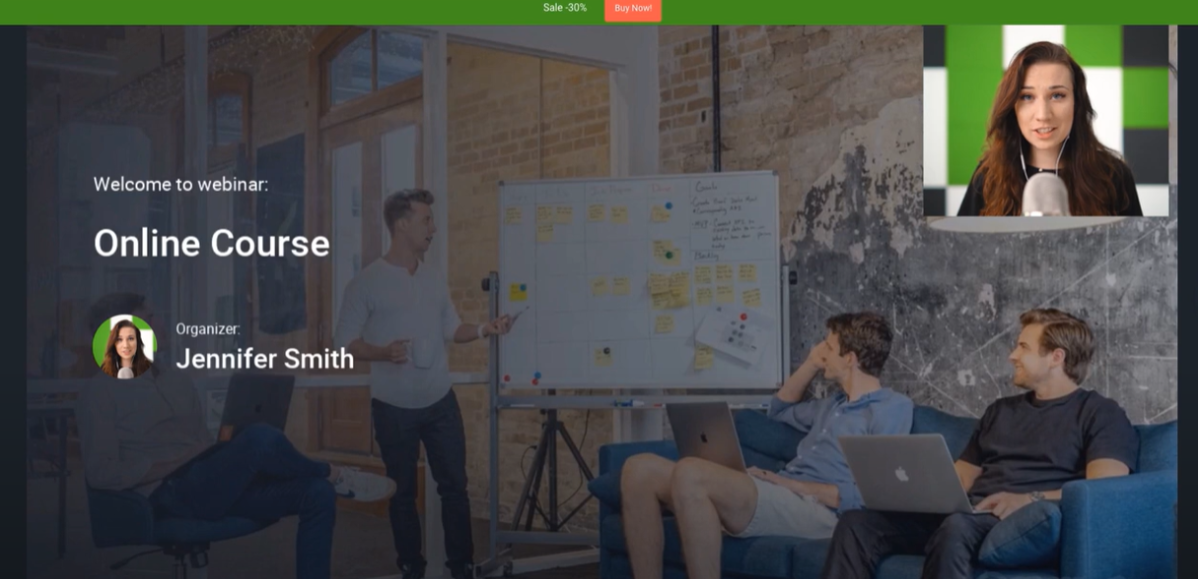
ClickMeeting feels like a more purpose-built solution for companies using webinars to engage customers, generate leads, or catch up with employees.
It allows you to connect to Google Analytics to share key marketing insights. Plus, new updates adding TikTok Pixel and LinkedinInsight Tag integrations to the existing Meta Pixel ones allow you to track user interactions on your page and other platforms.
But where the functionality of ClickMeeting for webinars gets really interesting is in the ability to create and share webinars with ease directly on the platform.
‘On-Demand’ webinars allow you to export, upload, or create videos on the platform. You can then use the editing tool to:
- Stitch videos together
- Add CTAs
- Allow attendees to send you messages during the webinar
- Play, pause, and rewind functionality
After creating your informative presentation, you can then send it to prospects via email. Bonus additional functionality connects you with over 1,500 apps, including popular CRM platforms via Zapier.
Where the platform falls down slightly is the support elements and pricing.
Account management support is available, but only on the highest tariff. So, if you don't have the budget for the top plan, you may have to suffer in silence if you experience any hiccups.
At the highest end of the payment scale, you can get all that incredible webinar functionality and cast to 1,000 people. But it could wind up costing you upwards of $300 a month, further pressurizing follow-up strategies.
Noteworthy features
- Host of clever integrations to track webinar efficacy and reach
- Use email marketing integrations to follow up with attendees
- In-meeting functionality to create polls, Q&As, and surveys
Pricing
| Plan | Participants | Who for | Inclusions | Price |
|---|---|---|---|---|
Seven-day free trial | Up to 25 attendees | New users testing the platform |
| Free |
Live | 25 - 1,000 | Small - medium businesses |
| $26-$265/month |
Automated | 25 - 1,000 | Businesses wanting recurring webinars |
| $40-$310/month |
Enterprise | Up to 10,000 | Large businesses |
| Custom quote |
Possible cons
- Support is limited until you upgrade to the top package
- Presenter screen can feel busy on first use
3. Google Meet
Best for Google integrations
It may seem like a cop-out to choose Meet as the best video conferencing software for Google integration. But just think of the vastness of Google Workspace.
90% of startups and over 60% of mid-sized companies in the U.S. use Gmail. So, too, do roughly 22% of the world’s population.
With that in mind, if you’re one of the businesses relying on Google Workspace, you can now create, join, and collaborate on meetings with ease using Google Calendar, Gmail, and other Google Workspace apps.
From a budgeting perspective, Google Meet pricing makes sense, too. The free version caters to 1:1 sessions as well as larger events, allowing up to 100 participants and offering unlimited 60-minute meetings. Plus, adding custom backgrounds helps lighten the mood of your sessions while simultaneously building company culture.
However, this leading video conferencing platform has some challenges, such as a lack of whiteboard-sharing functionality and the inability to track attendance.
Additionally, if you want to make use of Google’s powerful AI tool Gemini for live captioning, note-taking, and transcription, it’ll cost you an additional $20 a month.
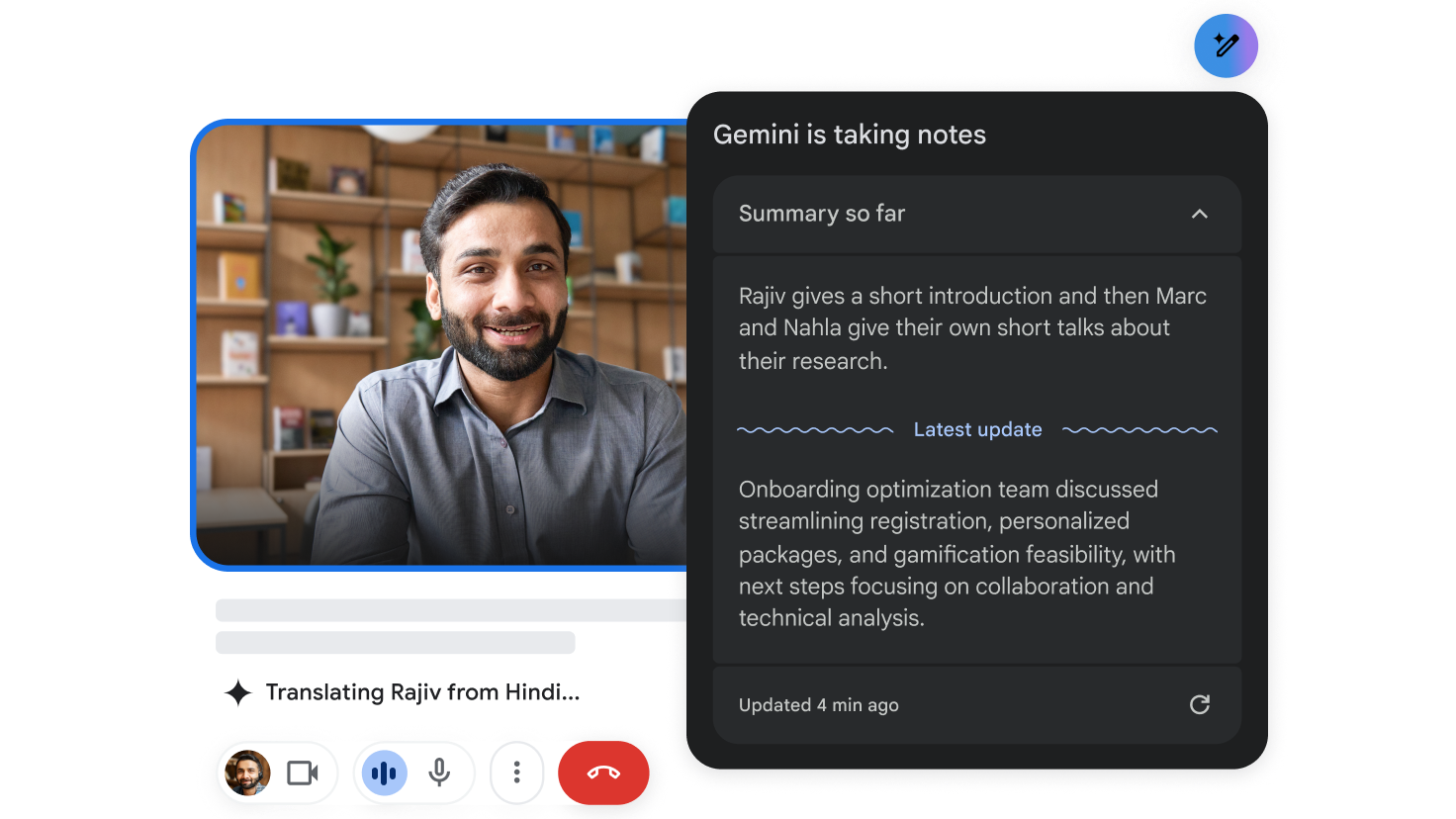
Plus, noise cancellation is only available on the upper end of the payment tiers.
Tip! If you use Jabra PanaCast 50 Bar, it comes with professional audio, including noise suppression, whiteboard-sharing technology, and three cameras that provide a 180° view of the room so you can see everyone in the room.
Noteworthy features
- Google suite integrations
- Meet with up to 100 participants on 60-minute meetings for free
- Google Meet mobile app allows you to catch up easily on the move
Pricing
| Plan | Participants | Who for | Inclusions | Price |
|---|---|---|---|---|
Free Plan | Up to 100 attendees | Small teams |
| Free |
Business Starter | Up to 100 | Small - medium businesses |
| $7.28/month |
Business Standard | Up to 150 | Medium businesses |
| $14.56/month |
Business Plus | Up to 500 | Medium-large businesses |
| $22.70 |
Enterprise | Up to 1,000 | Large businesses |
| Custom pricing |
Possible cons
- Lacks whiteboard sharing tools
- No option for breakout rooms, surveys, or polls on the free version
4. Zoho Meeting
Most cost-effective
If you’re looking for a top free video conferencing platform that doesn’t limit you too much, Zoho Meeting could be for you.
Offering a generous free package that allows unlimited meetings with up to 100 participants for 60 minutes. Unlike some of its bigger competitors, the free version comes with screen sharing, virtual backgrounds, meeting chat, and AI-powered analytics.
Plus, if you want to unlock more functionality, like the ability to lock a meeting, Zoho offers one of the most affordable pricing structures on the market.
Even the highest Enterprise functionality package won’t cost you more than $540 a month for up to 5,000 attendees at a meeting. This may sound like a lot, but bigger competitors charge more for top-of-the-range packages - they just make you call the sales line to find out.
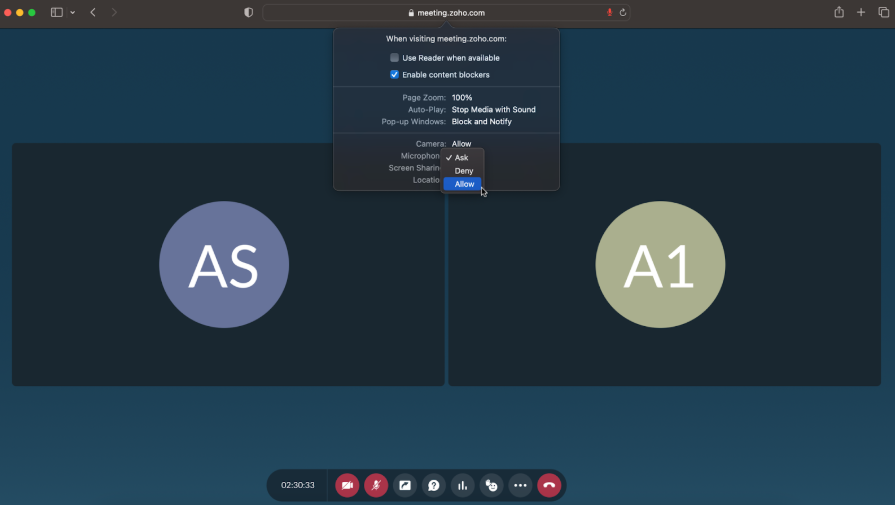
Zoho does miss out on some of the integrations you see from those more expensive competitors like Google Meet, Teams, or ClickMeeting. And setting up the AI functionality can be complex.
But, if you want a robust, simple-to-use, and cost-effective solution for screen sharing and collaborating in large groups for longer, this is the perfect platform for you.
Vinko Tosevski said after switching his healthcare firm to the platform:
"The process of switching and getting used to Zoho Meeting was smooth and without any issues. The user interface was and still is very intuitive."
Noteworthy features
- Affordable pricing structure for all types of video conferences
- Simple to use interface
- Unlimited meetings allowing up to 100 participants for 60 minutes on free plan
Pricing
| Plan | Participants | Who for | Inclusions | Price |
|---|---|---|---|---|
Free Plan | Up to 100 | Businesses with sporadic need for conferencing technology |
| Free |
Meeting Standard | Up to 250 | Small - medium businesses |
| $1.20 - 11 |
Meeting Professional | Up to 250 | Medium businesses |
| $3.50 - 18.50 |
Webinar Standard | Up to 1,000 | Medium-large businesses |
| $8.90 - 88 |
Webinar Professional | Up to 3,000 | Large businesses |
| $19.70 - 355 |
Webinar Enterprise | Up to 5,000 | Large businesses with reliance on webinars for lead gen |
| $79 - 540 |
Possible cons
- Lacks some third-party integration
- AI setup can be complicated
5. Webex
Best for cross-platform functionality
Webex provides great functionality and a straightforward interface whether you’re connecting via iOS, Android, Mac, Windows, or the Web.
Not only does it play nicely with all operating systems, but Webex can also be integrated into a plethora of apps you use every day, including Hubspot, Jiro, Freshdesk, Slack, vBrick, and more via the vast App Hub.
Plus, the helpful Webex Assistant tool leverages AI to take notes on your important catch-ups. So, no need for any more furious note-taking.
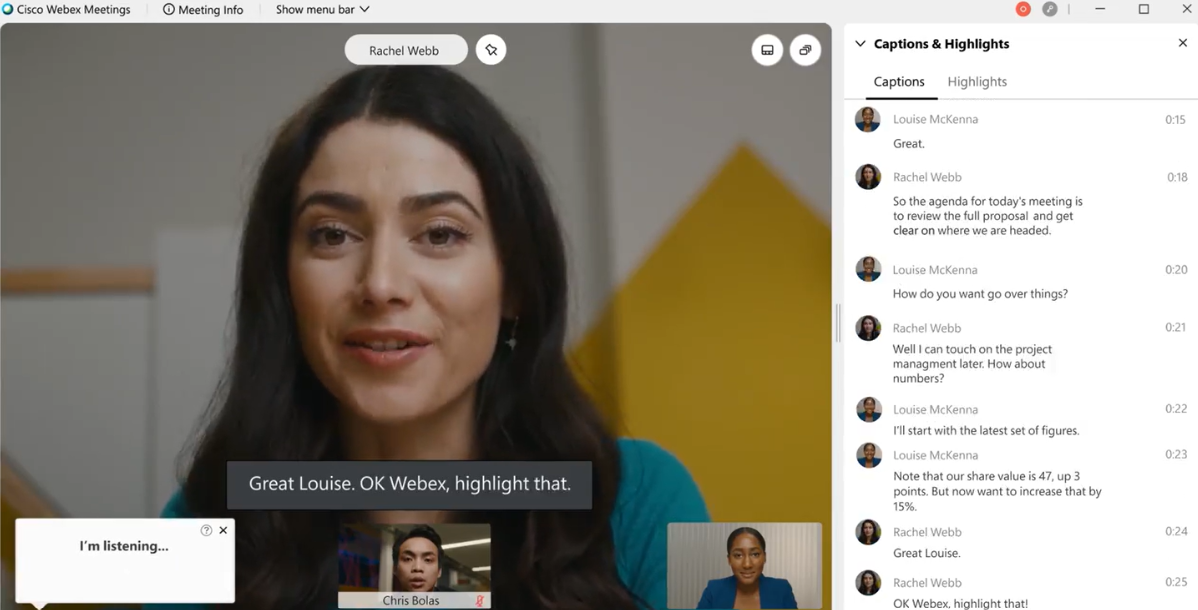
In addition, the software delivers HD audiovisual clarity. So, if you don’t have the budget to upgrade your headset or video conferencing cameras right now - this could offer a decent stop-gap solution.
Plus, it comes with intelligent functionality, including drawing, text, sticky notes, and a "magic pen" that tidies up your messy rectangles and circles. Making it a great cross-platform tool for collaborative teams.
However, if you want to be sure of the very best connectivity and audiovisual clarity, combining PanaCast with Cisco is the best way to guarantee crystal-clear connectivity.
Noteworthy features
- High-quality audiovisual offering
- Excellent collaborative tools across all platforms
- Free version available with up to 100 participants and a 40-minute duration
Pricing
| Plan | Participants | Who for | Top Inclusions | Price |
|---|---|---|---|---|
Webex Free | Up to 100 | Small teams |
| Free |
Webex Meet | Small - medium businesses | Small teams | Free Plan plus:
| $14.50 |
Webex Suite | Medium businesses | Small teams | Meet Plan plus:
| $25 |
Webex Enterprise | Up to 1,000 | Large businesses | Suite Plan plus:
| Custom pricing |
Possible cons
- Suffers from loss of connectivity on occasion
- Expensive packages for smaller businesses
6. Microsoft Teams
Most accessible
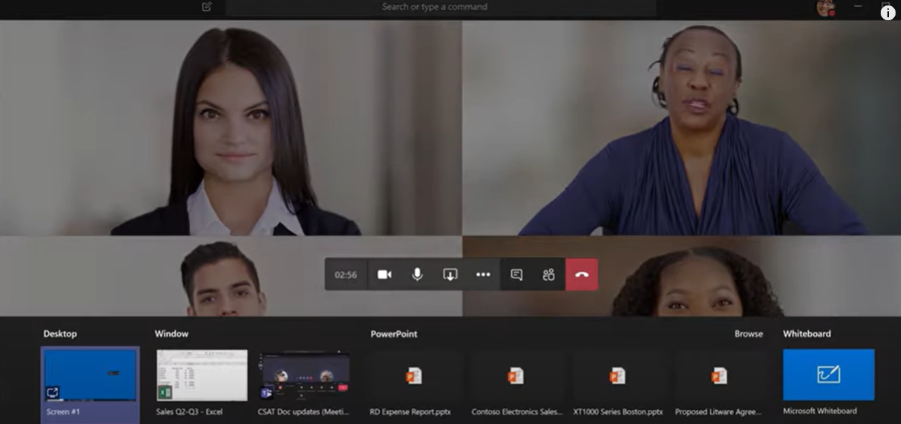
Over 2 Million companies use Microsoft 365 globally, including 80% of Fortune 500 companies. By now, many of us are familiar with the MS interface and UX.
That said, for users who haven’t spent much time in the Microsoft ecosystem, the Teams interface may take a little getting used to.
Still, if your business already relies on Microsoft 365 for day-to-day work, then integrating Teams is a no-brainer.
Aside from ease of integration, Teams also offers a host of useful features to help you get the most out of meetings, including linking seamlessly to your Jabra PanaCast video bars.
Screen sharing, call recording, live captions, background blur technology, and chat functionality keep this software high on most lists of the top video conferencing platforms.
Noteworthy features
- Microsoft 365 integrations
- 24/7 phone and web support on all plans
- File and screen sharing for excellent collaboration capabilities
Pricing
| Plan | Participants | Who for | Inclusions | Price |
|---|---|---|---|---|
Free Plan | Up to 100 | Small teams |
| Free |
Teams Essentials | Up to 300 | Small - medium businesses |
| $4.00 per user/month |
Business Basic | Up to 300 | Medium businesses |
| $6.00 per user/month |
Business Standard | Up to 500 | Medium-large businesses |
| $12.50 per user/month |
Business Premium | Up to 500 | Large businesses |
| $22.00 per user/month |
Possible cons
- Free version has limited advanced features when compared with other platforms
- Can be complex for new users to navigate
7. BigBlueButton
Best for virtual education or training
So far we’ve covered a lot of video conferencing platforms to help with everyday projects like presentations, catch-ups, meetings, and webinars. But what if a large portion of your business model is online training?
It may not be the most professional-feeling solution, but BigBlueButton is purpose-built for creating collaborative and engaging learning webinars.
Like with many of Jabra’s video conferencing cameras, you get multi-user whiteboard-sharing, making it simple for more people to share input during a discussion while giving you added functionality when breaking down complex topics.
But this intuitive software comes with more than just whiteboard sharing. Leaders can also leverage it to create shared polls and chats, and split attendees up into breakout rooms.
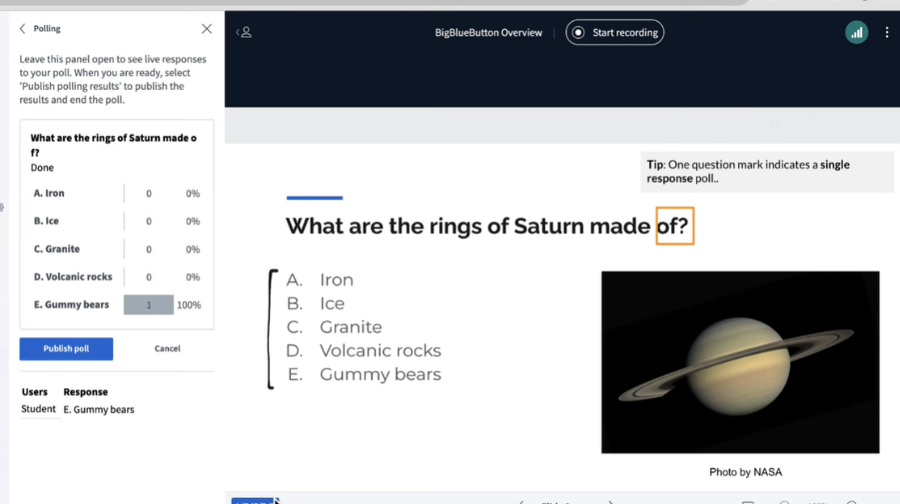
AVID (Advancement Via Individual Determination) moved away from conventional web-conferencing systems to BigBlueButton to make their online training more effective.
Using the platform to integrate seamlessly with their eLearning software, AVID was able to increase student engagement via the use of polls, chats, multi-user whiteboards, breakout rooms, and shared notes.
They said of the platform:
“BigBlueButton provided a robust, stable solution and had a big enough feature set that could support our standard of high engagement learning online.”
Noteworthy features
- Strong real-time collaboration tools for online learning
- Opportunity to leverage breakout rooms
- Simple-to-use user interface
Pricing
BigBlueButton offers two hosting payment plans (Economy and Premium), which doesn’t sound too complex. But, those are then broken down into 18 different options - which can be seen as either a plan customization heaven or a pricing complexity headache.
Here’s a brief breakdown of the costs for each plan.
| Plan | Participants | Who for | Inclusions | Price |
|---|---|---|---|---|
Free Plan | Up to 40 users per room | Small teams with occasional e-learning needs |
| Free |
Economy Plans | Up to 100 | Businesses that leverage e-learning software regularly |
| $65 - 3,500 |
Premium Plans | Up to 150 | Businesses that rely on webinars and online learning |
| $85 - 3,800 |
Possible cons
- There is a free version, but you need to download and run it on your server
- Software must be installed & maintained on Ubuntu Linux server - which can be complex
- Complex payment plans can get expensive
8. Livestorm
Best for security
Rounding off our list of the top video conferencing platforms is another collaborative powerhouse, Livestorm.
Renowned for its robust security makeup, Livestorm is perfect for businesses that need to meet with colleagues, customers, and clients regarding sensitive information. Good examples are law firms, banking institutions, financial or medical services.
Livestorm uses single sign-on and multi-factor authentications to provide secure connections. But it also uses both IDS (Intrusion Detection System) and IPS (Intrusion Prevention System) to protect against cyber attacks.
IDS monitors network traffic for suspicious activity and alerts administrators to potential threats.
Meanwhile, IPS compares data against known attack attributes or signatures. When it sees something it doesn’t like, it implements protective measures like blocking traffic or redirecting to specific safe locations for further analysis.
Livestorm is great from the office, but the lack of a dedicated app makes it tougher to connect on mobile. So, if you are security conscious but need to take meetings on the go, you may want to think about PanaCast 20 too.
With smart features like Intelligent Zoom, On-device Background Effects, and plug-and-play functionality. You can meet in 4K Ultra-HD, knowing you’re framed perfectly and everything around you safely out of view.

Noteworthy features
- Robust cyber security features
- Excellent collaborative tools for help breaking down complex topics
- Simple to use with straightforward UX
Pricing
| Plan | Participants | Who for | Inclusions | Price |
|---|---|---|---|---|
Free Plan | Up to 30 live attendees | Small teams with occasional e-learning needs |
| Free |
Pro Plans | Up to 100 | Medium businesses with weekly sensitive meetings |
| $79 |
Business Plan | Up to 3,000 | Businesses with daily sensitive meetings with many clients |
| Custom pricing |
Enterprise Plan | Up to 3,000 | Large businesses that host sensitive meetings multiple times daily |
| Custom pricing |
Possible cons
- Lack of an app could make connecting on the go difficult
- Slightly restrictive free package when compared to competitors
How to choose the right platform for your needs
Choosing the right video conferencing platform is specific to your business’s needs. Before committing to a platform, there are a number of considerations:
- How many participants do you need?
- How often do you meet with this number of participants?
- Is security or integration more important for your team?
- How sensitive is the information you’re sharing generally?
- Do you need conferencing software to inspire collaboration or educate?
It’s important to evaluate what matters most to your business. If you’re in need of added security, then Livestorm might be best. Whereas, if many of your sessions are e-learning-based, then maybe you’d be better off with a less corporate platform like BigBlueButton.
Additionally, think about your current software and integrations. If you’re an MS or Google-centric office, then it may be less disruptive to continue with Teams or Meet solutions.
Budget can also be a factor. If reliability or cost-efficiency is a priority, then either Zoom or Zoho Meeting will work great.
No matter which platform you choose, make sure to test thoroughly before committing to a payment plan. Take full advantage of free trials and make sure you’re getting peak performance by pairing your chosen platform with Jabra’s professional-grade Headsets and video conferencing cameras.