Inclusive Meetings

How to Run Inclusive Meetings Using Psychological Safety
Ever been in a meeting where you had something valuable to share—but decided not to? Maybe you worried it wasn’t the right time, or you felt unsure how your input would be received.
It’s easy to chalk moments like these up to nerves or uncertainty, but there’s often something bigger at play: a lack of psychological safety—the sense that it’s truly safe to speak up without fear of judgment or negative consequences.
Meetings often fail not because of a lack of talent or ideas but because the environment isn’t one where every voice feels safe to speak. This article explores what an inclusive meeting is, what makes meetings non-inclusive, and how to conduct a meeting where everyone feels safe enough to contribute.
What is an inclusive meeting?
An inclusive meeting is one where every participant—regardless of rank, communication style, geographic location, or ability—has an opportunity to contribute and feels safe doing so.
But truly fostering inclusivity takes more than good intentions. It requires thoughtful decisions about the agenda, tools, tone, and language to create a space where no single voice or group unintentionally dominates.
Here’s what an inclusive meeting looks like in practice:
- The organizer sends a clear agenda and pre-reads ahead of time so that quieter or more reflective team members can prepare their insights.
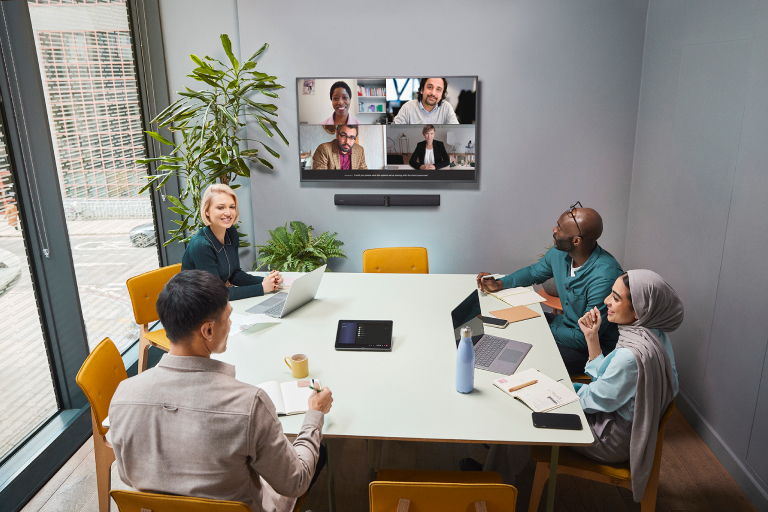
- During the meeting, they encourage questions and feedback. They explicitly invite input from each employee—especially if it’s a hybrid meeting where some participants are there in person and others are remote.
- They use high-resolution cameras and noise-canceling headsets to ensure every participant is visible and audible.
- And wrap up by inviting each participant to share their thoughts, ensuring everyone has a chance to speak before the meeting concludes.
On the flip side, here’s what a non-inclusive meeting might look like:
- The invite arrives last minute with little to no context, making it hard for participants to prepare.
- A few dominant voices take over the discussion, while others struggle to find space to contribute.
- Remote attendees face challenges like distorted or intermittent audio, making it difficult to fully engage.
- Questions are unknowingly brushed aside or left unanswered, causing participants to feel dismissed.
- The meeting ends abruptly, leaving some participants feeling overlooked or unsure of the next steps.
Inclusive Meetings VS Non-Inclusive Meetings
Non-Inclusive Meetings
What causes meetings to not be inclusive?
Quite a few seemingly minor oversights, including:
- Unclear or nonexistent agendas: Without a clear agenda, meetings give room to assertive participants who may unintentionally dominate the conversation, steering it toward their interests, while quieter members struggle to insert their thoughts.
- One-size-fits-all communication: Meetings that rely solely on a single communication style overlook the varied needs of participants. For example, using only spoken language can exclude introverted individuals, people with hearing impairments, or those who are neurodivergent — all of whom may benefit from features like live captioning, sign language, visual aids, or written input.
- Rigid hierarchies: When meetings are controlled primarily by senior or more confident voices, less experienced or lower-rank team members may hesitate to speak up.
- Neglecting hybrid/remote participants: Remote colleagues can miss nonverbal cues and side conversations if the meeting setup focuses only on those in the room. Glitchy audio, low volume, or grainy video amplify this divide, making it difficult for remote participants to engage fully.
- Unconscious bias in conversations: Organizers may unknowingly favor certain participants—for example, by giving more speaking time to those who share similar communication styles or backgrounds—while overlooking others. This unintentional favoritism erodes trust and discourages diverse perspectives over time.
- Meeting fatigue: Frequent, overly long, or poorly structured meetings can drain energy and focus, causing participants to tune out. This disengagement weakens collaboration and leads to fewer voices actively contributing.
- Limited training or resources: Teams without sufficient diversity and inclusion training or tools can default to routine practices that exclude some meeting participants.
What is psychological safety in meetings?
A psychologically safe environment is one where individuals feel comfortable speaking up, voicing concerns, questioning proposals, or admitting mistakes, without fear of ridicule or retaliation. In this environment, people trust that their ideas will be heard and treated with respect, even if those ideas challenge the status quo.
According to the 2024 Work in America Survey done by the American Psychological Association, employees who experience psychological safety at work report:
- higher job satisfaction
- better relationships with coworkers
- better engagement at work
- and a healthy mental state
Psychological safety manifests in meetings when team members freely ask clarifying questions, offer dissenting viewpoints, and participate in brainstorming without worrying about being shut down.
Meeting facilitators openly invite counterarguments or use affirming language to let participants know that their input is valuable. Small behaviors, like acknowledging someone’s concerns before moving on, help reinforce that no question or comment is trivial. And because people don’t fear embarrassment or backlash, they’re more likely to present innovative ideas and flag potential issues.
Creating a psychologically safe meeting environment encourages honest feedback and taps into the full range of a team’s creativity.
Over time, this leads to better decision-making, strong team cohesion, and a culture where everyone feels a genuine sense of belonging and respect.
8 ways to make meetings inclusive with psychological safety
1. Break your meetings into shorter, focused segments
In 2023, scientists researching sustained attention at Xiamen University and the National Engineering Research Center for e-Learning in China discovered three things:
- The human brain can't maintain attention over long periods of time because it tries to process the influx of stimuli from the immediate environment.
- Folks with attention-deficit disorders like ADHD, dyslexia, and depression find it especially hard to concentrate and are easily distracted.
- Humans fall into a state of mental fatigue when tasks require them to maintain a high level of attention for a long time (60+ minutes).
Based on this research, it’s safe to say that long, free-flowing discussions exhaust attention spans—especially for team members with attention-deficit conditions.
Break your meetings into shorter segments to prevent meeting fatigue and ensure that everyone chips in before getting distracted.
Here’s how to do this successfully:
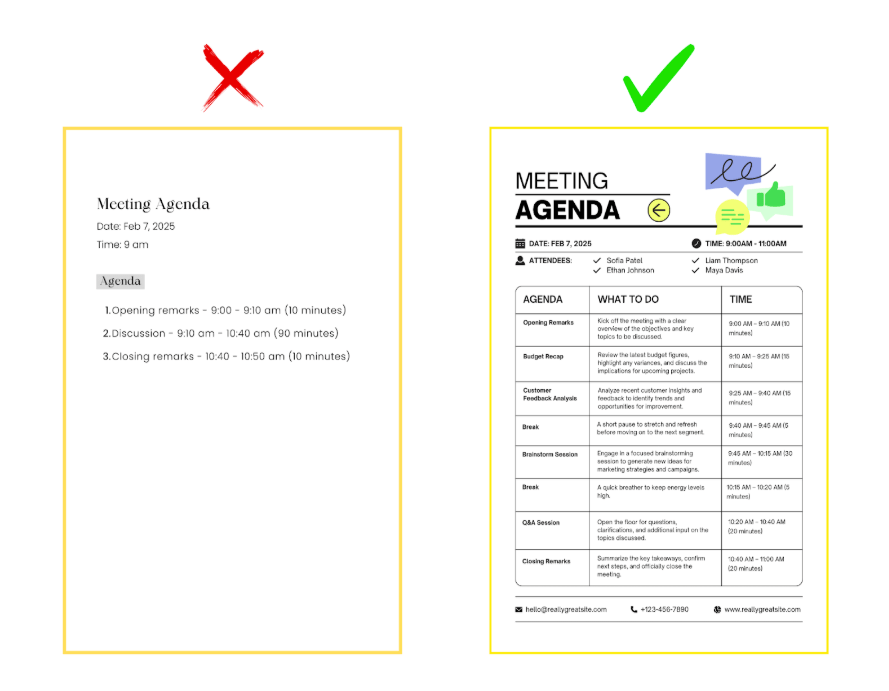
- Chunk the agenda: Instead of a single line item reading Discussion, break the meeting into smaller objectives: “Budget Recap (15 mins),” Customer Feedback Analysis (10 mins),” “Brainstorm Session (15 mins),” etc. When each discussion segment is distinct and time-bound, everyone gets an opportunity to contribute to the conversation.

- Take mini-breaks: After a 30-minute block (about 2 - 3 segments), pause for about 5 minutes to allow participants to stretch their legs, grab water, or simply breathe.
- Establish accountability: Designate someone to watch the clock and give gentle reminders or signals to wrap up discussions. You could also set timers that alert the group when the segment is nearing the end.
If you can’t resolve a topic in the allocated time, don’t let it spill over and derail the next segment. Instead, schedule an extra segment for another day or park it in a shared document so people can contribute in their own time. - Reduce distractions: In shorter meeting segments, every second counts, and background noise or poor sound quality can derail the flow.
However, you can reduce distractions by using noise-canceling headsets like our Evolve2 85 to filter out ambient chatter, HVAC hums, or street noise. These headsets ensure participants can focus on the discussion at hand rather than fiddling with volume controls or constantly asking people to repeat themselves.
2. Engage remote and on-site attendees during hybrid meetings.
According to Zoom’s Navigating the Future of Work report, 60% of companies in North America operate a hybrid work model—where some team members work in person at the office while others join virtually.
Without careful planning, a hybrid meeting can create two tiers of participants: those physically in the room, who benefit from spontaneous side conversations and nonverbal cues, and those dialing in, who may feel like silent observers.
Making hybrid meetings equitable for everyone can prevent this from happening. Here’s how:

- Address camera placement and angles: If you have a single camera, avoid side-angle setups that show only a few people clearly. Instead, position the camera so all in-person participants are equally visible. This setup can help create a more inclusive atmosphere and may encourage more team members to contribute.
Our PanaCast 50 video bar makes this easy as it uses multiple cameras and real-time stitching to provide a 180° field of view, even in smaller spaces. This wide-angle room coverage makes it easy to track multiple speakers without resorting to awkward laptop camera shuffling.
- Use a dedicated screen for remote participants: During hybrid meetings, display remote participants on a large monitor in the meeting room. This way, they’re front-and-center, not relegated to a laptop set up in the corner.
Giving remote team members full visual presence signals that their contributions are just as important as those in the room. This helps them feel included and more willing to share ideas.
3. Use inclusive language during meetings
Words shape culture, so be mindful of your language during meetings. Even well-intentioned teams can slip into using jargon, idioms, or gender-specific phrases that inadvertently alienate or diminish certain groups.
Deliberately choose words that welcome people with diverse backgrounds, identities, and communication styles to make it safer for participants to voice their perspectives.
Here are some ways to incorporate inclusive language in meetings:
- Adopt gender-neutral and person-first language: Replace words like “guys” or “he/him” with “team,” “everyone,” or “they/them” when addressing a mixed group or when you’re not sure what pronouns a person goes by. Also, avoid labels. Instead of “the disabled” or “the mentally ill,” say “people with disabilities” or “people with mental health conditions”. This subtle shift places the individual before any characteristic.
- Use global-friendly terms: If your team is geographically diverse, stick to universally understood phrases. A local sports reference or idiomatic expression (e.g., “touch base offline,” “knock it out of the park”) might confuse or isolate colleagues from different cultures. If you do use region-specific slang, give a quick explanation--e.g., “Hitting a homerun” is American slang for achieving significant success.
- Create a safe-call culture: Let participants know they can politely intervene, both verbally and in the meeting chat if someone uses outdated terms or labels, misgenders a colleague, or slips into region-specific idioms. They could say, for example, "Could we consider a different term here?" or “Could we rephrase that to be more inclusive?” The goal isn’t to shame anyone but to promote self-awareness and collective improvement.
4. Actively invite dissent and “messy” ideas
Many employees shy away from challenging the consensus out of fear they’ll rock the boat. However, research shows that dissent and unconventional thinking can lead to better decision-making, improved problem-solving, and increased innovation.
Creating a space where it’s acceptable to question assumptions or propose half-baked (or contrarian) ideas can build trust and make employees feel safer to share what’s really on their minds.
You can do this by:
- Setting the tone early: At the start of each meeting, state that all perspectives, including conflicting and half-baked ones, are welcome, e.g., “We want to hear your challenges and concerns—those ideas can help us improve.” This paves the way for honest input.
- Build “dissent slots” into the agenda: After presenting a topic, dedicate a 5-minute segment exclusively for challenges or alternative thoughts. When participants see it on the schedule, they understand that it's safe to propose different angles.
- Reward candid feedback: Publicly thank participants who offer a different take, even if you don’t adopt their suggestions. Positive reinforcement tells them that their input matters and helps others feel safe speaking up in the future.
5. Provide multiple ways for participants to contribute
Not everyone can—or wants to—speak up verbally during meetings. Some participants may have sensory impairments (visual, oral, or auditory), others may process information better when they can read or write it down, and some might simply be introverted.
A new study from Miro shows that only 30% of introverts are comfortable sharing ideas during meetings, unlike 84% of extroverts.
You can break down communication barriers by offering various mediums to share ideas. This inclusive approach signals respect for different abilities and work styles.
Here are some mediums to consider:
- Provide captions: People need to follow a conversation without barriers if they’re going to contribute ideas. So, during virtual or hybrid meetings, enable live captioning features (e.g., in Zoom, Microsoft Team), so non-native speakers and attendees with hearing impairments can follow the conversation without missing key points.
- Use high-quality audio equipment: Real-time captioning services depend on clean voice input, so you’ll need high-quality audio equipment like our Speak2 75 speakerphone. The omnidirectional microphones inside this speakerphone pick sound from all directions, while the noise reduction technology filters out extraneous noises. This provides the outstanding audio quality necessary to produce accurate transcripts.
- Use the chat feature: Encourage participants to share ideas, questions, or clarifications via the meeting platform’s chat function. This offers a less intimidating way for those who may be hesitant to speak up and contribute.
- Use digital collaboration tools: Use online whiteboard tools (e.g., Miro or Zoom’s Whiteboard feature) that let participants type or draw ideas in real time — which helps visual thinkers and those who prefer written communication.
- Stream content from physical whiteboards: If you're working in a physical meeting room, Jabra PanaCast 50 offers another solution: its built-in camera intelligently detects and streams content from a physical whiteboard, so remote participants can follow along seamlessly. It's a simple way to bridge the gap between in-room and virtual collaboration — without needing everyone to switch to a separate tool.
- Enable asynchronous participation: Some team members may need extra time or a quiet environment to compose their thoughts. Distribute pre-meeting documents or create a post-meeting discussion thread where participants can add comments or questions. Or maintain a central digital hub, like a shared folder or project management tool (e.g., Asana, Monday), where people can add commentary at their own pace.
6. Introduce a “micro-acknowledgement” practice
People often shy away from asking questions or offering comments because they fear interrupting or “looking stupid.” When you consistently affirm even small inquiries or points, you normalize curiosity and invite more participation.
However, if a few participants chime in too frequently, gently remind the group to give others a moment to contribute.
Here’s how to incorporate a “micro-acknowledgement” practice in meetings:
- Quick verbal affirmations: Whenever someone chimes in, pause for a second to acknowledge them by name and reflect on their question (or point it back to them). For example, “Sam, thanks for bringing that up. Let’s explore it further.” Even brief phrases like “Thanks for asking that” or “That’s a good point—can you elaborate?” make participants feel seen and encourage them to keep the dialogue flowing.
- Rotate acknowledgers: If only the official meeting leader praises input, some may dismiss it as routine politeness. So, assign a rotating “acknowledger” or “conversation concierge” who would monitor the chat, scan for raised hands, and promptly recognize anyone who wants to chime in.
- Watch for non-verbal cues: Some folks might display confusion through facial expressions or body language instead of words. If someone looks unsure, pause to ask directly, “Ana, do you have any thoughts?” This subtle invitation can turn uncertainty into constructive engagement.
In remote or hybrid meetings, you'll need a high-resolution camera like Jabra’s PanaCast 20 (webcam) or PanaCast 50 (conferencing camera) to pick up on these cues.
7. Use anonymous feedback nudges mid-meeting
Some participants won’t voice discomfort, confusion, or alternative ideas in front of others, no matter how open and inviting the environment seems. So, weave quick, anonymous check-ins into your session to get even the most cautious team members to contribute.
Here’s how to do that:
- Live polls or micro-surveys: Halfway through the meeting, invite attendees to anonymously rate the clarity of the conversation or signal if they’re comfortable with the direction. Tools like Mentimeter or the built-in polling feature in Zoom/Teams can handle this easily.
- Make real-time adjustments: If the results show confusion, slow down and clarify. If the feedback indicates that some participants disagree but won’t say so publicly, allot a short segment to discuss the “why” behind mixed responses.
- Post-meeting follow-up: Summarize the poll results in a quick recap and invite further anonymous input. This allows you to address people’s concerns before the meeting closes.
8. Implement a “check-in, check-out” ritual
When a meeting begins and ends with the loudest or most senior voice, participants may be hesitant to share their thoughts. Opening a meeting by hearing from everyone—regardless of role or seniority—breaks this pattern by showing that all voices are welcome. This sets a tone of respect and transparency that carries through the entire discussion.
Here’s how to implement a “check-in, check-out” practice:
- Concise opening rounds: Begin the meeting with a simple, open-ended question—like “What’s one thing on your mind today?” or “What are you excited to do today?” Give each person 10–15 seconds to respond. This breaks the ice, creates immediate engagement, and helps colleagues gauge energy levels.
- Closing reflections: At the end of the meeting, ask each participant to share one takeaway, question, or next-step commitment. This loop of reflection clarifies any final points and ensures that no one feels left out.
- Cap with action items: Right after the reflection round, briefly restate the next steps or decisions. This helps participants know what to do once they leave the meeting.
Inclusive meetings need structure, open dialogue, and reliable tech
At its core, an inclusive meeting relies on clear structure, active listening, and offering multiple ways for every voice to be heard. When you establish structured check-ins and encourage diverse input, you lay the foundation for open dialogue and genuine collaboration.
This approach not only boosts participation but also builds psychological safety, empowering every team member to share their ideas without fear of judgment.
However, the first step to making virtual or hybrid meetings inclusive is using the right video and audio technology. If attendees can’t properly see or hear other participants, it may be difficult for them to follow discussions, pick up on visual cues, or engage fully in the conversation.
That’s where our PanaCast conference cameras, Evolve2 headsets, and Speak2 speakerphones come in.
With wide-angle cameras that make every participant visible and noise-canceling headsets that deliver crisp, reliable sound, Jabra seamlessly integrates in-person and remote team members.
When participants can see everyone clearly and hear every word, they’ll feel more connected and confident to open up.