
Jabra Logo
Jabra Logo

Office worker using Jabra Direct
Wsparcie

How to manually recover or firmware update a Jabra device

Office worker using Jabra Direct

To manually update your Jabra device from a file, follow these steps

  1. On the Jabra Support website, navigate to the product support page for your Jabra device. Ensure you select the correct product variant.
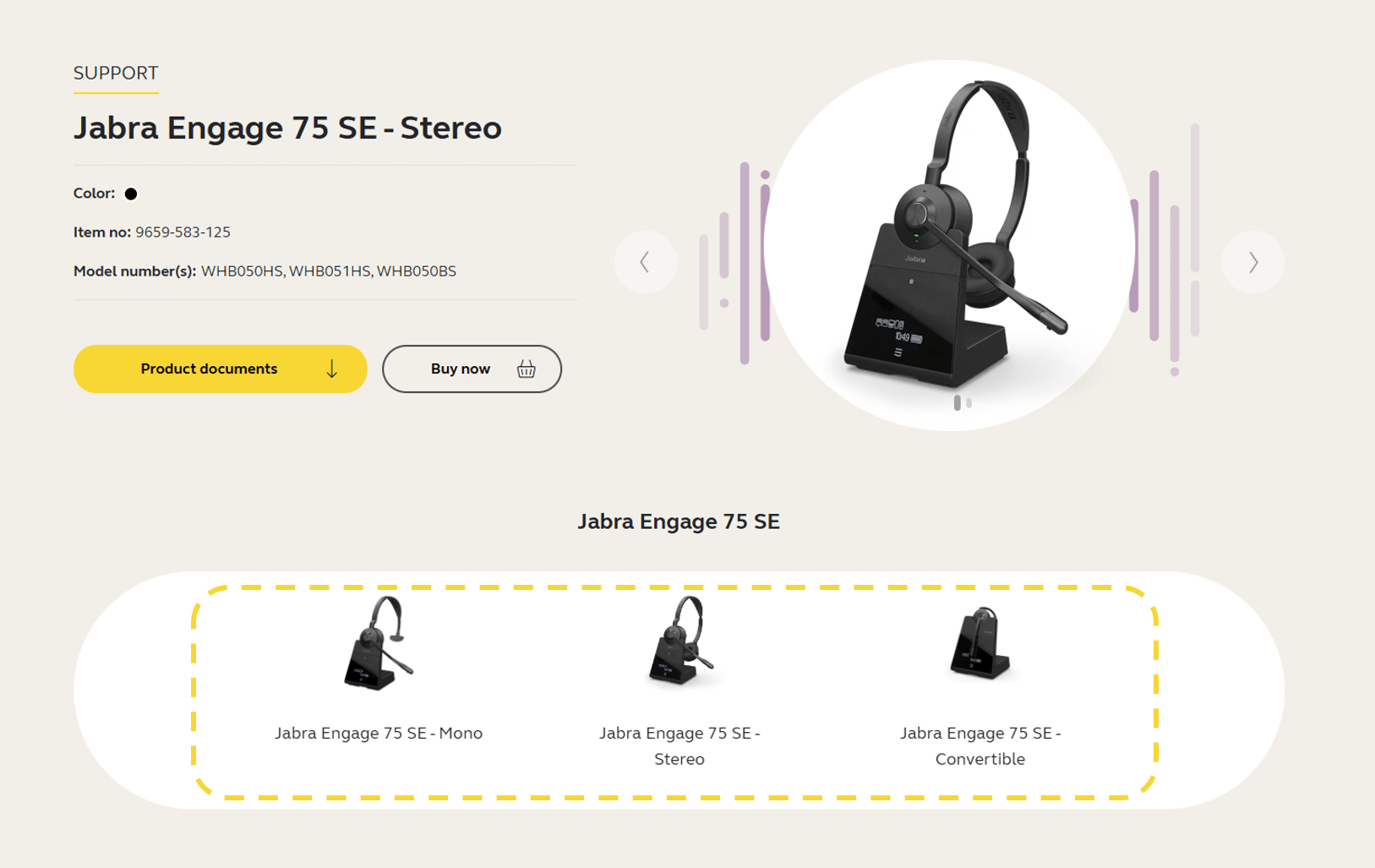


  2. Click the section Firmware and software and download the latest firmware version for your device. Save the file on your computer in a location you will be able to find later. Note that the firmware is the same for Windows and macOS.



  3. Open Jabra Direct, click Updates.

  4. If the Recover button is available for your device, click Recover and follow the instructions to complete the recover process. Otherwise, press Ctrl+Shift+U on your keyboard.

  5. Click the Update from File button that appears next to your device. 
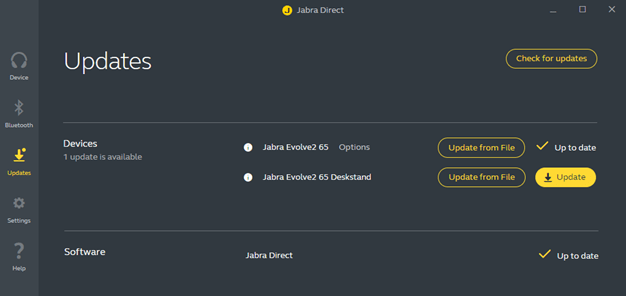


  6. In the dialog that opens, navigate to the relevant file on your computer and click Open.

  7. Select the preferred voice prompt language (if applicable) and then click Update from File.

    Important: Do not disconnect your device at any point during the update.

  8. When the firmware has been updated successfully, follow any instructions to complete the update.


If the firmware update is not successful, please contact Jabra Support. Find the relevant contact information on the product support page for your product.

Note
Images are for guidance purposes only. The displayed images may differ slightly from your device, however the content is still relevant and accurate.
  1. Firmware update recovery

O nas

  • Nasza historia
  • Praca
  • Zrównoważony rozwój
  • Wiadomości i komunikaty prasowe
  • Blog firmy Jabra
  • Studium przypadku
  • Nasza historia
  • Praca
  • Zrównoważony rozwój
  • Wiadomości i komunikaty prasowe
  • Blog firmy Jabra
  • Studium przypadku

Zasoby wsparcia

  • Wsparcie w zakresie produktów
  • Podręczniki użytkownika
  • Instrukcja parowania Bluetooth
  • Przewodnik po zgodności
  • Filmy instruktażowe
  • Akcesoria
  • Zidentyfikuj swój produkt
  • Wsparcie w zakresie produktów
  • Podręczniki użytkownika
  • Instrukcja parowania Bluetooth
  • Przewodnik po zgodności
  • Filmy instruktażowe
  • Akcesoria
  • Zidentyfikuj swój produkt

Najczęściej zadawane pytania

  • Jaki zestaw słuchawkowy jest dobry dla Skype?
  • Jaki zestaw słuchawkowy jest odpowiedni dla iPhone?
  • Czy zestawy słuchawkowe z technologią Bluetooth są bezpieczne?
  • Jaki zestaw słuchawkowy jest dobry dla Skype?
  • Jaki zestaw słuchawkowy jest odpowiedni dla iPhone?
  • Czy zestawy słuchawkowe z technologią Bluetooth są bezpieczne?

Skontaktuj się z nami

  • Skontaktuj się z działem sprzedaży Jabra
  • Zamówienia online
  • Zarejestruj swój produkt
  • Zostań sprzedawcą
  • Firmowe zasady końca okresu eksploatacji
  • Program deweloperski
  • Skontaktuj się z działem sprzedaży Jabra
  • Zamówienia online
  • Zarejestruj swój produkt
  • Zostań sprzedawcą
  • Firmowe zasady końca okresu eksploatacji
  • Program deweloperski
GN logo
  • Znaki towarowe
  • Bezpieczeństwo i ostrzeżenia
  • Polityka dotycząca plików cookie
  • Zmiana zgody na pliki cookie
  • Deklaracje zgodności
  • Zastrzeżenia handlowe
  • Polityka prywatności
  • Centrum bezpieczeństwa
  • Licencje Open Source