

Everything You Need to Know About Smart Meeting Rooms
Have you ever joined a hybrid meeting in person and spent the first 10 minutes fumbling with HDMI cables or adjusting microphones? You sit through the call, straining to catch what your remote teammates are saying because the audio is muffled and the video is grainy.
Or maybe you dialed in remotely and couldn’t tell who was speaking because most of the in-room team was out of frame. Worse, no one could hear you clearly over the sound of honking cars outside your window.
These are the everyday headaches of traditional meeting rooms. But it doesn’t have to be this way.
Smart meeting rooms solve these problems by giving both in-office and remote participants the tools they need to see clearly, hear everyone, and collaborate like they’re in the same room.
This article breaks down everything you need to know about smart meeting rooms, including:
- What they are and why they matter for hybrid teams
- The core technologies that power a smart meeting room
- How to upgrade or build a smart meeting room, and
- How Jabra solutions help bridge the gap between remote and in-person attendees
What is a smart meeting room?
A smart meeting room is a physical space that uses integrated technology (like intelligent cameras, beamforming microphones, and collaboration software). The goal is to ensure every person in the meeting, no matter if they’re sitting across the table or joining from thousands of miles away, can fully participate and contribute.
The word “smart” might sound like it’s all about expensive, high-tech equipment. But that’s not the point. Building an effective smart meeting room means making intentional choices about the room’s layout, the quality of the audio and video, and how easy it is to use the space.

When you focus on the meeting experience rather than just the gear, you’re more likely to meet important goals like:
- Inclusion: You create a level playing field in which remote participants are as visible and audible as those in the room. Clear audio and visual framing give all participants a voice, so no one gets left out of the conversation.
- Efficiency: Instead of wasting time troubleshooting equipment or adjusting settings, participants start meetings on time and focus on having a productive discussion.
- Automation: The technology in the room handles simple tasks, like zooming in on the active speaker or tracking meeting activity, so participants can concentrate on the discussion.
- Ease of use: Anyone can walk in, get set up, and start a meeting with minimal effort. The technology blends into the space and supports the flow of conversation, instead of interrupting it.
- Consistency: Every meeting room in the office provides the same high-quality, reliable experience, no matter which one you book.
Why hybrid work requires a smarter set-up
Hybrid work isn’t new, but the challenges it creates for meetings still haven’t been fully solved.
When part of your team is in the room and the rest are joining remotely, it’s common to run into issues. People talk over each other, someone forgets to unmute, or the camera only shows half the room. And if you’re not physically there, it’s easy to feel like you’re not part of the conversation.
These problems occur regularly because most meeting spaces aren’t designed for hybrid collaboration.
In January 2025, we surveyed 1,000 knowledge workers about their meeting experiences, and their responses reveal just how widespread the problem is:
- 80% of them say they waste time just trying to find an available meeting room. Even when they do, 50% of the time, the room lacks the tools they need to collaborate effectively.
- Only 1 in 3 small meeting rooms has a video conferencing tool installed, so if you’re not physically in the room, you may not be able to attend remotely.
- Fewer than half of the meeting rooms have speakerphones, resulting in poor sound quality.
- Only 30% of employees are confident they can consistently see or hear all participants during hybrid meetings.
- And 72% believe that better-equipped rooms would significantly improve their productivity.
A majority of existing meeting rooms simply don’t facilitate effective hybrid collaboration.
Read: Improving the hybrid meeting experience with professional technology
Five business benefits of using smart conference room technology
Here are five key ways smart meeting room technology adds value to your business.
1. Improved meeting equity
In hybrid meetings, it’s easy for remote participants to feel left out, especially when they can’t hear clearly, see who’s speaking, or read body language.
With intelligent cameras that frame everyone in the room and beamforming microphones that capture voices clearly and block out distractions, remote participants no longer feel like passive observers. They can follow the conversation in real-time, speak up when needed, and feel like active contributors.
This creates a more balanced meeting experience for everyone. And when people feel equally included, they’re more likely to engage, share ideas, and collaborate effectively.
2. Higher productivity
One of the biggest time-wasters in traditional meeting rooms is the pre-meeting scramble when everyone is trying to plug in their laptop, find the right adapters, and connect to the presentation screen.
Smart technology solves this problem through:
- One-touch start: Teams can walk into the room, launch the meeting by tapping the “Join Now” button on the meeting platform, and get started immediately.
- Wireless sharing: Attendees can wirelessly share their screen from any device (e.g., laptop, tablet, or smartphone) with zero setup time. This can save 5–10 minutes per meeting, which amounts to hours of regained productivity each week.
3. Easier room management for IT and facilities teams
Managing traditional meeting rooms can be time-consuming for IT teams. Equipment varies from room to room, leading to inconsistent experiences for employees and, consequently, more support tickets. IT staff often spend a lot of time troubleshooting connection issues and fixing hardware glitches.
Smart meeting rooms are different. They use integrated systems designed to work seamlessly together, which reduces the number of technical issues (and help desk requests).
Many smart setups also come with remote management tools that give IT teams full visibility into every room. From a central dashboard, they can:
- Monitor the health of devices in each room
- Monitor how employees use each meeting room
- Identify under- or over-utilized spaces
- Push software updates and resolve issues without needing to be on-site
This shift from reactive support to proactive room management reduces manual work for IT teams, minimizes disruptions, and keeps meeting spaces running smoothly.
4. Better use of physical office space
Smart conference room technology provides data on how meeting rooms are actually used. For example, occupancy sensors can track:
- How often rooms are booked
- How many people use them
- Whether booked rooms are even occupied
This helps you optimize your office layout, avoid wasted space, and make smarter decisions about how to design or repurpose rooms.
For example, if you find that smaller rooms are in high demand but under-equipped, you can work towards upgrading them with smart tools that support hybrid collaboration. And if large rooms are rarely used, you might consider dividing them into smaller, more efficient spaces.
5. Stronger collaboration across locations
In large enterprises, teams often span multiple offices, time zones, or countries. Without reliable meeting technology, in-room participants may struggle to hear remote speakers, remote participants may hold back for fear of being ignored, and ultimately, valuable context and ideas are lost on both sides.
Smart meeting rooms solve this by using intelligent cameras and microphones to clearly capture every voice and face, so both in-room and remote participants can follow the conversation.
For example, a product team in London can brainstorm with marketing leads in New York and engineers in Berlin. With high-quality video, professional audio , and easy screen sharing, location stops being a barrier.
Smart meeting room solutions: The technology that powers modern collaboration.
Smart meeting rooms rely on integrated technology that improves how people connect, communicate, and collaborate in hybrid work environments. Here are the key technologies that make modern meeting rooms truly smart.
Intelligent cameras
In a smart meeting room, the camera should do more than show who’s in the room. It should ensure that remote participants feel as if they’re in the room too. To do that well, it requires features such as wide-angle lenses, automatic framing, and speaker tracking.
Take Jabra’s PanaCast 55 VBS , for example.

It offers a 180° field of view in high-definition panoramic 4K, which helps remote participants see everyone in the room clearly, even if the meeting table is pushed up against the wall. It also uses eight beamforming microphones to capture voices clearly and minimize background noise, so everyone sounds sharp on the call.

Built-in AI adjusts the camera in real time to follow the active speaker, and works seamlessly with meeting platforms that offer live transcription, and provides meeting recaps, thereby helping teams stay focused on the conversation rather than taking notes.
When everyone can see and hear each other clearly, meetings become more inclusive, fluid, and productive.
Comfortable, noise-cancelling headsets
Whether you're in a physical office or working from home, background noise can quickly derail a meeting. In the office, it might be ringing phones, a humming photocopier, or clacking keyboards. At home, it could be a barking dog, traffic noise, or someone blending a smoothie in the kitchen.
Whatever the source, it makes it harder for others to hear you—and harder for you to concentrate.
That’s why noise-cancelling headsets, like our Evolve3 75 , are a smart investment for hybrid teams. This headset uses AI-powered deep learning, Jabra ClearVoice™, to isolate your voice and filter out distractions so your team hears you, not the background. It also features Jabra Advanced ANC™, which dynamically adjusts to your individual fit, blocks out ambient sound and helps you focus, even in very noisy environments.

Comfort matters too, especially in longer meetings. So we padded the headband with ultra-soft, breathable foam to relieve pressure on your head, so you can stay focused as you work.
Note: If you don’t want to use headsets during meetings, you can opt for noise-cancelling speakerphones instead. Our portable Speak2 75 speakerphone offers full duplex audio that allows conversations to flow freely in both directions, just like an in-person chat.
It also has four beamforming microphones that capture sound from all directions and block out background noise, so everyone’s voice stands out clearly.
Personal cameras
When dialing in remotely, how you appear on screen matters.
However, most built-in laptop webcams aren’t designed for professional calls. They often have limited resolution, poor lighting adjustment, and fixed framing, which makes remote participants appear grainy, dim, or off-center. This can be distracting and, in some cases, even reduce how seriously others take you during meetings or presentations.
A high-quality personal camera can make a big difference. For example, our PanaCast 20 uses an advanced 13-megapixel camera to deliver crisp, 4K Ultra-HD video. This ensures that your image is always sharp, vibrant, and professional during calls and presentations.
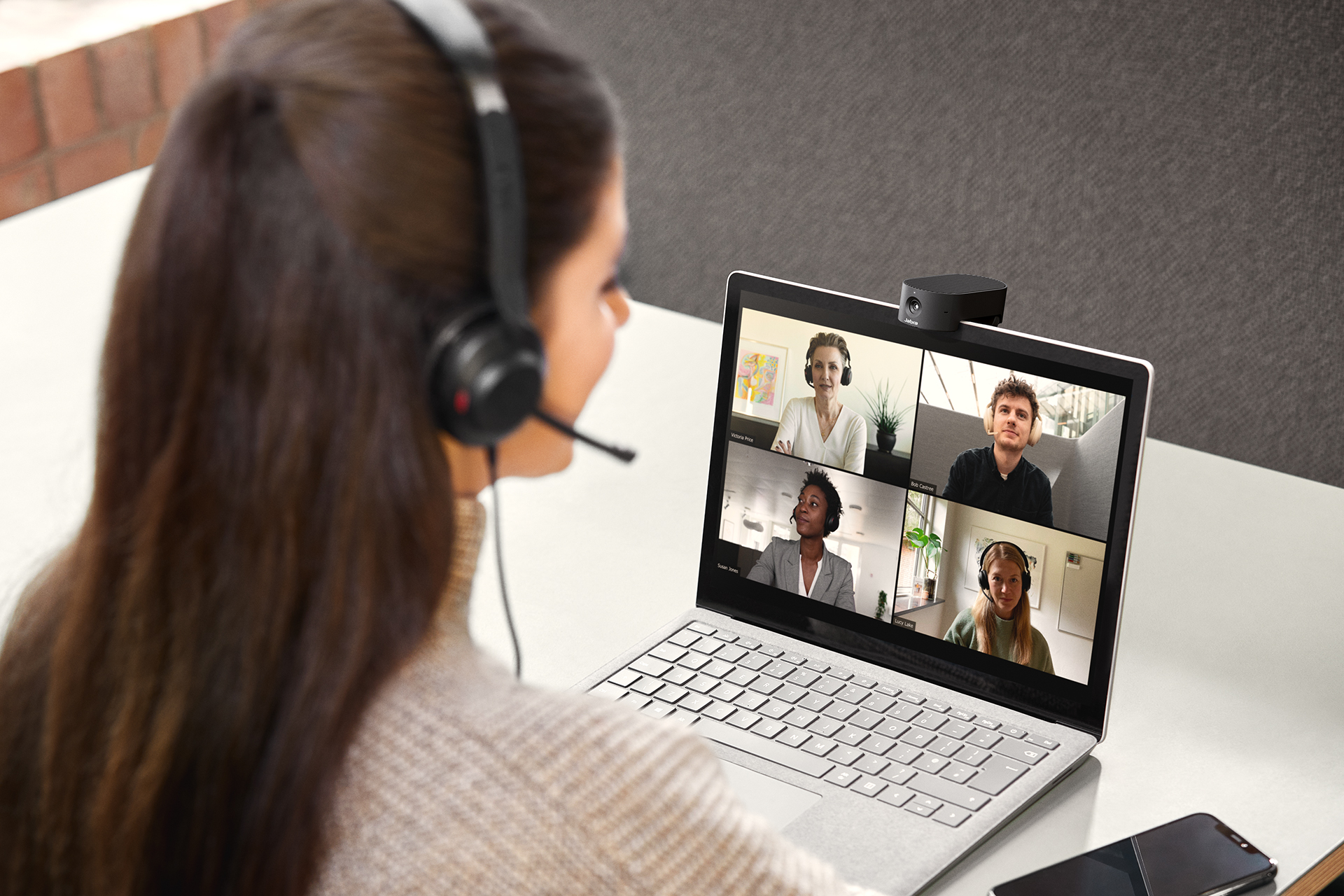
The camera also uses built-in AI video features to optimize your video feed. For example, the Intelligent Zoom feature automatically adjusts the camera to keep you centered in the frame, even if you shift slightly. And if you’re sitting in a poorly lit room or have a bright window behind you, the camera adjusts the lighting to keep your face properly exposed and visible.
Collaboration software and platform integration
Your smart meeting room technology should work seamlessly with your video conferencing tools, whether that’s Microsoft Teams, Zoom, or Google Meet. When your meeting software and hardware are fully compatible, devices connect reliably, content is easy to share, and meetings run smoothly from start to finish.
For instance, Jabra’s PanaCast 20 personal camera and PanaCast 55 VBS are certified for Microsoft Teams , Zoom , and Google Meet , and are optimized for all major UC platforms. That means they work right out of the box with the systems your teams already use, without the need for custom setups or workarounds.
Touchless controls and room automation
The less time people spend setting up a room, the faster meetings can begin. Touchless controls and automation help remove friction from the meeting experience, reducing setup time, limiting the need for IT support, and minimizing physical contact with shared surfaces.
Smart meeting rooms can now perform many routine tasks automatically or through voice and motion input. Here’s how that works in practice:
- Motion-activated room startup: Lights, displays, and video bars power on automatically when someone enters the room.
- Voice control for common actions: Instead of searching for a control panel, participants can start or end a meeting, adjust the volume, or join a call using voice commands through platforms like Microsoft Teams Rooms and Zoom Rooms .
- Auto-framing and speaker tracking: Cameras automatically adjust the view based on who’s speaking, so there’s no need to manually reposition the camera during the meeting.
- Automatic screen sharing: Some systems detect when a laptop is connected and prompt the user to share their screen, making it easier to conduct presentations.
- Occupancy detection: Sensors can track whether a room is occupied or empty, which helps with resource planning and reduces energy waste when a room is idle.
With less to touch, configure, or adjust, meetings feel easier, and rooms are ready whenever people are.
Room utilization and analytics tools
To manage smart meeting spaces effectively, IT and facilities teams need to know how rooms are being used and how devices are performing. Without this insight, it’s hard to know which rooms are underutilized, which ones get overcrowded, or when a device is down until someone submits a support ticket.
Room analytics tools help provide this visibility. Here’s how:
-
Occupancy and usage tracking
Sensors built into smart room systems can track when rooms are booked, how often they’re actually used, and how many people attend meetings. This helps identify patterns, like consistently empty rooms or high-demand spaces that may need better equipment.
-
Environmental monitoring
Some systems (e.g., Neat Sense, IoT Factory 7-in-1 Room Sensor) measure environmental factors such as room temperature, humidity, air quality, and ambient noise in real-time. This information helps companies create more comfortable, productive meeting environments, while also supporting workplace health or energy-saving efforts.
-
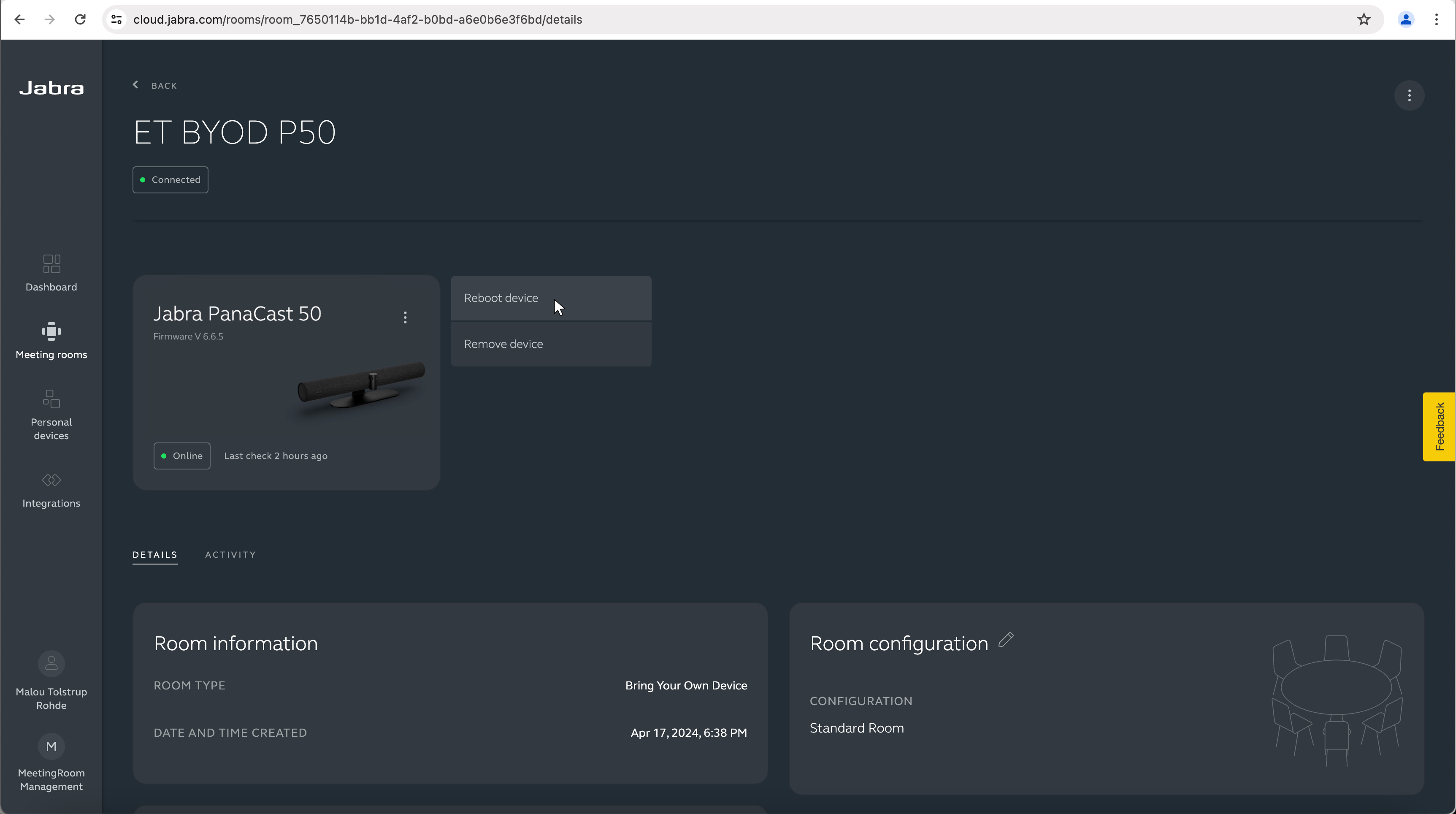
Device management with Jabra Plus
If you use Jabra’s video bars, headsets, speakerphones, or webcams, you can manage them all with Jabra Plus . This platform provides a dashboard where you can see which devices are disconnected, view detailed diagnostics, tweak settings, or even reboot a video bar or speakerphone remotely. This reduces support tickets and minimizes meeting downtime.
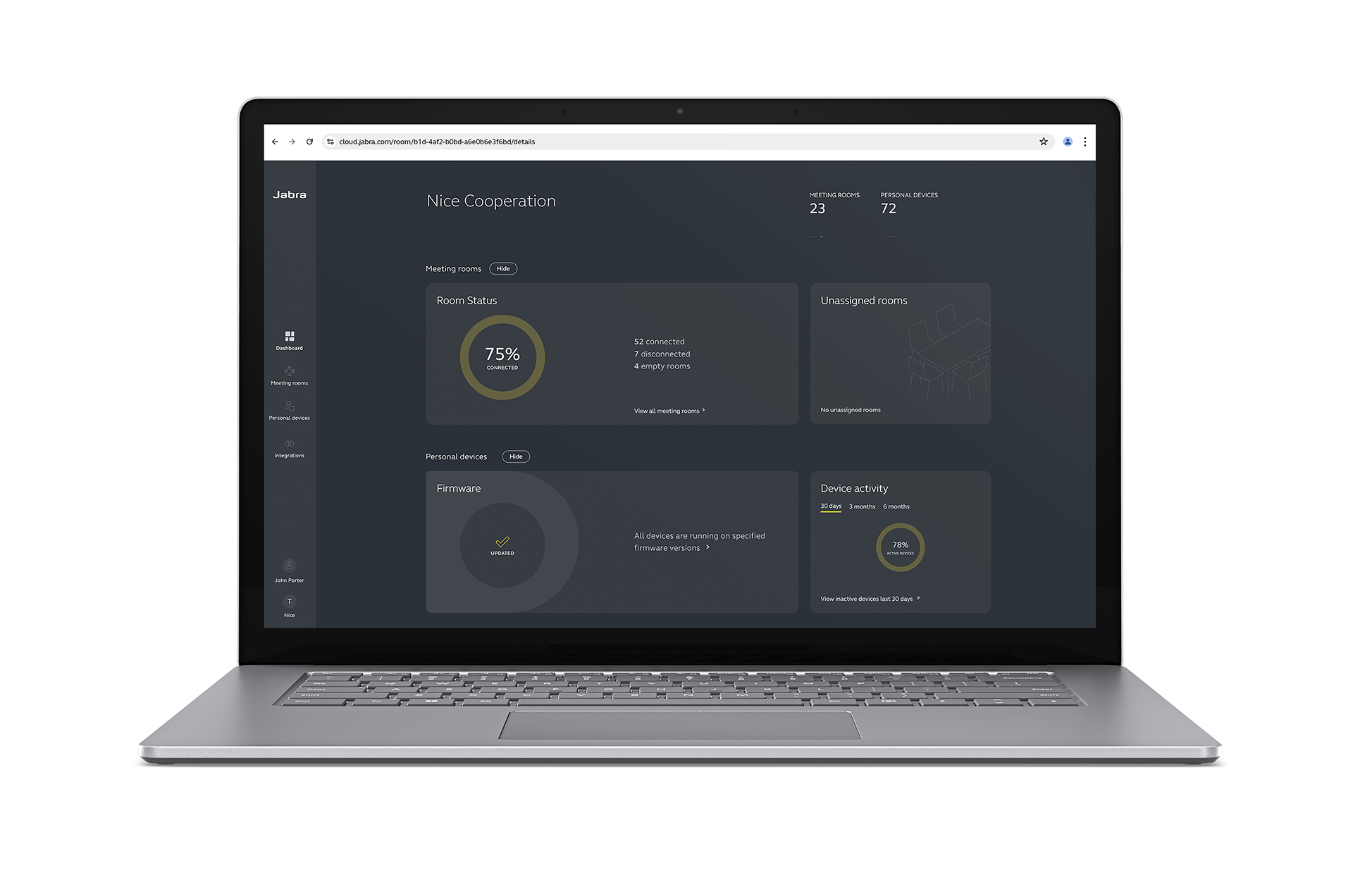
Whether you're managing a few rooms or a large number of devices across multiple locations, Jabra Plus scales with you and lets you group devices by location for easier management.
How to upgrade or build a smart meeting room
Whether you’re building a smart meeting room from the ground up or upgrading an existing room, the goal is the same: create a space that supports better hybrid collaboration.
Here’s how to do it, step by step.
Step 1: Assess your current space and needs
Start by understanding the space you’re working with and what your organization actually needs. Your smart meeting room should reflect how your teams meet, collaborate, and interact across locations.
Here are some key things to consider:
- Room size and layout: Is this a small huddle room, a mid-size meeting room, or a large boardroom?
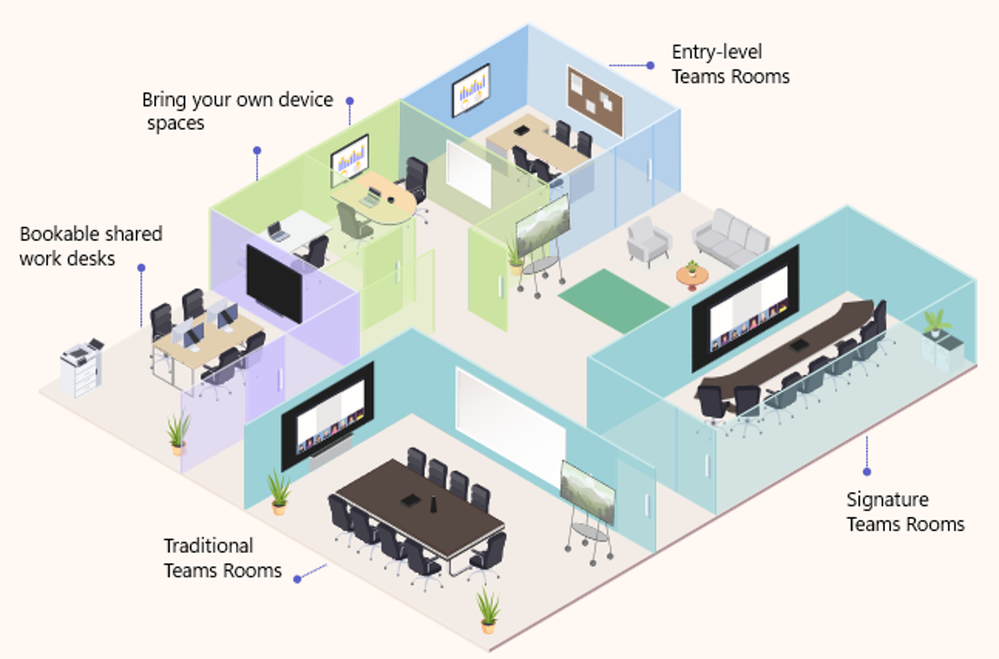
Smaller spaces may only need a single video bar with a wide field of view, while larger rooms might require multiple microphones, extended camera coverage, or table-mounted controls. Think about where people sit, where screens are mounted, and how sound might travel across the room.
-
Primary use cases: What kinds of meetings will take place here?
A room used mostly for quick check-ins might need simple, reliable audio and video. But if the space is used for client presentations, executive briefings, or creative brainstorms, you’ll want higher-quality cameras, screen sharing, and perhaps even whiteboard capture.
-
Department needs: Different teams use meeting rooms in different ways, so design with their needs in mind.
For example, sales and customer service teams prioritize clear video and crisp audio for external calls, while product and engineering teams may need tools for whiteboarding, screen sharing, and content reviews.
-
Existing equipment and gaps: Take stock of the equipment you already have (e.g., displays, webcams, microphones, speakerphones) and where it’s falling short.
For example, if remote participants frequently complain about poor audio or feeling left out of the discussion, you likely need better in-room microphones and a smarter camera setup.
-
Platform compatibility: Are your teams using Microsoft Teams, Zoom, Google Meet, or something else?
Choosing hardware that’s certified for your main platform ensures fewer setup issues, smoother integration, and a consistent experience across rooms.
Step 2: Choose the right technology for your room
After assessing your space and existing equipment, the next step is to choose the technology that directly supports how your teams meet and collaborate. Here are the key categories to consider:
-
Video
The camera you choose should have a field of view appropriate for the room’s size and layout, and built-in microphones so you don’t have to buy separate mic systems.
If your spaces are mid- to large-sized, you’ll benefit from video solutions with intelligent cameras such as Jabra’s PanaCast 55 VBS which combines a 180° field of view with built-in AI video features that automatically adjust framing in real-time to include everyone in the room.
It can zoom in on whoever’s speaking, anonymously count the number of people present, and adjust lighting and exposure to keep faces clearly visible, even in rooms with poor lighting conditions.

-
Audio
Both remote and in-person attendees should use headsets like the Jabra Evolve3 75 , which offers Jabra Advanced ANC™ noise cancellation that filters out background noise and captures voices clearly. This means fewer repeats and less frustration on both sides of the call.
However, if in-room participants prefer hands-free communication, devices such as our Jabra Speak2 75 speakerphone offer full duplex audio, so conversations can flow both ways naturally, just like in person. It also filters out background noise, so everyone’s voice comes through clearly, even in lively or open spaces.
-
Platform compatibility
Whatever hardware you choose should work seamlessly with the video conferencing platform your team already uses, be it Microsoft Teams, Zoom, Google Meet, or something else. This ensures quick setup, reliable performance, and a familiar experience for all users.
Note: Jabra’s PanaCast 55 VBS and Evolve series headsets are certified for Microsoft Teams, Zoom, and Google Meet, and are optimized for use with all major UC platforms. That means fewer support tickets, less troubleshooting, and more time focused on the meeting itself.
PanaCast 55 VBS vs. PanaCast 50 Room System: Which should you use?
The PanaCast 55 VBS is a standalone video bar that connects to your existing computer (a laptop or a dedicated in-room PC) to run your preferred video conferencing software (like Microsoft Teams or Zoom).
You simply plug it in via USB, and it functions as an all-in-one camera, microphone, and speaker. This option is ideal if your rooms already have computers or if you prefer a “bring your own device” (BYOD) model where meeting participants connect their laptops directly.
PanaCast 50 Room System, on the other hand, is a complete, ready-to-deploy solution that combines the video bar with dedicated control hardware and an integrated compute unit, called the Lenovo ThinkSmart Core.
This system runs the meeting software (e.g., Microsoft Teams Rooms, Zoom Rooms) natively on the ThinkSmart Core, and the touch controller lets you start or manage meetings with a single tap, without plugging in a personal laptop. This is the better choice if you want a standardized, reliable, and easy-to-use setup across all your meeting spaces, with minimal setup and user involvement.
Step 3: Include remote participants in design thinking
Designing smart meeting rooms that serve only the people physically present creates an uneven experience in which remote participants struggle to contribute, stay engaged, or even follow the conversation.
To avoid this, include remote participants in your planning from the start. Here’s how:
Provide professional-grade cameras
Remote participants need intelligent personal cameras, like our PanaCast 20 webcam , that deliver crystal-clear 4K video, intelligent framing, and dynamic lighting, so they are always well-lit and clearly visible during calls.

Pro tip: While Jabra’s PanaCast 20 camera has built-in noise-cancelling microphones, we recommend pairing it with a professional headset like Evolve3 75 , especially when working in very noisy environments. This ensures remote participants can hear and be heard without distractions.
Keep the joining process simple
Make sure remote attendees can join meetings with a single click. Complicated dial-in codes or multi-step processes create barriers to entry and increase friction for every attendee, including those physically present.
Test for equity
When piloting a new smart technology setup, have team members join remotely and give honest feedback on their experience. Ask questions like:
- Can you see the whiteboard clearly?
- Can you tell who is speaking, even if they whisper or turn their head?
- Can you see and hear everyone in the room?
These questions help surface blind spots you might miss when testing from inside the room. Remote participants experience meetings differently, so designing with their feedback ensures that no one is left out of the conversation.
Starting with one smart meeting room allows you to test your setup, gather feedback, and see how the right technology can transform the meeting experience. But even as you focus on that first room, think ahead because the goal isn’t just one better meeting room, it’s a better meeting culture across your entire organization.
Here are two things to plan for early:
-
1. Multiple room sizes
Meeting rooms come in different shapes and sizes (from small huddle spaces to large boardrooms), and each one has different requirements. What works in a mid-size room may not be enough for a larger space.
As you scale, choose technology that can adapt, like cameras that adjust framing based on room layout and speakerphones that pick up sound from all directions. Depending on the size, you may also need to add microphones, displays, or touch controllers to ensure full coverage and usability.
-
2. Global teams
If your company operates in multiple cities or countries, using the same core technology across offices helps create a consistent experience such that employees know exactly what to expect, whether they’re joining a call from London, Lagos, or Los Angeles.
This consistency makes training easier, reduces support issues, and helps IT teams manage systems more efficiently across locations.
Smart conference room examples and layouts
Here are two examples of smart rooms that show how the thoughtful placement of technology makes a meeting space inclusive and efficient for everyone, including remote participants.
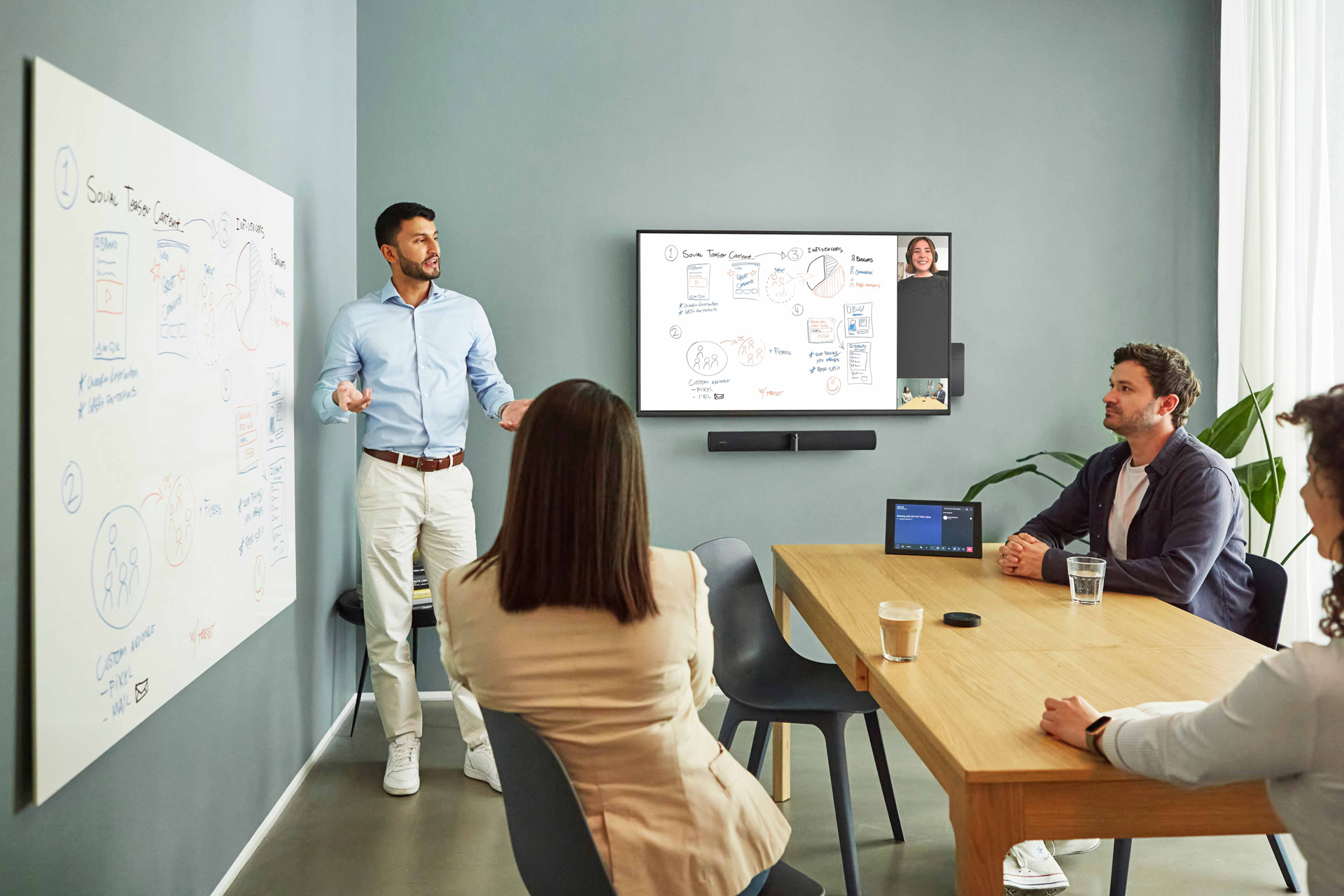
1. Huddle room with hybrid collaboration
There are four people present in this small meeting room, with a fifth participant joining remotely. The camera is positioned to capture the entire group, including the person standing by the whiteboard and leading the discussion. This ensures that everyone stays visible, even as people move around, stand up to present, or reference material on the board.
On the display, the whiteboard appears as the main view, while the remote attendee is shown in a smaller frame. Even though the whiteboard isn’t directly in front of the camera and someone is standing in front of it, the system still captures it clearly. This setup allows both in-room and remote participants to easily follow along, especially when visual concepts or ideas are being explained.
2. Conference room with dual display
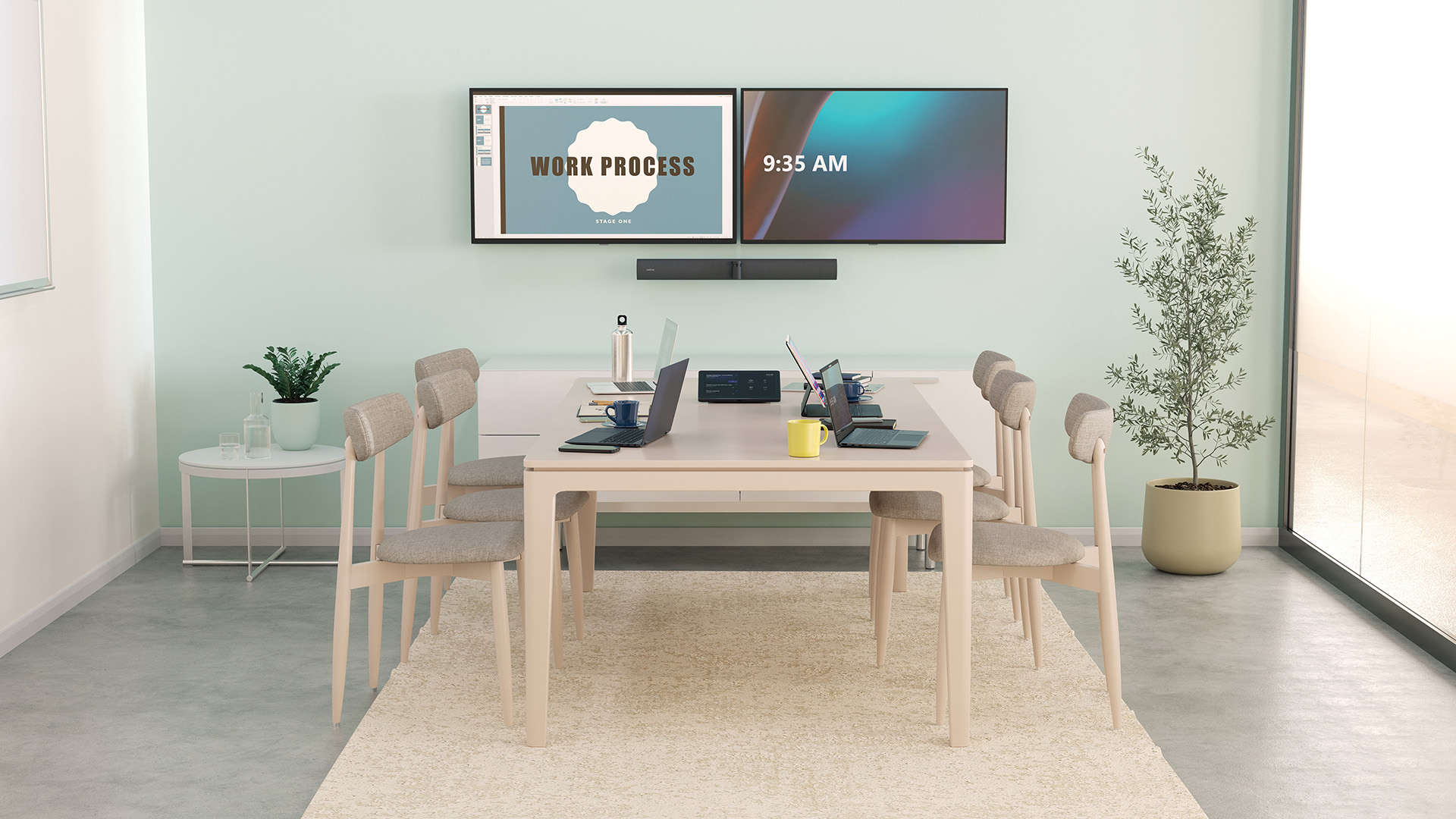
This mid-sized meeting room is designed for six participants, with space to accommodate a few more. Jabra PanaCast 50 is mounted at the head of the table to capture the entire room, ensuring that everyone stays in frame, regardless of where they sit.
Unlike the small room setup, this meeting room uses a dual-display system: one screen displays the physical whiteboard, while the other displays a shared presentation deck. This lets remote participants see both the presenter’s content and any in-room brainstorming or diagrams at the same time.
It’s a setup that supports natural, free-flowing collaboration, whether people are on-site or dialing in from another continent.
For smarter rooms with stronger collaboration, get Jabra
At Jabra, we’re committed to building smarter meeting spaces that help people collaborate seamlessly, whether they’re in the room or halfway around the world. We offer intelligent video bars like PanaCast 55 VBS for high-performance video conferencing and the integrated PanaCast 50 Room System for a standardized and straightforward experience across all meeting rooms.
For remote participants, PanaCast 20 personal camera delivers professional video quality that keeps them front and center. Both in-room and remote attendees benefit from Evolve3 75 headset, which offers all-day comfort and outstanding noise cancellation. And for hands-free calls, our Speak2 75 speakerphone ensures every voice is heard clearly.
Whether you're upgrading one meeting room or scaling across global offices, Jabra helps you create meeting experiences that feel natural and inclusive for everyone.
If you’d like to learn more about how Jabra can help you set up hybrid-friendly smart meeting rooms, check out all our solutions here.

Smart Meeting Room FAQ
-
What is a smart meeting room?
A smart meeting room uses integrated hardware and software, like intelligent cameras, noise-cancelling headsets, and platform-compatible tools, to support hybrid collaboration. These rooms are designed to make hybrid meetings more inclusive, productive, and efficient by removing common barriers like poor visibility, bad audio, or clunky manual setup.
-
What equipment do I need for a smart meeting room?
At minimum, you’ll need a high-quality camera with intelligent framing, clear audio (via noise-cancelling headsets or speakerphones), a reliable display, and video conferencing software integration (e.g., Zoom, Microsoft Teams). Optional extras include dual displays, occupancy sensors, touchless controls, and cloud-based device management for IT teams.
-
Can I upgrade an existing meeting room, or do I need to start from scratch?
You can absolutely upgrade an existing room. Start by assessing what you already have, then incorporate smart technology like intelligent cameras, audio gear, and remote management tools. Many smart technologies are designed to layer onto your existing system. For example, you can add an intelligent video bar or upgrade your audio setup without changing your display or conferencing platform.
-
How do smart meeting rooms support remote participants?
Smart meeting rooms ensure remote attendees can see, hear, and participate just like those in the room. Intelligent cameras capture everyone present, beamforming microphones pick up voices across the room, and integrated software lets remote attendees join meetings easily, view shared content, and even see whiteboards in real-time.
-
Are smart meeting rooms worth the investment?
Yes, especially for hybrid teams. They reduce meeting friction, improve communication, and make hybrid collaboration feel natural. The built-in remote management tools also help IT teams monitor devices, push updates, and troubleshoot issues without going on-site. Over time, smart meeting rooms boost productivity and employee satisfaction.