PanaCast 50
Room System 2

PanaCast 50 plus Lenovo ThinkSmart Core Gen 2. A match made for smarter Microsoft Teams meetings.
Buy now

More power, more flexibility

We’re making hybrid collaboration even more seamless with the PanaCast 50 Room System 2 - the next evolution in intelligent video conferencing. Featuring an upgraded Lenovo Core Gen 2 and a choice of two new touch controller options, it delivers next-level performance, flexibility, and security.

Engineered for intelligent meeting room systems

  • Astounding Sound
    From the world leaders in professional audio

  • Picture Perfect
    180° field of view in Panoramic-4K

  • Next-gen AI processing
    Faster, more efficient performance

  • Better connectivity
    USB-C for screen sharing, charging, and BYOD (Bring Your Own Device)

Made for smarter meetings

The Jabra PanaCast 50 Room System 2 is a complete solution that enables small and medium rooms to play host to even more inclusive and immersive virtual meetings. Eight beamforming microphones and four stereo speakers deliver crystal-clear audio and ensure every voice is heard. With panoramic 4K resolution camera and 180° view, nobody is left out of the picture. Powered by the Lenovo ThinkSmart Core Gen 2, the Jabra PanaCast 50 Room System 2 delivers fast AI processing and smooth video streaming to make every meeting seamless.

Fully immersive. For all.

Nearly half of hybrid workers feel disconnected when not in the meeting room. That’s why the intelligent features of the Jabra PanaCast 50 Room System 2 are the complete solution to keep meetings engaging and productive. When the whole team is interacting as equal participants, get ready for next-level results.

Collaboration, for the win.

WORLD-LEADING AUDIO

Sound that astounds.

Great meetings start with great sound, and as the world leaders in professional audio, that’s something we know a thing or two about.

We’ve reinvented meeting room audio for modern ways of working, with eight professional-grade microphones and precision voice detection.

Intelligent algorithms automatically identify and remove residual echo and static noise, and we added an array of four powerful speakers in a zero-vibration stereo setup, to fill the room with premium, high-definition sound.

However you work, Jabra PanaCast 50 is engineered to keep you talking.

OUTSTANDING 180° VIDEO

All in.

In addition to our world-leading audio, we’ve gone all-in on inclusive video that keeps everyone, well… all in.

Three 13-megapixel cameras, mounted in a high-precision, multi-camera array, cover every part of the room.

But here’s the really clever part:

Our patented real-time video stitching technology intelligently decides exactly the right point to live-stitch the three feeds together, creating a smooth, 180° view in high-definition Panoramic-4K.

That means nobody is squeezed together, distorted, or missing from the picture. Jabra PanaCast 50 puts inclusive meetings back on the table, safely.

We’ve gone all-in on getting you all in.

Lenovo ThinkSmart

The Lenovo ThinkSmart Core Gen 2 is the latest AI-ready system designed for Microsoft Teams Rooms, taking professional performance up a notch with the Ultra5 processor, up to 40% lower power consumption, and even safer security features. With seamless integration into hybrid meeting spaces, the ThinkSmart Core powers advanced AI-driven collaboration features for smooth, real-time processing of video, audio, and smart meeting functions. 

You’re in control

With a choice of two touchscreen controllers, you can find the perfect fit for every meeting space.

  • Lenovo ThinkSmart USB Touch Controller

    Simple, plug-and-play touch interface for easy meeting management.

  • Lenovo IP Touch Controller 

    Network-based controller for enterprise environments that need more stability and flexibility.

SIMPLE INSTALLATION

Easy as 1, 2, 3.

Whichever way you look at it, PanaCast 50 couldn’t be easier to install, with three different options, to suit every room setup.

Choose from Wall Mount, Table Stand, and Screen Mount (VESA)*, with clear, easy-to-follow instructions.

Who doesn’t like to keep things simple?

Designed for Microsoft Teams Rooms

The PanaCast 50 Room System 2 comes with certified, preloaded software for seamless hybrid collaboration.

  • microsoft-teams-certified logo
Intelligent Experiences

  • Dual-Stream Whiteboard

    Share your whiteboard content with our built-in content camera, which streams both the content and in-room participants simultaneously.

  • Intelligent Meeting Space

    Define virtual meeting space boundaries to only include the people inside the meeting space; ideal for glass-walled and open plan spaces.

  • Intelligent Speaker

    Thanks to their premium audio quality, our video conferencing cameras were the first front of room devices to work with Microsoft’s Intelligent Speaker functionality for Teams Rooms. This enables cutting edge new Teams capabilities like live transcription and recap features*, allowing you to focus on the meeting rather than trying to scribble down meeting minutes.
    *Requires separate Microsoft Copilot license

  • Intelligent Zoom

    Uses powerful AI to dynamically adjust and frame in-room meeting participants for optimal collaboration.

  • Multi-stream dynamic composition with face recognition

    Offers a choice of meeting room participant views, including the most recent in-room speakers or close ups of recent speakers with a panoramic view of the room.

  • Virtual Director

    Adjusts the camera view of the room in real-time to focus on the active speakers, helping everyone track the natural flow of the conversation.

Jabra Plus

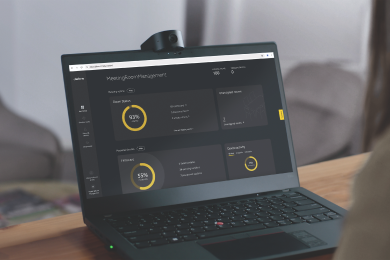
Make device management simple

View, manage, control and update all your devices in one place, with Jabra Plus. Our comprehensive device management platform makes it easy for you to ensure your teams can get down to business with minimal device downtime or disruption, wherever they are.

Dashboard view of Jabra device and room management software

Jabra PanaCast Tested Peripheral Devices

There are several options for cabling and extending the connection between Jabra PanaCast and the host or dock. Please see below for our current list of approved cables, extenders, and USB hubs for use with Jabra PanaCast.

Technical specifications - USB Controller

  • Jabra PanaCast 50
    PanaCast 50, power supply, wall mount, USB-C to USB-A cable 2m/6.6ft (USB 3.0), Privacy cover
  • Lenovo ThinkSmart Core Gen 2 and USB Controller
    ThinkSmart Core Gen 2 computing device, ThinkSmart USB Controller display, Power Supply for Core Gen 2, wall Mounting Plate, Core Gen 2 Mounting Plate, power Supply mounting cage, 10m/32ft USB C to C Cable (for touch panel), 3m/9.8ft USB C Cable (for BYOM)
  • Preloaded application
    Microsoft Teams Rooms
  • Number of cameras
    3
  • Type of camera
    Panoramic multi-camera array
  • Camera resolution
    13 megapixels
  • Zoom
    Up to 6x lossless digital zoom
  • Field of view
    Horizontal: 180°, Vertical: 54°
  • Resolution
    Panoramic-4K: 3840 x 1080 @ 30fps
  • Intelligent Zoom
    Yes
  • Intelligent Meeting Space
    Yes
  • Dynamic Composition
    Single-stream Dynamic Composition (BYOD + MTR + ZR), Multi-stream Dynamic Composition
  • Virtual Director
    Yes
  • Vivid HDR
    Yes
  • Multi-stream IntelliFrame with people recognition
    Yes
  • Speakers
    2 x 2" (50mm) woofers, 2 x 3/4" (20mm) tweeters
  • Speaker frequency range
    80Hz - 20000Hz
  • Number of speakers
    4
  • Automatic speaker detection
    Yes
  • Microphone type
    8 microphone beamforming array certified for room up to 4.5m x 6m
  • Number of microphones
    8
  • Microphone sensitivity
    -37dBFS
  • Microphone frequency range
    100Hz - 8000Hz
  • Aux-Out
    Yes
  • Microsoft intelligent speaker functionality
    Yes
  • System requirements
    Compatible with Windows 11, macOS 10.15 and later, including macOS 11.x
  • Compatible software and/or apps
    Jabra+, Jabra Direct, Jabra Sound+, Jabra Xpress
  • Proxy support
    HTTP, SOCKS4, SOCKS4A, SOCKS5, SOCKS5H
  • Integrated PeopleCount
    Yes
  • Software Development Kit (SDK)
    Yes
  • Whiteboard Sharing / Content Camera (Windows only)
    Yes
  • Manual Pan-Tilt-Zoom (PTZ)
    Yes
  • Intelligent Speaker
    Yes
  • Connectivity
    USB-A, USB-C, Ethernet (RJ45) for connection to supported management systems, Wi-Fi
  • Supported USB versions
    USB 2.0, USB 3.0
  • Bluetooth Low Energy support
    Yes, for remote control and Sound+ access
  • Operating temperature
    5°C to 35°C | 41°F to 95°F
  • Storage temperature
    -20°C to 60°C | -4°F to 140°F
  • Warranty
    3 years
  • Packaging dimensions (D x W x H) cm/inch
    19.6×69.8×51.9cm | 7.73×27.51×20.45in
  • Weight range, specific to regional power plug
    10617.8g | 374.53oz | 23.36lb
  • Certifications and compliance
    Microsoft Teams Rooms (with separate Microsoft Teams Rooms certification for integrated Content Camera), Microsoft Intelligent Camera Experience

Technical specifications - IP Controller

  • Jabra PanaCast 50
    PanaCast 50, power supply, wall mount, USB-C to USB-A cable 2m/6.6ft (USB 3.0), Privacy cover
  • Lenovo ThinkSmart Core Gen 2 and IP Controller
    ThinkSmart Core Gen 2 computing device, ThinkSmart IP Controller display, Lenovo Link Box, power Supply for Core Gen 2, wall mounting Plate, Core Gen 2 Mounting Plate, power Supply Mounting Cage, 5m/16.4ft CAT5e RJ45 Ethernet cable, 1.8m/6ft HDMI, 0.9m/3ft HDMI, 0.9m/3ft USB A to B, power supply for Lenovo Link Box, 3m/9.8ft USB C cable (for BYOD)
  • Preloaded application
    Microsoft Teams Rooms
  • Number of cameras
    3
  • Type of camera
    Panoramic multi-camera array
  • Camera resolution
    13 megapixels
  • Zoom
    Up to 6x lossless digital zoom
  • Field of view
    Horizontal: 180°, Vertical: 54°
  • Resolution
    Panoramic-4K: 3840 x 1080 @ 30fps
  • Intelligent Zoom
    Yes
  • Dynamic Composition
    Single-stream Dynamic Composition (BYOD + MTR + ZR), Multi-stream Dynamic Composition
  • Virtual Director
    Yes
  • Vivid HDR
    Yes
  • Multi-stream IntelliFrame with people recognition
    Yes
  • Speakers
    2 x 2" (50mm) woofers, 2 x 3/4" (20mm) tweeters
  • Speaker frequency range
    80Hz - 20kHz
  • Number of speakers
    4
  • Automatic Speaker Detection
    Yes
  • Microphone type
    8 microphone beamforming array certified for room up to 4.5m x 6m
  • Number of microphones
    8
  • Microphone sensitivity
    -37dBFS
  • Aux-Out
    Yes
  • Microsoft intelligent frequency range
    Yes
  • System requirements
    Compatible with Windows 11, macOS 10.15 and later, including macOS 11.x
  • Compatible software and apps
    Jabra+, Jabra Direct, Jabra Sound+, Jabra Xpress
  • Proxy support
    HTTP, SOCKS4, SOCKS4A, SOCKS5, SOCKS5H
  • Integrated PeopleCount
    Yes
  • Software Development Kit (SDK)
    Yes
  • Whiteboard Sharing / Content Camera (Windows only)
    Yes
  • Manual Pan-Tilt-Zoom (PTZ)
    Yes
  • Intelligent Speaker
    Yes
  • Connectivity
    USB-A, USB-C, Ethernet (RJ45) for connection to supported management systems, Wi-Fi
  • Supported USB versions
    USB 2.0, USB 3.0
  • Bluetooth Low Energy support
    Yes, for remote control and Sound+ access
  • Operating temperature
    5°C to 35°C | 41°F to 95°F
  • Storage temperature
    -20°C to 60°C | -4°F to 140°F
  • Warranty
    3 years
  • Packaging dimensions (D x W x H) in cm/inch
    19.6×69.8×51.9cm | 7.73×27.51×20.45in
  • Weight range, specific to regional power plug
    11137.8g | 392.87oz | 24.51lb
  • Certifications and compliance
    Microsoft Teams Rooms (with separate Microsoft Teams Rooms certification for integrated Content Camera), Microsoft Intelligent Camera Experience

Contact Sales

Get the best solution for your organization and specific use case. Our experts can advise on products, compatibility and UC deployments.

Try Jabra for free

We offer free trials for companies of 500+ employees, who are replacing their current devices or have a new project. T&Cs apply.

Need technical support?

For product support and warranty-related questions, visit our support pages where you can find user manuals, FAQs, videos, contact information and more.

Get help now

Product support

Support content including User Manuals, FAQs, Video Tutorials, and more.

Find support

Payment Methods

  • system.PaymentMethodLogo
  • Apple Pay payment method icon
  • system.PaymentMethodLogo
  • system.PaymentMethodLogo
  • system.PaymentMethodLogo
  • dinersclub logo
  • system.PaymentMethodLogo
  • system.PaymentMethodLogo
  • system.PaymentMethodLogo
  • Bank Transfer
  • system.PaymentMethodLogo
  • system.PaymentMethodLogo