 1. Increased productivity from better work rhythm, reduced distractions, and purposeful in-person collaboration.
With hybrid work, employees can design their workdays around their natural energy peaks. They can also design their work week so that tasks requiring 100% focus are done at home and collaborative ones are scheduled for in-office days.
This rhythm reduces distractions, supports deep work, and creates space for intentional collaboration. All of which are ingredients for more engaged teams .
The data backs this up: Gallup finds that 36% of hybrid employees are engaged at work, outperforming both fully remote (33%) and fully on-site (27%) teams.
 2. Talent attraction and retention, especially for top talent who prioritizes flexibility.
In roles that can be done remotely, over 60% of employees prefer hybrid arrangements. Rather than a perk, it’s becoming the expectation.
For example, while many on the Salesforce team work three days per week in person, their engineering team only works 10 days in person per quarter. According to the CEO , “they’re very productive at home” and can still come to the office to collaborate, hang out, and get to know each other. That's what matters.
Hybrid setups like this help you attract great talent and retain them.
In fact, in a Stanford-backed study , resignations dropped by 33% among workers who shifted from fully on-site to a hybrid work schedule.
The more flexible your policies are, the better for your company long term.
 3. Cost savings on office space, utilities, and overhead.
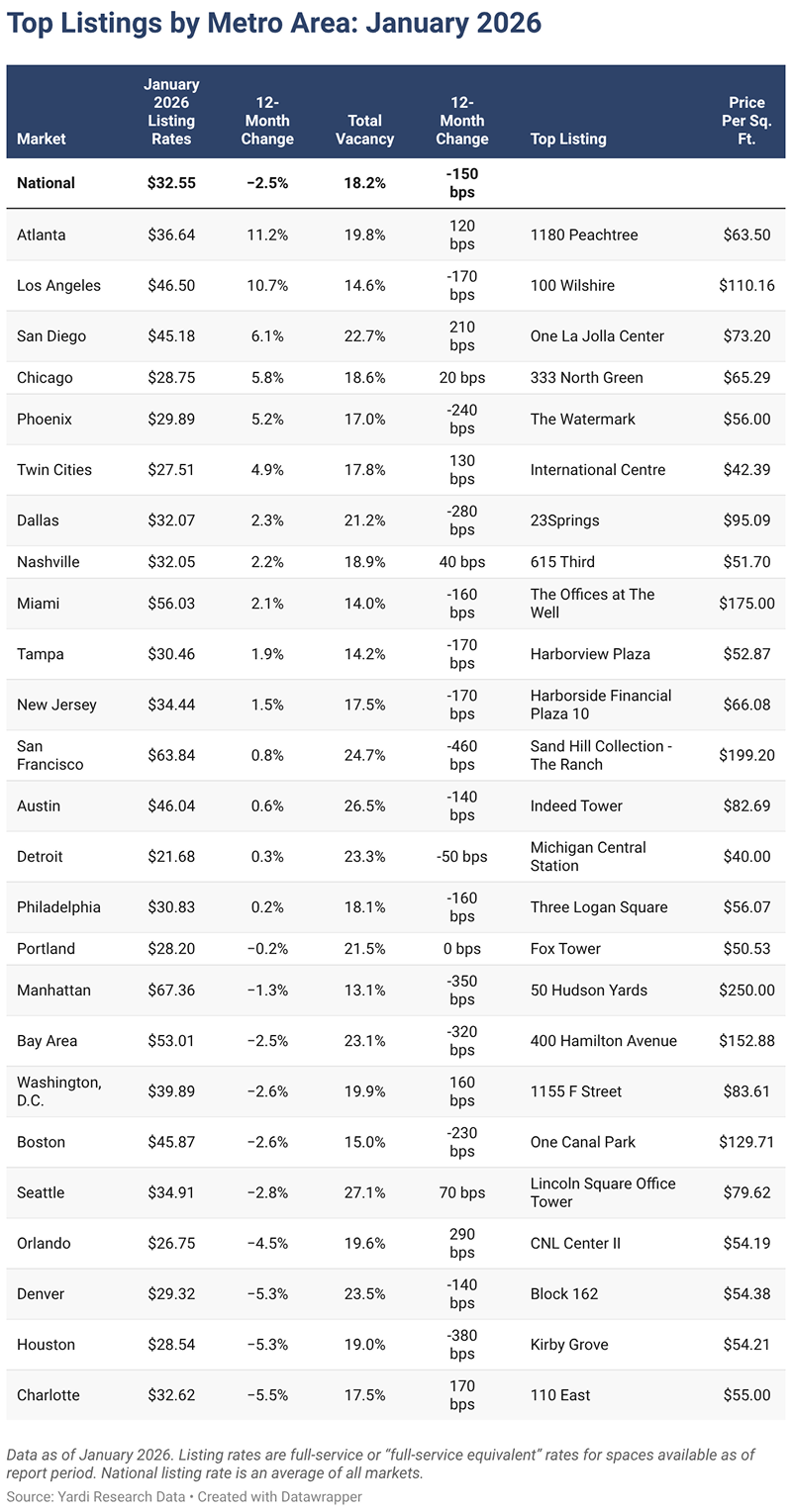
Rent in major cities is expensive. In April 2025 for example, Manhattan, NYC topped the list with an average listing rate of $68.34 per sq. ft., followed by San Francisco at $64.19, and Dallas at $31.45.
But regardless of where you're based, you’re likely spending between $94,540 and $141,810 annually for a 2,000–3,000 sq. ft. office. And that's before factoring in WiFi, furniture, and utilities.
With a hybrid work model, you'll rarely need all employees onsite at once. This gives you the opportunity to cut office costs. You can:
- downsize to a smaller space
- sublease part of your office
- share space with another company.
The strategy depends on your team's schedule. If your teams rotate when they come in on different days, you’ll only need enough space to support whoever’s coming in that day. And if you use fixed in-office days, you can still scale your space to match real usage instead of max capacity.
Either way, you reduce real estate costs without sacrificing collaboration. Plus, you can save energy costs if there are days where no one's in.
 4. Access to a broader talent pool without going fully remote
In the past, your best hire might’ve lived two hours away but not have been an option because the commute was a dealbreaker. Hybrid work changes that.
With just two or three required office days per week, candidates outside your immediate city are now in reach. People are more willing to take a job that requires a long commute once or twice a week than five days a week. This opens the door to skilled talent in neighboring cities, suburbs, or regional hubs.
Nearly 9% of U.S. workers already travel over an hour each day to work. That’s a high bar for five-day commuting, but it’s acceptable if the trip only happens occasionally.
One finance professional calculated that working just two days from home saved him over £6,000 (8,079.43) per year. This includes 122 hours in driving time, over £850 ($1,072.50) in fuel, and thousands more in regained productivity.
This kind of flexibility makes more of your roles attractive to more people.
Hybrid work may not let you hire across the globe the way remote does. But it can unlock a much wider radius of qualified, motivated candidates than traditional office models ever could.


The Benefits & Challenges of Hybrid Working
After working remotely for over two years, a company decided to adopt a hybrid work policy. The change prompted one of their employees to wonder why.
So, like anyone living in the age of the internet and social media would do, they turned to their Reddit community and asked: What are the benefits of being in the office a couple of days a week?*
It didn’t take long for someone to chime in, responding that “the biggest benefit is being around people.” They then pointed to specific moments that in-person work makes possible:
- Grabbing coffee, lunch, or happy hour with coworkers.
- Whiteboarding or brainstorming in the same room.
- Getting quick answers or casual feedback in real time.
These, they said, are harder to replicate remotely.
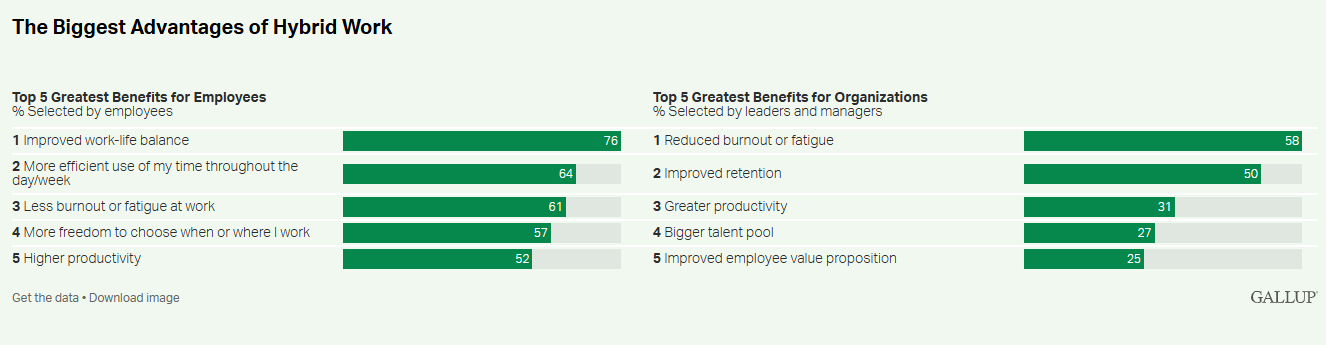
But hybrid work isn’t without tradeoffs. 48% of employees* say it decreases communication, while 45% say it reduces collaboration.
Source: Gallup
As a decision maker considering the benefits of hybrid working, what then is the upside for you? And where should you proceed with caution?
The benefits of hybrid working for employees (and how to ensure they feel them)
1. Greater flexibility to manage work alongside life
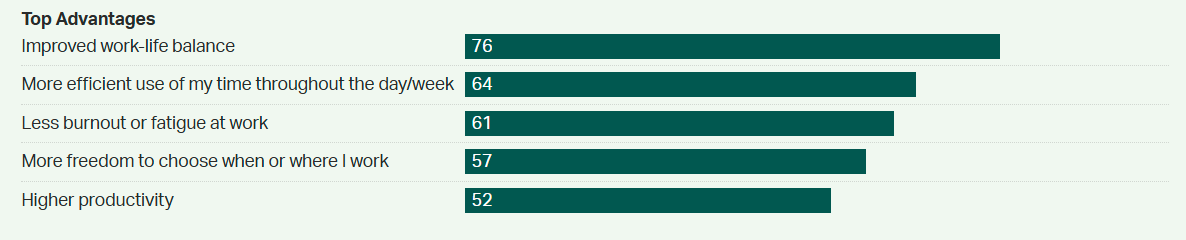
76% of hybrid employees say they have better work-life balance, and 61% experience less burnout and fatigue at work.
Source: Gallup
The time at home helps them focus on their tasks and responsibilities without the occasional office distractions. Because at home, employees can turn off notifications to focus.
It also lets them handle everyday life without derailing productivity.
They can throw in a load of laundry between meetings, run a quick errand at lunch, or take a midday walk to recharge then jump back into work without losing momentum. This level of autonomy builds trust and leads to better output.
2. Reduced commute stress, leading to better well-being and availability.
A project manager shared with Reddit that they wake up at 4:50 AM every day, prepare for work, and commute for 50 minutes, all to be at work by 6:00 AM. According to them, they have zero flexibility and the schedule costs them wear and tear on their vehicle as well as precious time.
They then have to deal with traffic, burnout from traveling for long distances, and the mental exhaustion of commuting before their workday even begins. Hybrid work takes this away, at least on the days they work from home.
That exhausting prep is no longer a daily burden. Instead of gearing up for a commute five days a week, employees might only do it twice. On the other days, they can wake up, make a cup of coffee, and start their workday in minutes.
3. Cost saving (because fewer commutes will benefit their wallet)
Since hybrid employees will take fewer commutes, they can save thousands a year. One Redditor took the time to determine that they save an estimated €6,000 ($6,600) every year as a hybrid worker.
Every little bit of money saving can help your employees live more fulfilled lives.
4. Improved focus and autonomy for meaningful work
Hybrid work gives employees more control over how they structure their day which often leads to deeper focus and greater ownership.
This sense of autonomy helps people feel trusted, respected, and motivated. It can also increase productivity.
Lars Lofgren , a fractional VP of Content and former Head of Growth at KISSmetrics, considers autonomy a key trait of high-performing teams.
One of his go-to practices ? Let employees set their own deadlines.
“In my experience, people will set deadlines that are way too aggressive,” he says. “But when things go sideways, they don’t complain or make excuses. They buckle up and get it done.”
That kind of self-imposed accountability comes from feeling empowered, not micromanaged. And for many employees, being trusted to work where and how they’re most effective increases job satisfaction and performance.
5. Higher job satisfaction when policies feel fair and empowering
Done correctly, hybrid work gives employees flexibility and fairness.
In fact, 92% of employees say a remote policy feels fair when they’re allowed to decide how it’s implemented, either individually or at the team level. That sense of agency leads to higher morale, stronger buy-in, and deeper job satisfaction.
Hybrid work policies can do the same through their remote days. Instead of forcing rigid schedules, they empower people to work in ways that align with their lives, energy levels, and personal circumstances.
Overcoming the challenges of hybrid work
1. Communication gaps and misalignment across teams
Slack messages and video calls help, but they’re not always enough. Tone can be misread, updates can be missed, and not everyone gets looped in.
This disconnect has real costs. Gallup estimates that poor communication contributes to $8.9 trillion in lost productivity globally.
That’s why consistency is key. Lars Lofgren recommends lightweight, recurring check-ins: daily standups, weekly 1:1s, and a weekly kickoff. These create alignment, keep issues from festering, and connect individual work to broader business goals.
He breaks it down like this:
- Daily standups (15 min) help everyone focus on top priorities.
- Weekly kickoff calls (1 hour) align teams on the big-picture (and the company's goals).
- Weekly 1:1s (30 min) give space for managers and team members to surface challenges early.
It’s 2.5 hours a week, but it helps teams stay aligned and accountable. Most of these check-ins happen virtually and still work well.
But some types of work, like whiteboarding a new strategy or solving cross-functional issues, benefit from being in the same room. That’s where having in-person days become a strategic advantage.
You can plan in-person days around collaborative work, and reserve remote days for deep work.
And when hybrid meetings bring remote and in-office participants together, tools like Jabra PanaCast 55 VBS ensure no one is left out. It’s a video bar with:
- 180° camera coverage (so every attendee is covered in meetings),
- An inbuilt speaker (so everyone hears remote attendees clearly), and
- A mic that picks up the voice of every attendee within 20 feet in the room (so every on-site participant is heard).
This way, attendees working from home can see and hear everyone clearly without echo from the meeting room.
Read more: download our report on how to make hybrid meetings better .
2. Meeting inequality and proximity bias
In hybrid teams, not everyone has a seat at the table. Literally.
While those in the room can share side glances, sketch ideas on a whiteboard, and chat before and after every meeting, remote teammates miss these moments, even if they join the meeting on time.
This divide creates meeting inequality. Those dialing in struggle to contribute, be seen, or even heard. And over time, it feeds proximity bias; the subtle but real tendency to favor the people leaders see and hear more often.
According to Gartner , proximity bias can lead to remote employees being overlooked for promotions, projects, and key decisions, even if their performance is just as strong.
So what helps?
-
Default to “remote first.” Act like everyone’s remote, even when some aren’t. That means no whiteboarding unless you can do it digitally, no side convos off-camera, and no “we’ll fill them in later.”
For whiteboards, PanaCast 55 VBS has a whiteboard-sharing feature and you can use it to collaborate with remote participants.
It uses one of the video bar’s three cameras to focus on your whiteboard and stream the session so when you write on the board, remote attendees can see what you’ve written in real-time and brainstorm with you.
-
Assign meeting roles. You can designate someone as the “remote rep.” This person will ensure people joining remotely contribute to the conversations every time.
-
Rotate visibility. Alternate who leads calls or presents team updates, especially when some team members are working remotely. This way, everyone contributes to every session during a calendar year whether they are remote or on-site.
-
When possible, bring the whole team onsite on the same day. It eliminates the split between who’s in the room and who’s dialing in. Everyone can have spontaneous conversations, face-to-face interactions, and shared whiteboard sessions. This reduces the risk of remote teammates feeling sidelined or actually being overlooked.
3. Technology inconsistency causes frustration and inefficiency
An underrecognized source of friction is that everyone often has a different setup.
You’ve got someone on a crackly headset, another fumbling with cables, and someone else echoing through their laptop mic. It slows things down, creates confusion, and kills momentum.
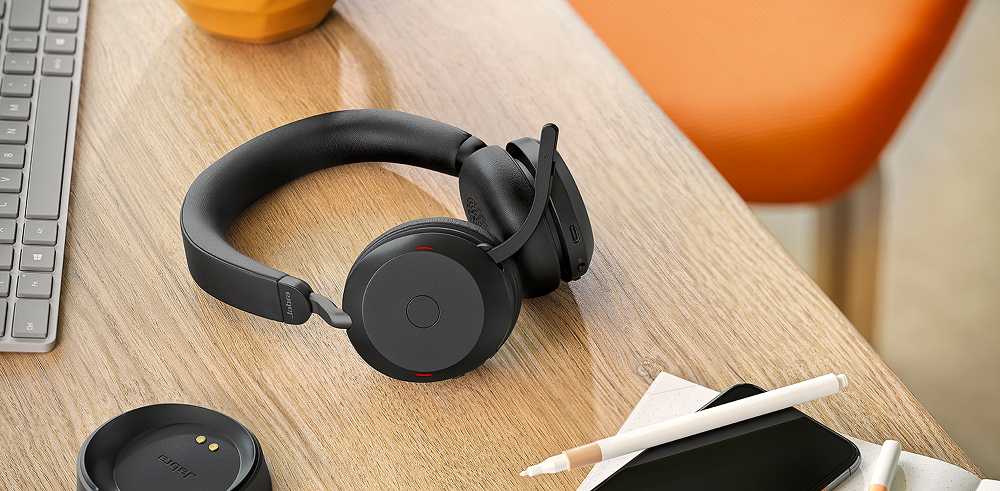
Instead of the chaos, set a baseline for the gear every team member should have. They can start with a high quality headset like Jabra Evolve3 75 or Jabra Evolve3 85 , a reliable personal webcam like the Jabra PanaCast 20 , and fast enough WiFi.
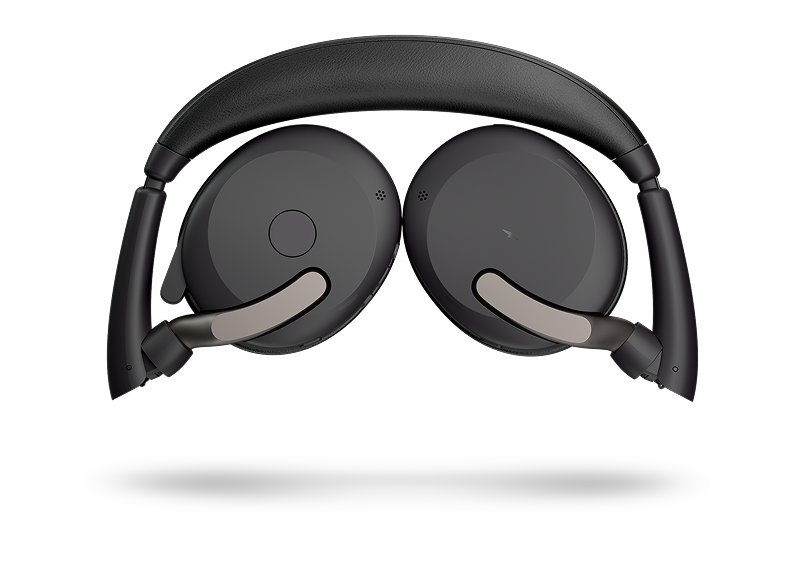
Unlike most consumer headsets, Evolve2 65 Flex and Evolve2 75 have two-way noise cancellation. They block background noise for the user and also cancel out noise from the user’s mic, so people on the other end hear only the speaker, not the sounds around them.
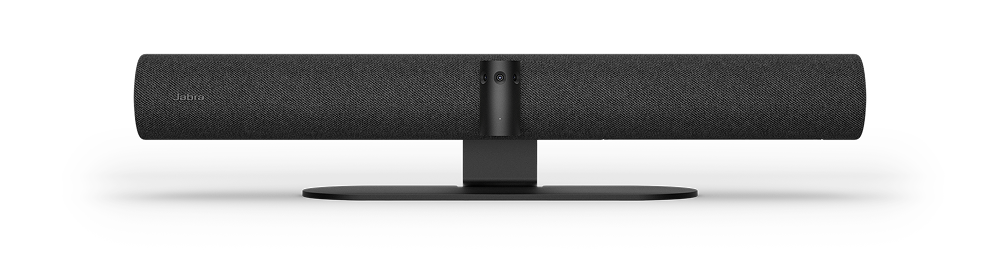
Then, in your meeting rooms, install a PanaCast 50 video bar so you can use the intelligent speaker tracking feature to bounce from speaker to speaker so remote teams can see who is speaking.
4. Lack of culture and visibility, especially for remote employees.
Only 28% of remote workers strongly agree they feel connected to their company’s mission. Hybrid employees are susceptible to similar sentiment if they don’t regularly work in the office.
They miss the casual conversations, the inside jokes that start in the lunchroom, and the recognition that happens in passing. Over time, it erodes culture: the work gets done, but the connection fades. And when people feel invisible, performance dips and more people leave.
What to do:
- Make the invisible visible. Celebrate wins where everyone can see them. On public channels, in weekly check-ins, etc. It increases motivation and adds to company culture.
-
Deliberately “create” culture moments. This could mean monthly social sessions, spotlighting remote voices in internal newsletters, or simply asking non-work-related questions to kick off meetings.
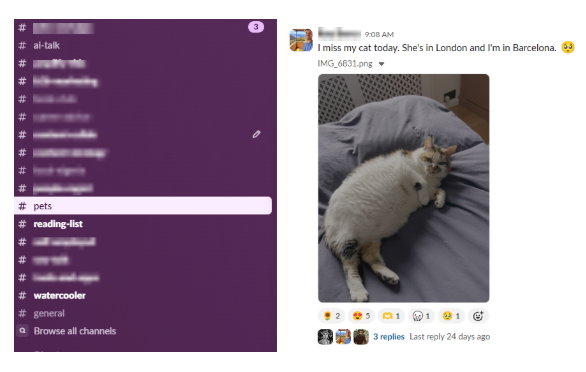
You can even dedicate a Slack channel and encourage your team to share pictures of their pets or pictures of themselves engaging in a hobby. Just to bond with others in the company. Here’s an example:
Exploring hybrid work options
You may be missing out on the benefits of hybrid working because you’re using the wrong hybrid work schedule. Here are five common schedules to make hybrid work more productive:
- Fixed schedule: Everyone comes in on the same days, say, Tuesday to Thursday. It’s easy to coordinate and encourages in-person collaboration. But it’s less flexible for those with 60 minutes+ commutes, school runs, and other personal needs.
- Employee-choice models: Here, employees choose when to come in. This is great for autonomy and trust, but when employees decide not to come, you get empty offices, poor relationship-building, and less collaboration.
- Rotational/team-based model: Here, different teams come in on different days (e.g., Sales on Mondays and Wednesdays, Product on Tuesdays and Thursdays) so they can work in-person. This schedule reduces crowding and optimizes office space. But cross-team collaboration takes a hit, and spontaneous problem-solving becomes a rarity because the separate teams aren’t on-site on the same days of the week.
- Manager-assigned or team-defined models Here, teams choose their in-office days based on a broader policy (e.g., two days a week). This model allows team buy-ins but can create scheduling chaos when every team follows a different pattern.
- The blended approach: This hybrid work model combines fixed anchor days with flexible ones. For example, everyone’s in on Wednesdays, teams pick another day, and individuals choose their third in-house day by themselves. It’s balanced, but requires strong communication to avoid drop-off.
We wrote more about hybrid work schedules and the tips you’ll need to succeed.
Going hybrid? Get set up for for success.
How people collaborate and communicate across locations is important to the success of your hybrid work strategy.
Start with making your conference rooms and huddle rooms spaces where everyone is seen and heard, whether physically in the room or joining remotely. Jabra PanaCast 55 VBS uses three cameras to provide a full 180° view, so no one is cropped out. It automatically tracks and frames the active speaker (even when they change regularly), and uses four beamforming mics to capture voices within 20 feet.
And don’t forget that your remote employees need great tech too if they’re going to focus on the call, not the clinking of cups in the cafe. We recommend Evolve2 65 Flex and Evolve2 75 headsets to block out background noise and increase voice clarity on calls.
Add Jabra Meet Anywhere to the mix, our compact 4K webcam with built-in mics to help remote teammates show up clearly and professionally on videos.
If possible, provide a gear stipend or equipment budget, so your team works with the same gear everywhere.
Explore our full range of workplace equipment to find what will work best for you and your team: Headsets and video conferencing cameras .