

Why Do Enterprise IT Managers Choose Jabra Headsets?
When each employee picks their own headset, IT is left to inherit the consequences.
Those consequences include platform incompatibility, inconsistent audio quality, and a help desk queue that fills faster than it empties.
The problem isn't the hardware on its own, but everything that surrounds it:
- how devices get deployed
- how they're configured
- whether they stay secure
- what happens when the organization grows or shifts to hybrid work
Most headset vendors don't think past the headset wearer. Jabra does.
In this article, you'll learn what makes Jabra the headset ecosystem enterprise IT teams keep coming back to.
Jabra is certified for the platforms IT teams already manage
Jabra headsets are certified for the platforms enterprises already use like Microsoft Teams and Zoom . This means Jabra has been tested and approved by the platform vendors themselves.
Working with certified headsets ensures enterprise IT teams don't run into unexpected audio routing issues, broken call controls, or time-consuming integration troubleshooting. Employees can plug in their headsets, join calls, and everything works as expected.
Here are some of the platform certifications for the most popular and newest Jabra headset models:
| Certifications | |
|---|---|
Evolve3 75
| Microsoft Teams, Zoom, Google Meet |
Evolve3 85
| Microsoft Teams, Zoom, Google Meet |
Evolve3 45 | Microsoft Teams, Zoom, Google Meet |
Evolve3 65 | Microsoft Teams, Zoom, Google Meet |
Evolve3 65 Flex
| Microsoft Teams, Zoom, Google Meet |
Evolve2 65
| Microsoft Teams, Zoom, Google Meet |
Engage 55 SE
| Teams (MS variant), Zoom, Google Meet, Chromebook (UC variant) |
Engage 75 SE
| Microsoft Teams, Zoom, Google Meet |
For organizations using Teams or Zoom, these certifications remove the need for weeks/months of compatibility testing and give IT confidence that Jabra devices will behave consistently across the entire company.
Jabra offers software built for IT
Jabra provides software that gives IT teams control over how headsets are deployed, configured, and maintained across the organisation. Jabra offers solutions that work together across different levels of deployment and management.
1. Jabra Plus Management (Real-Time Monitoring & Control)
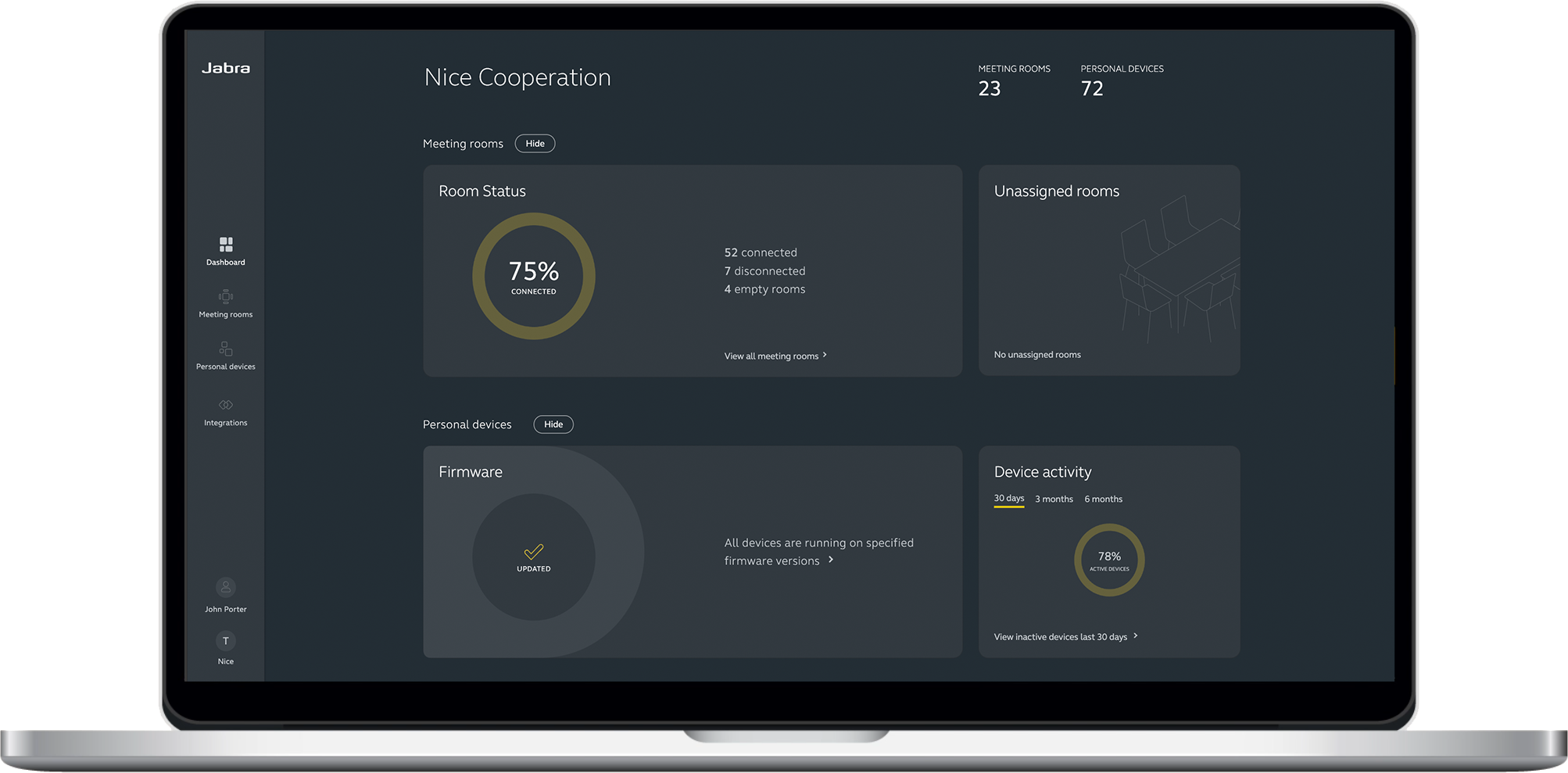
Jabra Plus Management is a cloud-based software platform that helps IT administrators monitor, manage, and update Jabra audio and video devices without needing physical access.
With this platform, IT teams can:
- Push firmware updates to all devices at once or test them on specific rooms first. They can also schedule updates to avoid disrupting active meetings.
- View a color-coded status dashboard that shows whether devices are online, offline, or experiencing issues in real time.
- Apply standardized configurations across all meeting rooms or set custom settings for specific locations or individual devices.
- Organize devices by location, group, or specific room for faster access to data and management controls.
2. Jabra Direct (Device Level)
Jabra Direct is a desktop application that allows individual users to:
- Update their firmware and get the latest features and bug fixes;
- Configure audio settings, including audio protection levels, sidetone, music, and ringtone; and
- Optimise performance for platforms like Microsoft Teams and Zoom.
IT teams can also use Jabra Direct for one-off configuration or troubleshooting, while in managed environments, it serves as the client layer that connects devices to broader control systems.

With Jabra, you get security that meets enterprise requirements
When deploying headsets, security isn't always the first thing on the agenda, but wireless audio is still a form of data transmission and should be secure, especially in hybrid work environments where sensitive conversations might occur outside the main office.
Here's how Jabra keeps its headsets secure:
Jabra’s Engage series
Jabra Engage headsets (e.g., Engage 55 SE, Engage 75 SE) are DECT Security-certified and use FIPS-approved military-grade algorithms, making them suitable for high-security sectors like finance, legal, healthcare, and government.
They use strong authentication and encryption to keep conversations private and protected from eavesdropping. Pairing is physically assisted, so the headset must be docked in the base to connect, which blocks over-the-air pairing attempts and reduces the risk of interception.

Jabra’s Evolve3 Series
The Evolve3 series (e.g., Evolve3 75 and Evolve3 85) uses Bluetooth with enterprise-grade encryption and secure chipsets to protect audio streams and voice prompts. Each device comes pre-paired with a Link 390 adapter, so connections are authenticated from the start without manual pairing.
IT teams can also push security updates and configurations through Jabra Plus Management to protect the device fleet from exploitation.

Jabra is effortlessly scalable across the organization
When rolling out headsets, IT teams need devices and systems that continue to work as the organisation grows, shifts to hybrid work, or changes infrastructure.
Jabra is designed to scale from small teams to large and across distributed organisations without adding operational overhead. Here's how:
- Extended device lifespan: Replaceable parts and ongoing firmware support mean Jabra devices last longer, so you're not constantly replacing headsets.
- Flexible for hybrid work: Many Jabra headsets (such as the Jabra Engage 75 SE) support hot-desking, so hybrid workers can connect to different base stations across locations.
- Works in restricted environments: With Jabra Plus Management, IT teams can manage updates and configurations through a centralized, cloud-based platform.
- Built for integration and automation: Jabra offers SDKs and tools for integration of the products so that IT teams can enable and accelerate integrations with Jabra devices.
Employees love adopting Jabra into day-to-day work
Procurement decisions that work for IT teams don't always work for the people using the kit every day. But that's not something you'll need to worry about with Jabra.
Jabra's approach to simplicity extends from deployment and management to the headset experience itself by making the headsets that employees genuinely prefer. They are lightweight enough for a full day of calls, clear enough that employees sound professional wherever they work, and compatible with the AI tools they're already using.
When employees like their hardware, adoption is higher, audio complaints drop, and IT fields fewer tickets about devices that were never the right fit. With Jabra, IT teams can deliver a better employee experience without giving up operational control.
Which Jabra headsets do IT teams standardize on?
| Deployment Scenario | Recommended Jabra Headsets |
|---|---|
Hybrid knowledge workers, Teams/Zoom environments
| Evolve3 and Evolve2 series |
In-office contact centre, high call density | Engage 75 SE |
Hybrid contact centre, home and office
| Engage 55 SE |
Mixed environment (knowledge workers + contact centre)
| Evolve3, Evolve2 and Engage series |
💡 Standardizing within the Jabra range means IT teams use the same software tools across all devices. So, whether you choose an Engage or Evolve3 headset, you manage everything through a single software ecosystem.
Jabra Headsets: The right choice for enterprise IT. A great experience for everyone else.
IT managers choose Jabra because it offers a scalable, professional-grade headset ecosystem.
From certified platform integrations to enterprise-grade security and centralized management tools, Jabra's headsets are designed to give IT teams full control over how devices are deployed and maintained.
If you're evaluating headsets for your organization, Jabra's sales team can advise on the right models, deployment approach, and scale.
💡The question on every IT Manager’s lips: Is switching worth the disruption?
Precisely for this situation, Jabra's free trial program is available to organisations deploying 100 headsets or more.
IT teams can test devices in their actual environment before committing, which removes the biggest risk from the decision. And because Jabra's management tools like Jabra Plus Management and Jabra Direct are designed for large-scale deployment, the rollout itself is significantly less disruptive than most IT teams expect.